
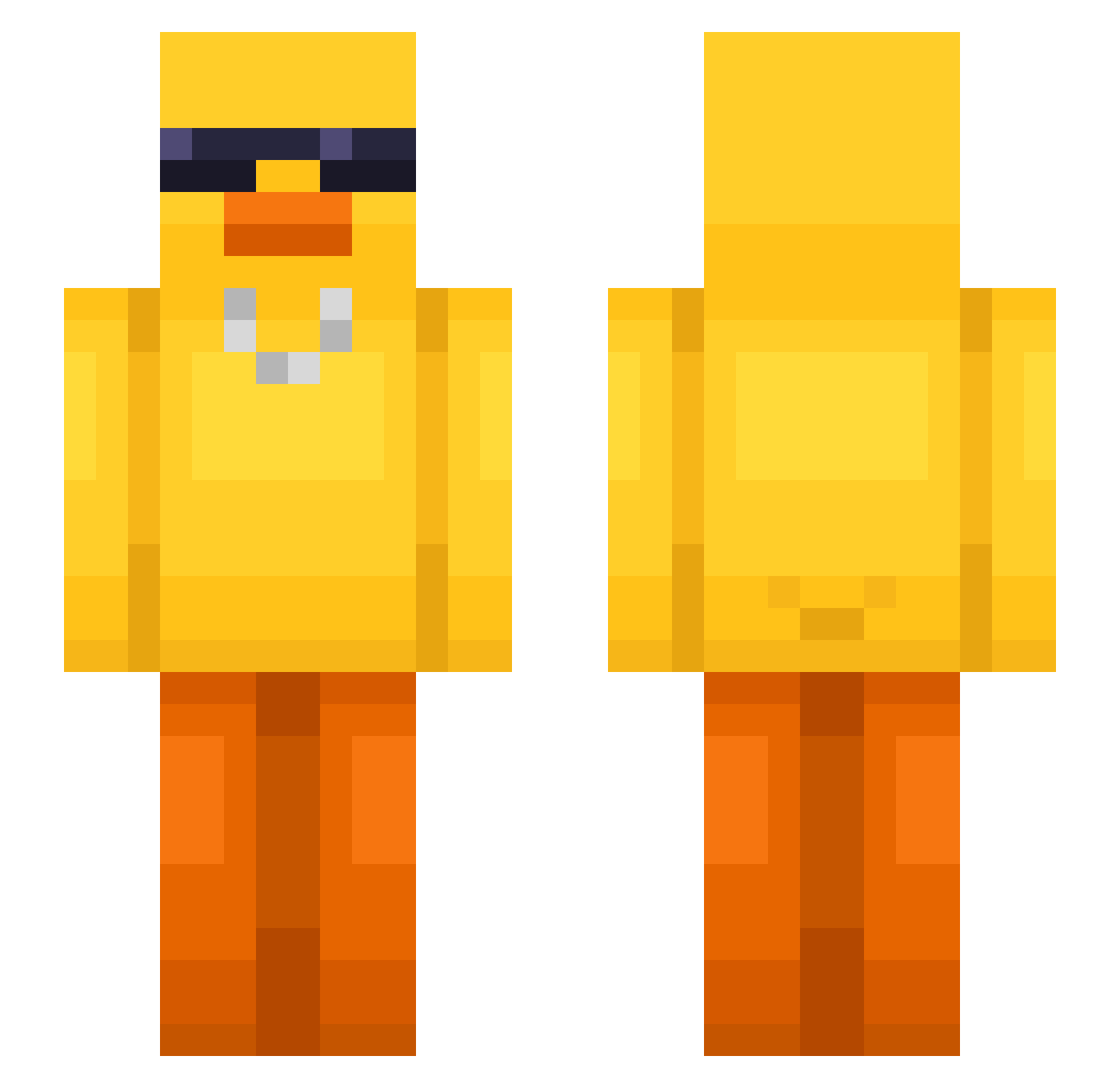
Current Minecraft skin of the player DJM3842, loaded from the official Mojang API. Rotate the 3D model with your mouse or finger, then download the skin as a PNG file and use it in Minecraft: Bedrock Edition or Java Edition for free. When DJM3842 changes their skin, this page updates automatically and the old skin stays in the history below.
Other players with this skin (480)
DJM3842 was the 336th player we have seen with this skin, first spotted on 25.09.2026. The same skin was seen on these players. Open a nickname to see their current skin and skin history.
 spiderman_sus rlawnsdn233 zOzOzz KreyzXx ZanT1ngcq pelonchaMT Rabatzmann Kasak707 Hakiim01 Coast710 xXNeyXx JeramiahChaft h4ppy_123 wo_odk Bonqueequee101 YaKelb_ Rsenix CHONLAWITT Liam6nine Silversueun mobbielasta TubbyVoltic ONLYbemo Verion44 gazowanie HayZenTMIMI 1amgroot_ ShadowSunflower LimJeff SunnyAqua minsol_1 dingusbobingus1 ej_c beanbabie420 EBiiii229 Nicolas2603 Vibinn Chaos5814 Llzse_y MS_J_7 jjirong96 Latheus24 Amel1409 B10ndi itzz_macius Arkke__ MaChuPig Ricky_420_420 Lelysz WPITG hsc1227 Wangzajisu ItsMePhip ku_jiro1007 Marsuna BlueEyedBubbles Powerhitter247 bagajjang basilahmad jjongpari
More Chain Minecraft skins
How to install the DJM3842 skin
- Press the Download button above to save the skin as a PNG file.
- Minecraft: Bedrock Edition (PE): open the Dressing Room from the main menu (or tap your character → Edit Character), go to Classic Skins → Owned, press the + (new skin) button, choose the downloaded PNG and pick the Slim (Alex) model. Works on PC and mobile; consoles cannot import custom skins.
- Minecraft: Java Edition: open the Minecraft Launcher, go to the Skins tab, click New Skin, load the PNG, pick the Slim (Alex) model and press Save & Use. You can also upload it at minecraft.net → Profile → Change Skin.
The skin does not show up after import - what should I do?
Restart Minecraft and open the Dressing Room again - imported skins sometimes appear only after a restart. Also make sure you selected the imported skin and picked the Slim (Alex) model.
Which model should I choose, Classic or Slim?
This skin is designed for the Slim (Alex) model. If you pick the wrong model, the arms of the skin will look stretched or squeezed.
Is the skin of DJM3842 free to download?
Yes. Press Download, save the PNG file and use it in Minecraft: Bedrock Edition or Java Edition - no payment or registration needed. The skin also works on multiplayer servers and Realms.
More skins
Looking for more? Go back to all Minecraft skins and check the top skins of the week, month and all time, or find any player's skin by nickname.