
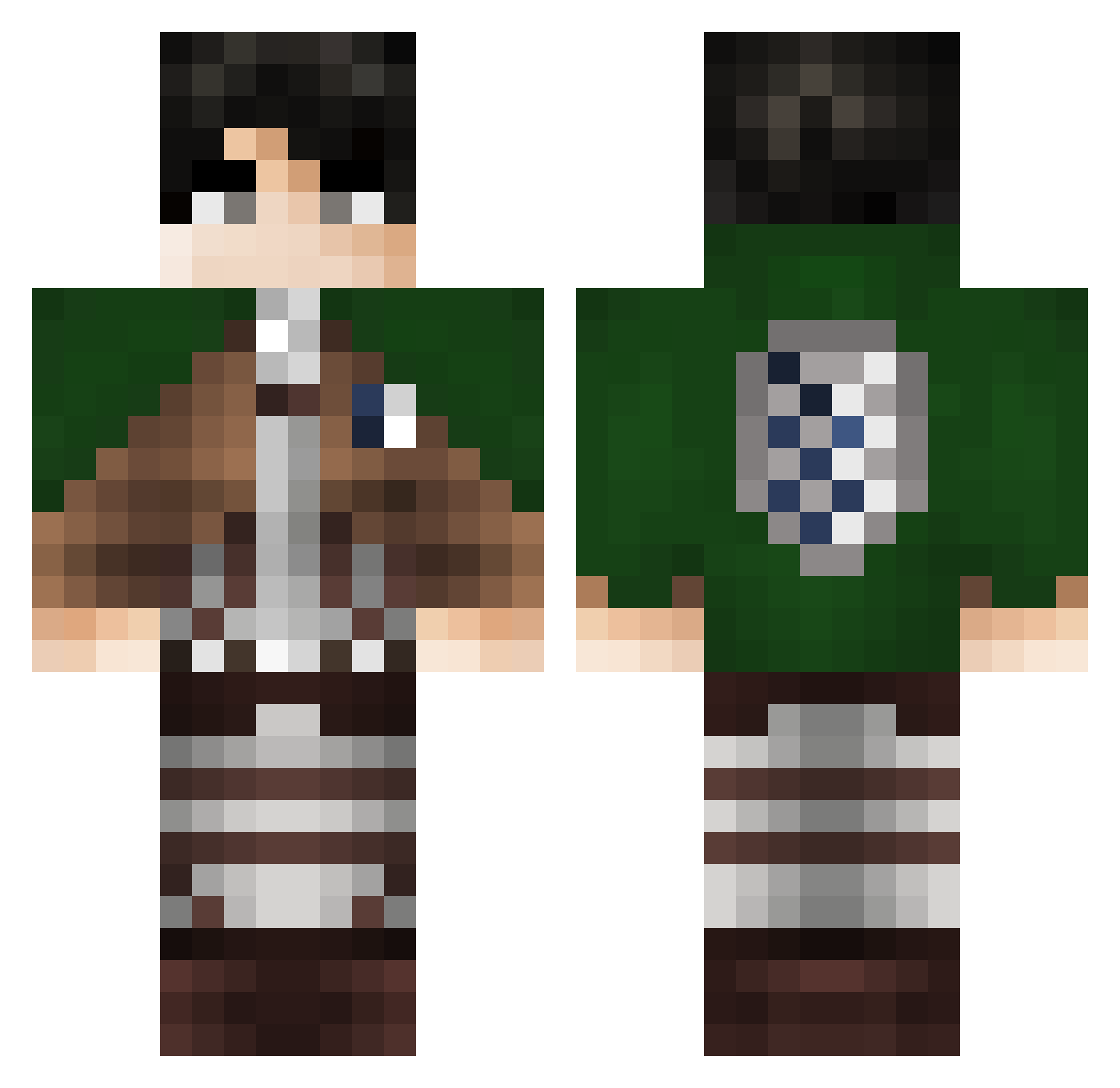
Current Minecraft skin of the player Correee, loaded from the official Mojang API. Rotate the 3D model with your mouse or finger, then download the skin as a PNG file and use it in Minecraft: Bedrock Edition or Java Edition for free. When Correee changes their skin, this page updates automatically and the old skin stays in the history below.
Other players with this skin (263)
Correee was the 79th player we have seen with this skin, first spotted on 23.08.2026. The same skin was seen on these players. Open a nickname to see their current skin and skin history.
 Hohoho0723 KaztelG Milofis Antonsteve24 _LeeGun_ Blackblizard DanielGTO Kazinm Jexathic Sharpe095 Mazoni543 WandHyperon CraaZyyBanana hmada1 TiiGunTeur TTVPallavPlayzYT Franklliine SUBTOMINIBLOXIA saiqr Nedyy MikeeTea Code3Nor itzrickz kmotor007 FernandoUchiha8 Replycent ptmfrosty Ch1sho _Derby_ LeviAcker1206 Piotrus131 Rocco_is_lit SorrowFeather Leiviboy el_cerbi YOUONXD deniskaaa OanVillanea17 Darth_Vader2004 Levi_XS
 Paolo1809 bingus690 Dark_swyp iTs_L30N Navar7 raygun0626 Advancer24 parkus123 azirkalel23 ellios4 wasdf_Ws_502 G4wain Rada_05 aiiden04 Vuzkiz Popopom12 Daniiey JAMINZAO FrostFlower27 Ardilloso
More Levi Ackerman Minecraft skins
See all 163 Levi Ackerman skins
How to install the Correee skin
- Press the Download button above to save the skin as a PNG file.
- Minecraft: Bedrock Edition (PE): open the Dressing Room from the main menu (or tap your character → Edit Character), go to Classic Skins → Owned, press the + (new skin) button, choose the downloaded PNG and pick the Classic (Steve) model. Works on PC and mobile; consoles cannot import custom skins.
- Minecraft: Java Edition: open the Minecraft Launcher, go to the Skins tab, click New Skin, load the PNG, pick the Classic (Steve) model and press Save & Use. You can also upload it at minecraft.net → Profile → Change Skin.
The skin does not show up after import - what should I do?
Restart Minecraft and open the Dressing Room again - imported skins sometimes appear only after a restart. Also make sure you selected the imported skin and picked the Classic (Steve) model.
Which model should I choose, Classic or Slim?
This skin is designed for the Classic (Steve) model. If you pick the wrong model, the arms of the skin will look stretched or squeezed.
Is the skin of Correee free to download?
Yes. Press Download, save the PNG file and use it in Minecraft: Bedrock Edition or Java Edition - no payment or registration needed. The skin also works on multiplayer servers and Realms.
More skins
Looking for more? Go back to all Minecraft skins and check the top skins of the week, month and all time, or find any player's skin by nickname.