
CAFF2 - Minecraft Skins & Skin History
Current Minecraft skin of the player CAFF2, loaded from the official Mojang API. Rotate the 3D model with your mouse or finger, then download the skin as a PNG file and use it in Minecraft: Bedrock Edition or Java Edition for free. When CAFF2 changes their skin, this page updates automatically and the old skin stays in the history below.
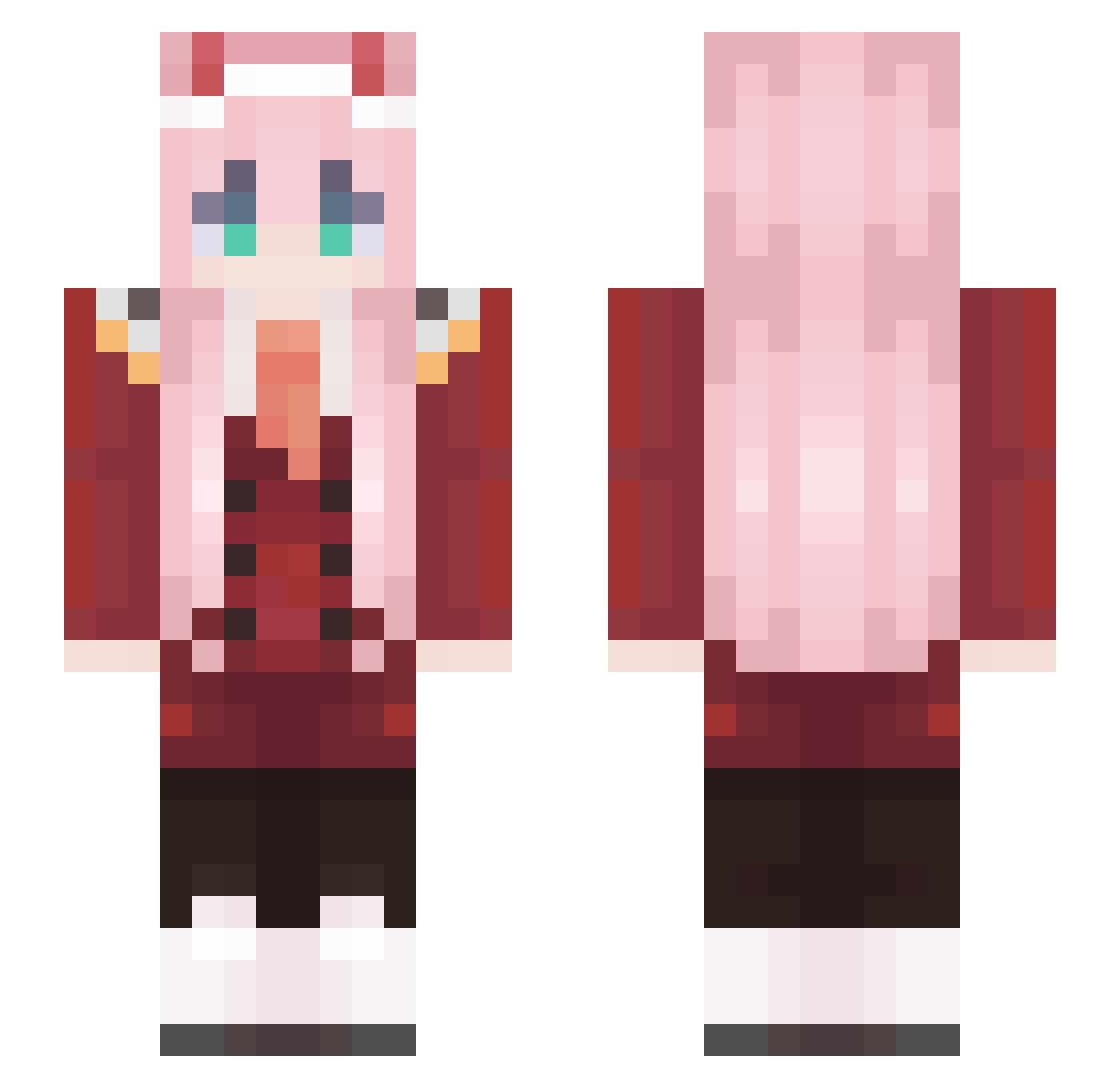
Other players with this skin (574)
CAFF2 was the 234th player we have seen with this skin, first spotted on 09.09.2026. The same skin was seen on these players. Open a nickname to see their current skin and skin history.
 Mixsed Zhaoxiaoman Julie2_0 Frostykus95
 Oscarciacraft D0gLOLWa1er sueheetack Jessesal Maiiday bigtitiwaifu1 BazaDragons CKFreddy diego_guille KarmicFrOZeN MinecraftEcho mopolilol Crazyland05 fathermother12 bbibbi173 KittyHawkz AlexisLeGenie jpfxy2333 Bopedebapi19 wuheiai Sthesia soothsayerr4 Lincinha SuTorres Bounty47 CASH69 macaroni87 Cqrno PyroMalefic silent_Kip BoomKnuffelaar69 qiongqiongjili naturalweb17 SnowfallenOnyx Tribemode FluffyFlock Fruchtzwerg49 ku_bano VenomSpitter25 OatmealSenpai Angelo4ek1 everholy343 mattmix007 MC_liangpi SL1Mv Rayannex Bopedebapi15 4NNID4RI BlesseOwO ScamChan 00two_ Harsky_ Hazelsz BuKa_SNIP CANHEL96 riceshower___
More Zero Two Minecraft skins
How to install the CAFF2 skin
- Press the Download button above to save the skin as a PNG file.
- Minecraft: Bedrock Edition (PE): open the Dressing Room from the main menu (or tap your character → Edit Character), go to Classic Skins → Owned, press the + (new skin) button, choose the downloaded PNG and pick the Slim (Alex) model. Works on PC and mobile; consoles cannot import custom skins.
- Minecraft: Java Edition: open the Minecraft Launcher, go to the Skins tab, click New Skin, load the PNG, pick the Slim (Alex) model and press Save & Use. You can also upload it at minecraft.net → Profile → Change Skin.
The skin does not show up after import - what should I do?
Restart Minecraft and open the Dressing Room again - imported skins sometimes appear only after a restart. Also make sure you selected the imported skin and picked the Slim (Alex) model.
Which model should I choose, Classic or Slim?
This skin is designed for the Slim (Alex) model. If you pick the wrong model, the arms of the skin will look stretched or squeezed.
Is the skin of CAFF2 free to download?
Yes. Press Download, save the PNG file and use it in Minecraft: Bedrock Edition or Java Edition - no payment or registration needed. The skin also works on multiplayer servers and Realms.
More skins
Looking for more? Go back to all Minecraft skins and check the top skins of the week, month and all time, or find any player's skin by nickname.