
Bruno2575 - Minecraft Skins & Skin History
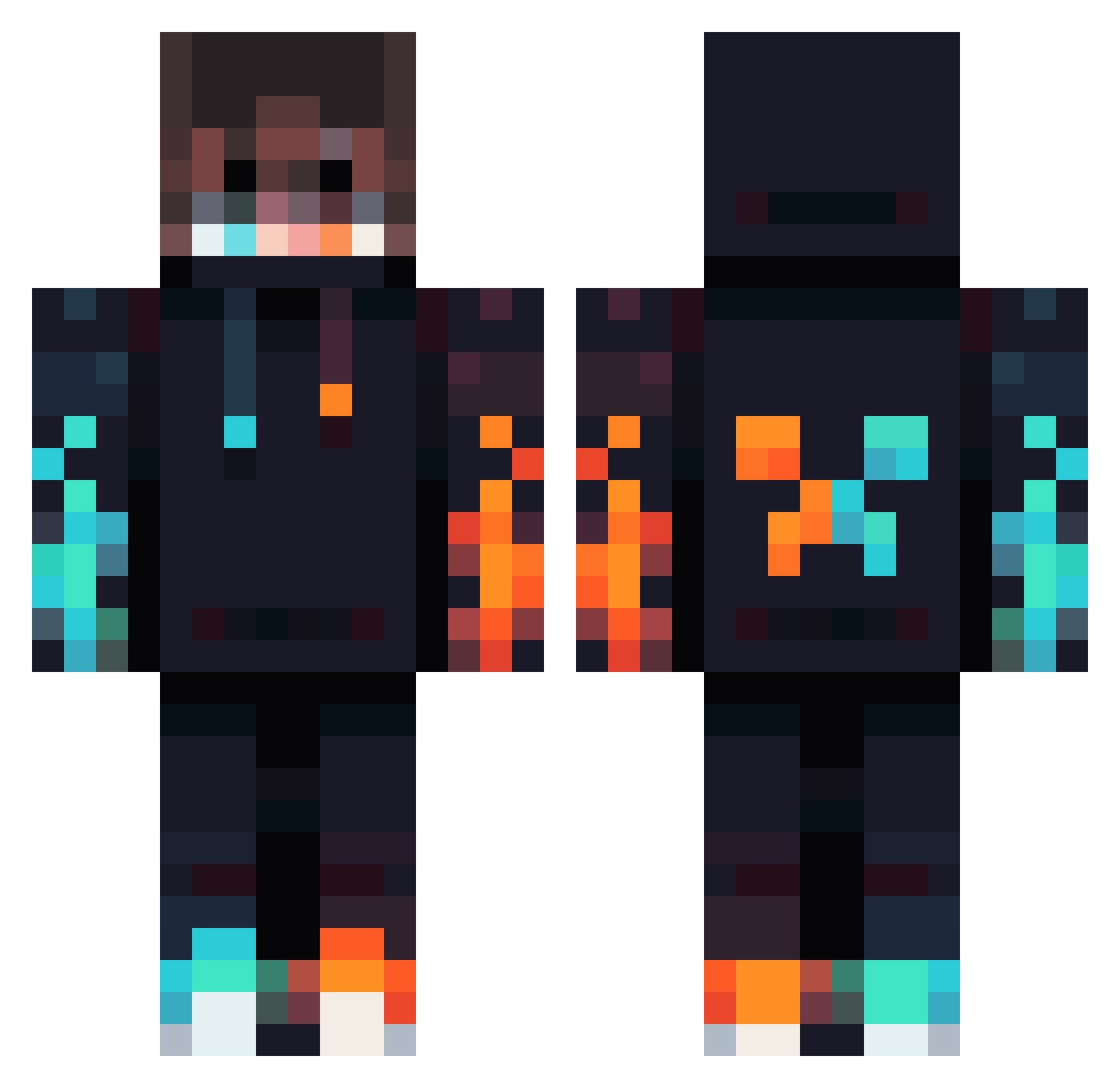
Current Minecraft skin of the player Bruno2575, loaded from the official Mojang API. Rotate the 3D model with your mouse or finger, then download the skin as a PNG file and use it in Minecraft: Bedrock Edition or Java Edition for free. When Bruno2575 changes their skin, this page updates automatically and the old skin stays in the history below.
Other players with this skin (834)
Bruno2575 was the 368th player we have seen with this skin, first spotted on 13.09.2026. The same skin was seen on these players. Open a nickname to see their current skin and skin history.
 Military147 XxspiderboyxX_2 Hidapit Archpro1231 Optycs_ MH_1509 GIAOBOB CWM0824 V8flame szkipa JefeFastMage MrMenphis Cannabeans BossSiamang9774 Tommy1545 Alt3redChaos97 TheMorchen TempVortex123 Alitoh20 Kun4l CraXy132 ColdLuna_Wolf Fz_SePeHr JALMARZ BangoDaMangoo Eisyan nightgamer122 Mattplayzyt2323 SwarmEnvy EdFlack Kjc3d Edgardo3718 pvpplayer1000 TheGamer772 Anthon64 Sandaun Teddygamer000 __Amoo__ nisteez MysticCr8tor El_Cabesa Yena_The_Duck mamandamien YaZe101 ItsJustin1111 Crying_blade Runicsavage30 Ken_Kaneki456 HBadger118 Embys Karandeepsingh nos1dee HummingBird9952 Zylko4565 kukuudon ChromeHangouts Timeless2k stoneredder MaliProPlays accidenti_al_sin
More Fire Minecraft skins
How to install the Bruno2575 skin
- Press the Download button above to save the skin as a PNG file.
- Minecraft: Bedrock Edition (PE): open the Dressing Room from the main menu (or tap your character → Edit Character), go to Classic Skins → Owned, press the + (new skin) button, choose the downloaded PNG and pick the Classic (Steve) model. Works on PC and mobile; consoles cannot import custom skins.
- Minecraft: Java Edition: open the Minecraft Launcher, go to the Skins tab, click New Skin, load the PNG, pick the Classic (Steve) model and press Save & Use. You can also upload it at minecraft.net → Profile → Change Skin.
The skin does not show up after import - what should I do?
Restart Minecraft and open the Dressing Room again - imported skins sometimes appear only after a restart. Also make sure you selected the imported skin and picked the Classic (Steve) model.
Which model should I choose, Classic or Slim?
This skin is designed for the Classic (Steve) model. If you pick the wrong model, the arms of the skin will look stretched or squeezed.
Is the skin of Bruno2575 free to download?
Yes. Press Download, save the PNG file and use it in Minecraft: Bedrock Edition or Java Edition - no payment or registration needed. The skin also works on multiplayer servers and Realms.
More skins
Looking for more? Go back to all Minecraft skins and check the top skins of the week, month and all time, or find any player's skin by nickname.