
BiggestBoom - Minecraft Skins & Skin History
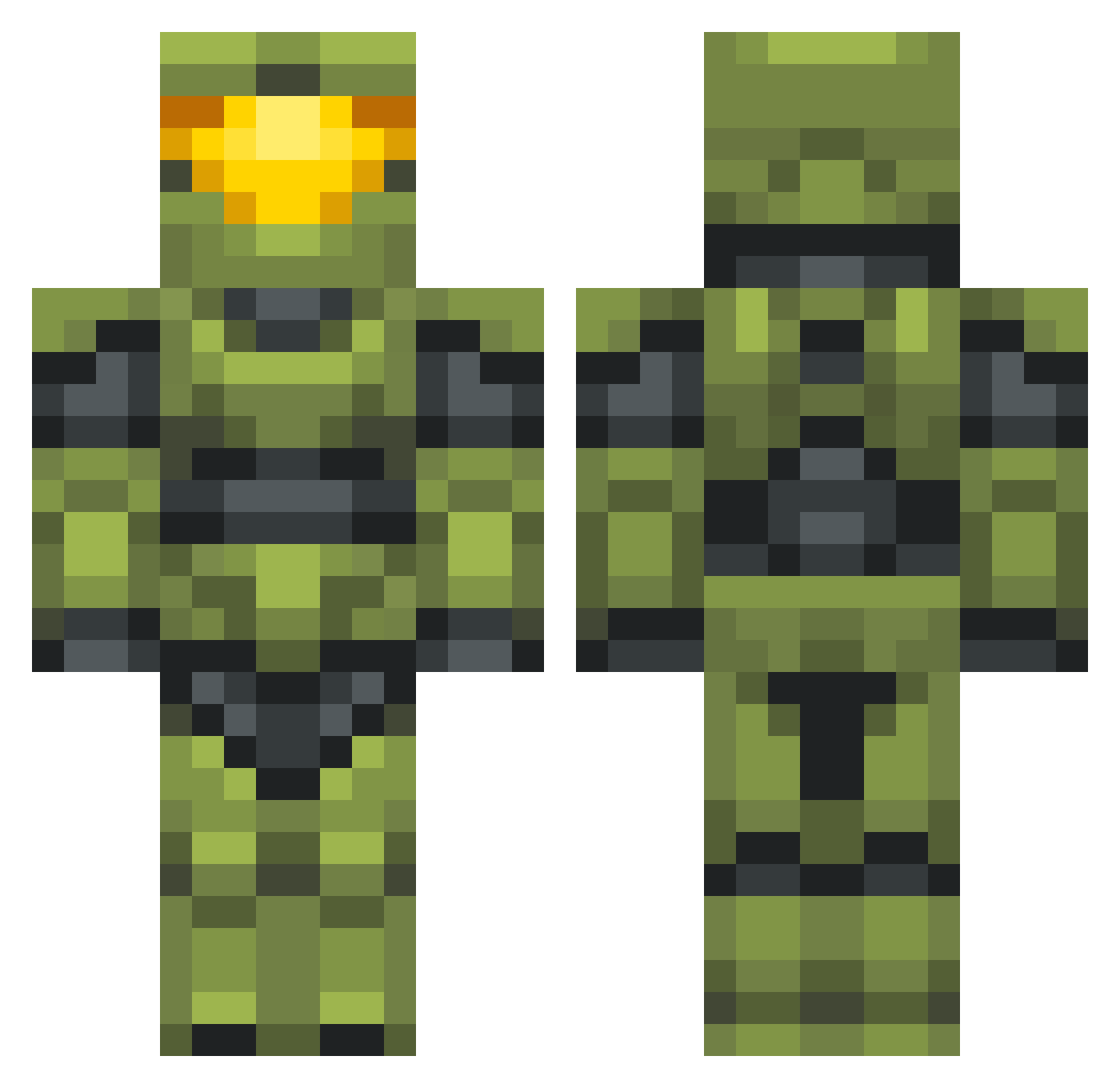
Current Minecraft skin of the player BiggestBoom, loaded from the official Mojang API. Rotate the 3D model with your mouse or finger, then download the skin as a PNG file and use it in Minecraft: Bedrock Edition or Java Edition for free. When BiggestBoom changes their skin, this page updates automatically and the old skin stays in the history below.
Other players with this skin (702)
BiggestBoom was the 109th player we have seen with this skin, first spotted on 13.08.2026. The same skin was seen on these players. Open a nickname to see their current skin and skin history.
 girthquake____ funny_monkey_man Mr_0rl0 creepsandwitch RickyD1cky UndeadBP Schulzy_Boltz Abelix24 Tchr1s GodAlano harychicken hfk1708 NeFar1ouss MeanPanda1 TeaPocky
 BluFire7210 Idle_Insomniac 62firelight leamsi360
 t3l Ashtontheboss84 That_Guy4177 Lil_Beep Kash45640 cyb3rsk LovelessGnat659 RawJon ButterMaiBiscuit fineflat natoisd eyekeeper1 Maztercheef Philionare jmps117 SemiSolidOwl45 Parko21 AtomPirate Skully63 JJaX TheAznReclaimer MrNiceGuy760 Suoranta MajoR_MickeY raingrains RageDoggz bear_and_fox DrMamaska DiablitoJuan SaintLaurente canaleta7 Shad0wCharmer Ajax_Fox IoSouLzZoI SirJack16 wagmann Saint_Davee Schrutenator HALALKRATOS Gamsche MosesGotCakes420
More Master Chief Minecraft skins
See all 538 Master Chief skins
How to install the BiggestBoom skin
- Press the Download button above to save the skin as a PNG file.
- Minecraft: Bedrock Edition (PE): open the Dressing Room from the main menu (or tap your character → Edit Character), go to Classic Skins → Owned, press the + (new skin) button, choose the downloaded PNG and pick the Classic (Steve) model. Works on PC and mobile; consoles cannot import custom skins.
- Minecraft: Java Edition: open the Minecraft Launcher, go to the Skins tab, click New Skin, load the PNG, pick the Classic (Steve) model and press Save & Use. You can also upload it at minecraft.net → Profile → Change Skin.
The skin does not show up after import - what should I do?
Restart Minecraft and open the Dressing Room again - imported skins sometimes appear only after a restart. Also make sure you selected the imported skin and picked the Classic (Steve) model.
Which model should I choose, Classic or Slim?
This skin is designed for the Classic (Steve) model. If you pick the wrong model, the arms of the skin will look stretched or squeezed.
Is the skin of BiggestBoom free to download?
Yes. Press Download, save the PNG file and use it in Minecraft: Bedrock Edition or Java Edition - no payment or registration needed. The skin also works on multiplayer servers and Realms.
More skins
Looking for more? Go back to all Minecraft skins and check the top skins of the week, month and all time, or find any player's skin by nickname.