
BerenErchamion6 - Minecraft Skins & Skin History
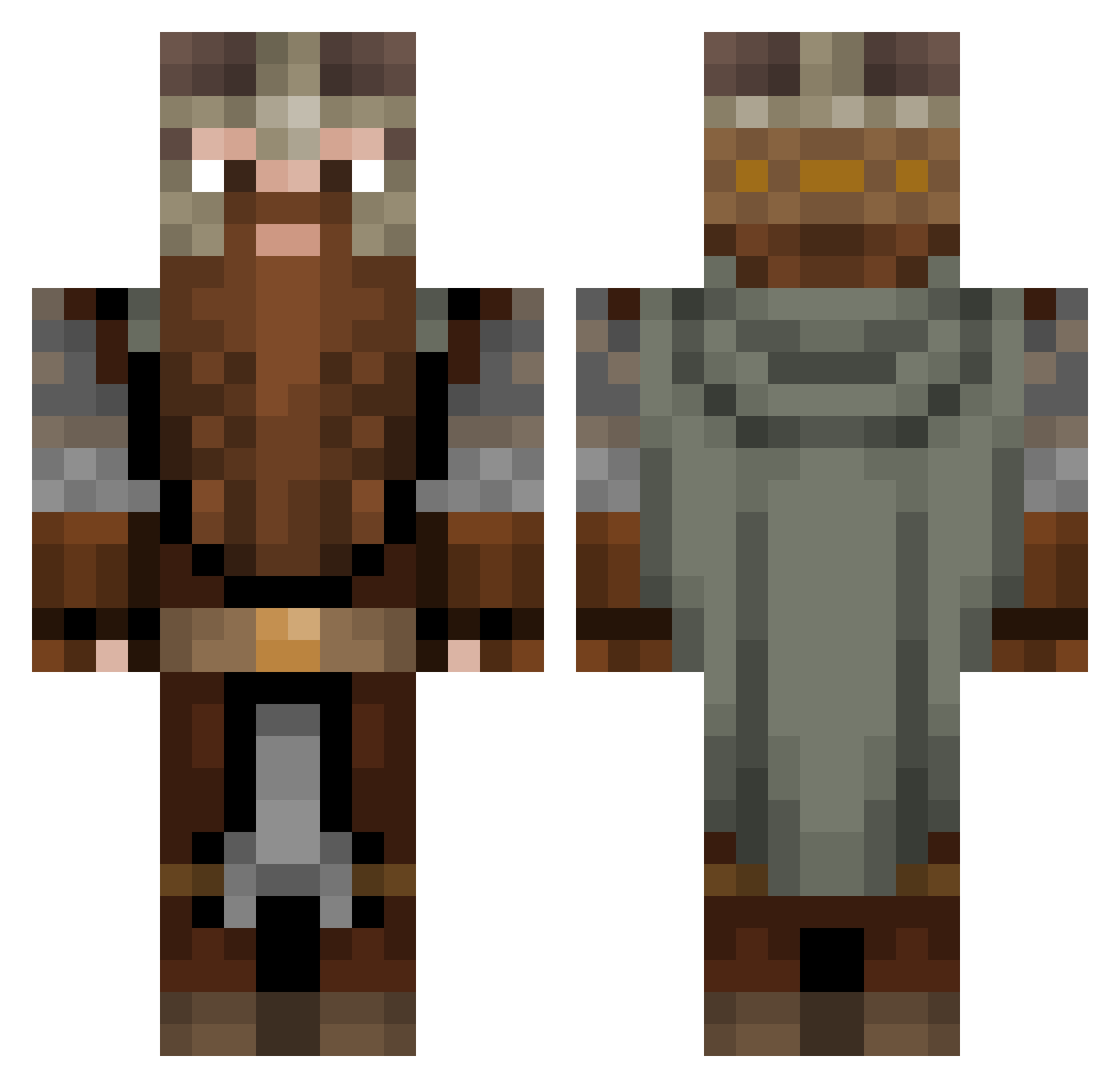
Current Minecraft skin of the player BerenErchamion6, loaded from the official Mojang API. Rotate the 3D model with your mouse or finger, then download the skin as a PNG file and use it in Minecraft: Bedrock Edition or Java Edition for free. When BerenErchamion6 changes their skin, this page updates automatically and the old skin stays in the history below.
Other players with this skin (1083)
BerenErchamion6 was the 931st player we have seen with this skin, first spotted on 21.10.2026. The same skin was seen on these players. Open a nickname to see their current skin and skin history.
 Bleureigner xCyb3rus Wuccies TaraCoffeh SkyGard3 Dors968 sammyslays BAJOdot HelmHammerHands PuffinH bongo_bongo37 pacific22 Midget_FC LukeKnight1213 scrib7495 IvanManojlovic23 Limbo579 Worn4l LordTony01 urs4n_ RedBeard1995 LotsOfAluminum Aronidas141 GRaffaX CaptainLykke132 Atompflaume ItsGameTime68 Beknep SiulIrbmic088 PastramiStaven partybeast70 DutchViking10 Sagitta_00 Foxx_of_Nod TheReallyRealBoy Fefelau OB3RST htradredav contor972 sterling919 JackalVix Peterlaerke EduardCelFrumos Galapagos_Stoat Hapoksi Watabuck LightningBoltg 69banquetmayo69 Rokugamixs Yavaneth BalbusFinnegan douleurr Ethian74 captain_maec SuperJumper67 ekiloX_ Findy14 Kaiser_Ko Wittmann_tanker gimli_the_lad
More Dwarf Minecraft skins
How to install the BerenErchamion6 skin
- Press the Download button above to save the skin as a PNG file.
- Minecraft: Bedrock Edition (PE): open the Dressing Room from the main menu (or tap your character → Edit Character), go to Classic Skins → Owned, press the + (new skin) button, choose the downloaded PNG and pick the Classic (Steve) model. Works on PC and mobile; consoles cannot import custom skins.
- Minecraft: Java Edition: open the Minecraft Launcher, go to the Skins tab, click New Skin, load the PNG, pick the Classic (Steve) model and press Save & Use. You can also upload it at minecraft.net → Profile → Change Skin.
The skin does not show up after import - what should I do?
Restart Minecraft and open the Dressing Room again - imported skins sometimes appear only after a restart. Also make sure you selected the imported skin and picked the Classic (Steve) model.
Which model should I choose, Classic or Slim?
This skin is designed for the Classic (Steve) model. If you pick the wrong model, the arms of the skin will look stretched or squeezed.
Is the skin of BerenErchamion6 free to download?
Yes. Press Download, save the PNG file and use it in Minecraft: Bedrock Edition or Java Edition - no payment or registration needed. The skin also works on multiplayer servers and Realms.
More skins
Looking for more? Go back to all Minecraft skins and check the top skins of the week, month and all time, or find any player's skin by nickname.