
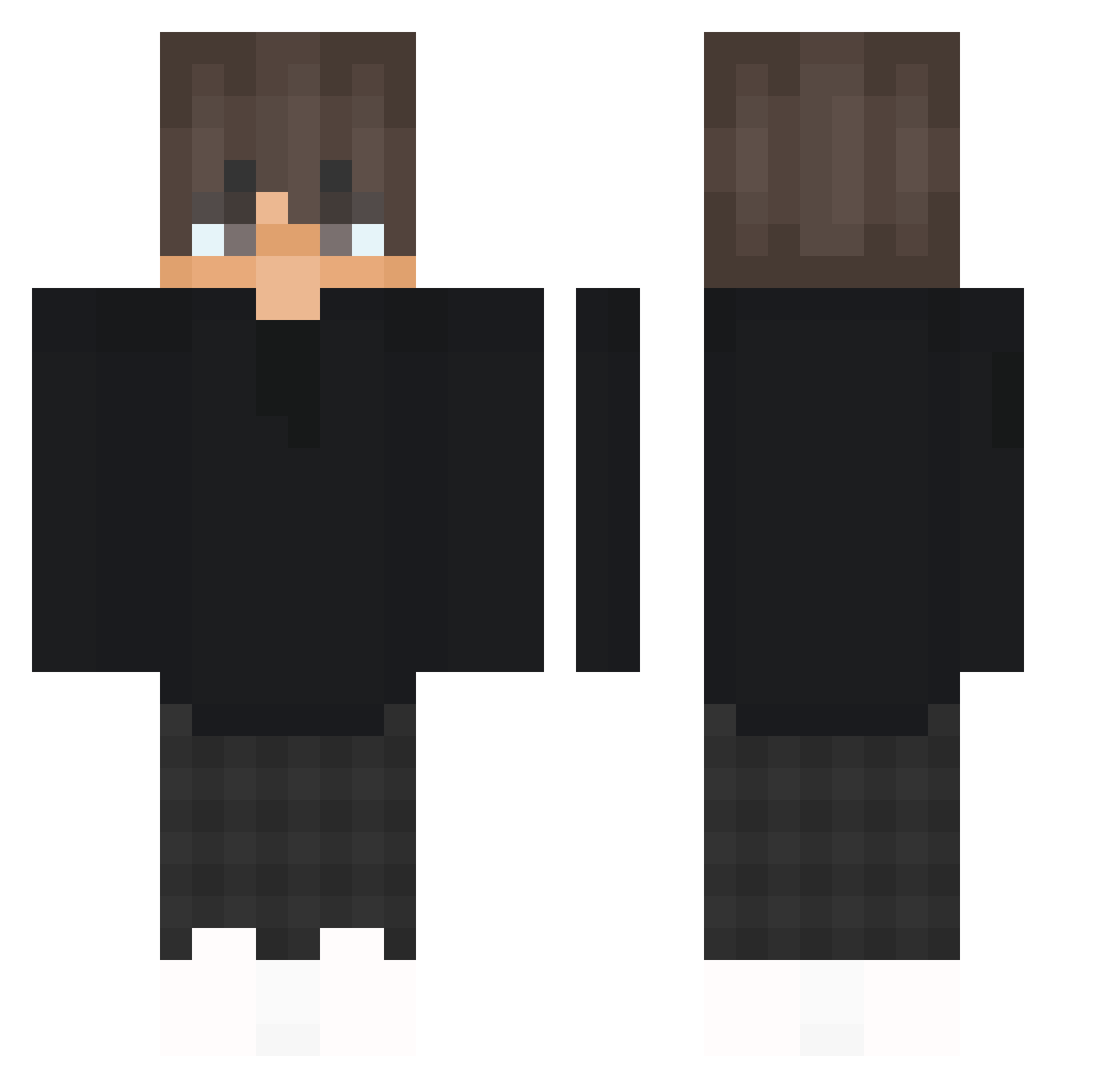
Current Minecraft skin of the player Armin11Craft, loaded from the official Mojang API. Rotate the 3D model with your mouse or finger, then download the skin as a PNG file and use it in Minecraft: Bedrock Edition or Java Edition for free. When Armin11Craft changes their skin, this page updates automatically and the old skin stays in the history below.
Other players with this skin (337)
Armin11Craft was the 101st player we have seen with this skin, first spotted on 22.08.2026. The same skin was seen on these players. Open a nickname to see their current skin and skin history.
 Baartuss_ ziveup4w filisorchid MzstY_Vortex FillPro Kinjer _NQXY_ Fe4r58 Sz3jker SnSBullDor ValcaTech Mrdisyact OnuInx
 iluschka11 NightvexonYT freeeszu TheChillCat797 judeh_gamer fukatani GraysonPlayz16 Sigh_ty tt_D1cpvp Miggfps gr7 BoB3K harshxchan saddrifter fufughg json69 D3yZox KianElias TheSmile53_
 xRavix37 SalehEzzat KLmc2 jrtherapper Einfachjonas2 MinecraftPEayer JAKE1_1 SimLeo2404 Polserulle TrashDawg69
 Dimusiek Farris27 Oxinox19 Ardinho78 dxrius1337 grabiaz M4hr3z_ ketsubiruman SecrectColours DAAddy a70_boy mp1003 Tondoxd NnnoriegaNT GuyLnwZa007 Nicoatt DrebPirateAlex BaZed
How to install the Armin11Craft skin
- Press the Download button above to save the skin as a PNG file.
- Minecraft: Bedrock Edition (PE): open the Dressing Room from the main menu (or tap your character → Edit Character), go to Classic Skins → Owned, press the + (new skin) button, choose the downloaded PNG and pick the Classic (Steve) model. Works on PC and mobile; consoles cannot import custom skins.
- Minecraft: Java Edition: open the Minecraft Launcher, go to the Skins tab, click New Skin, load the PNG, pick the Classic (Steve) model and press Save & Use. You can also upload it at minecraft.net → Profile → Change Skin.
The skin does not show up after import - what should I do?
Restart Minecraft and open the Dressing Room again - imported skins sometimes appear only after a restart. Also make sure you selected the imported skin and picked the Classic (Steve) model.
Which model should I choose, Classic or Slim?
This skin is designed for the Classic (Steve) model. If you pick the wrong model, the arms of the skin will look stretched or squeezed.
Is the skin of Armin11Craft free to download?
Yes. Press Download, save the PNG file and use it in Minecraft: Bedrock Edition or Java Edition - no payment or registration needed. The skin also works on multiplayer servers and Realms.
More skins
Looking for more? Go back to all Minecraft skins and check the top skins of the week, month and all time, or find any player's skin by nickname.