
AlexGamer134 - Minecraft Skins & Skin History
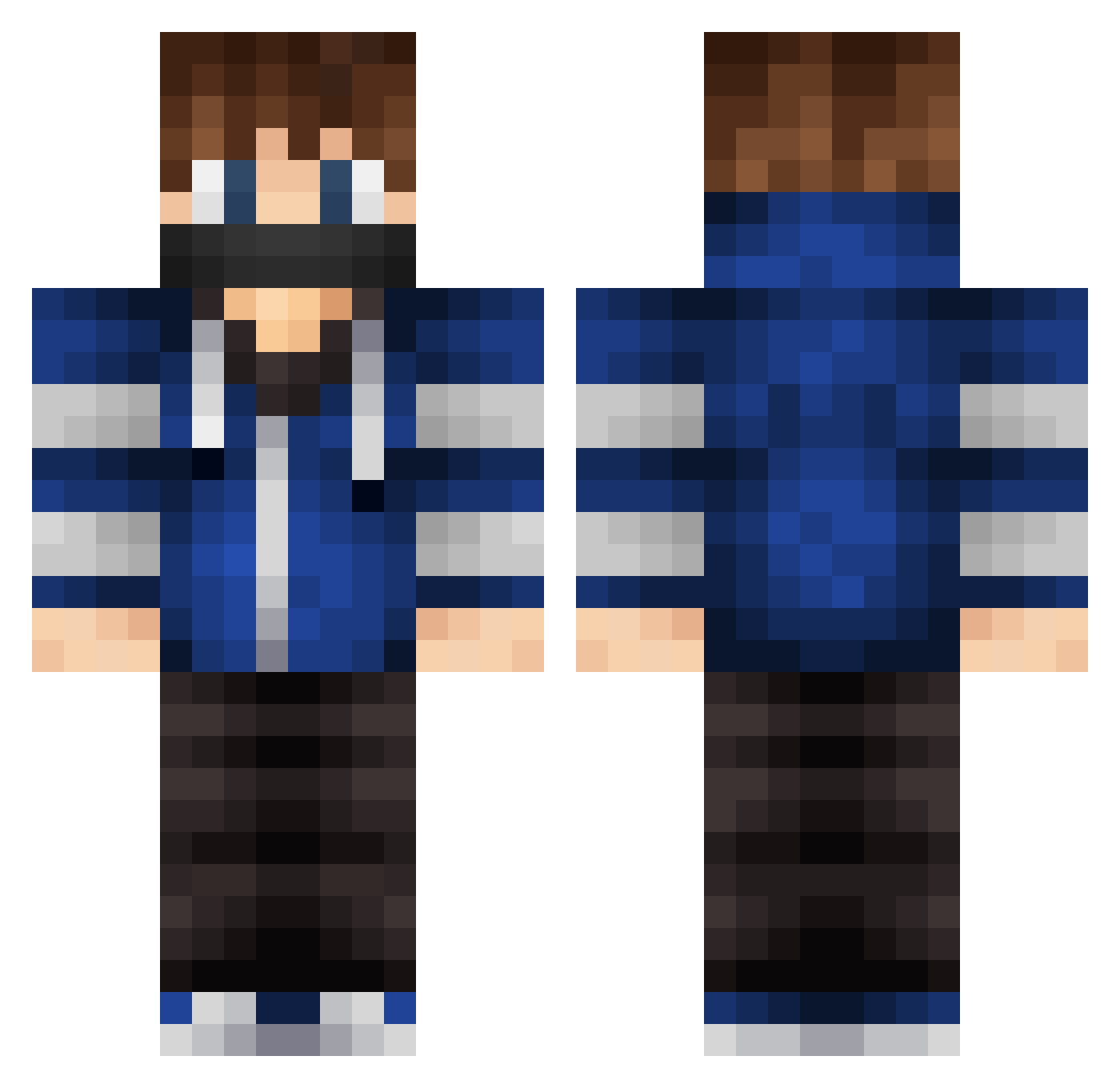
Current Minecraft skin of the player AlexGamer134, loaded from the official Mojang API. Rotate the 3D model with your mouse or finger, then download the skin as a PNG file and use it in Minecraft: Bedrock Edition or Java Edition for free. When AlexGamer134 changes their skin, this page updates automatically and the old skin stays in the history below.
Other players with this skin (579)
AlexGamer134 was the 310th player we have seen with this skin, first spotted on 03.10.2026. The same skin was seen on these players. Open a nickname to see their current skin and skin history.
 CracketBones Bratboy89 Sadmonk_ Memre_K AidanStevens365 LuiiSHD max02_09 Myeviltwin04 Thrasher_Vale Bullnmejty Follerer PearlsForPigs TheBlueSniper123 TheFastgame j7ll7 PelsangTenzin Silent_Hawk2 Paligamer_YT AlexandrosHD ScytheHD Exorder SergioHS minebuilder5321 xxXCollinXxx Kid_Fury9 HOUSEOFCORTEZ EliasRettedal lewie55 jokerjoe2 ginji_ryu TooBlatant ItsActive_PVP Whempleane Crazed_V Win_RiX Opactor Bikeboy702 Ultr4z gagantua0815 thieagle Osarz JoaoVSP jay_287 77Zombiez Ved9o SuperKai6 Miitchell Gesselll _WilliamBlue_ Werturo_ Eggynator MIKA2005 KibbieGurII WayneC Fuhomy El_Pro_5566 Beast_17 JAWROUGH christakis03 DerAdler94
More Mask Minecraft skins
How to install the AlexGamer134 skin
- Press the Download button above to save the skin as a PNG file.
- Minecraft: Bedrock Edition (PE): open the Dressing Room from the main menu (or tap your character → Edit Character), go to Classic Skins → Owned, press the + (new skin) button, choose the downloaded PNG and pick the Classic (Steve) model. Works on PC and mobile; consoles cannot import custom skins.
- Minecraft: Java Edition: open the Minecraft Launcher, go to the Skins tab, click New Skin, load the PNG, pick the Classic (Steve) model and press Save & Use. You can also upload it at minecraft.net → Profile → Change Skin.
The skin does not show up after import - what should I do?
Restart Minecraft and open the Dressing Room again - imported skins sometimes appear only after a restart. Also make sure you selected the imported skin and picked the Classic (Steve) model.
Which model should I choose, Classic or Slim?
This skin is designed for the Classic (Steve) model. If you pick the wrong model, the arms of the skin will look stretched or squeezed.
Is the skin of AlexGamer134 free to download?
Yes. Press Download, save the PNG file and use it in Minecraft: Bedrock Edition or Java Edition - no payment or registration needed. The skin also works on multiplayer servers and Realms.
More skins
Looking for more? Go back to all Minecraft skins and check the top skins of the week, month and all time, or find any player's skin by nickname.