
Adamcmm - Minecraft Skins & Skin History
Current Minecraft skin of the player Adamcmm, loaded from the official Mojang API. Rotate the 3D model with your mouse or finger, then download the skin as a PNG file and use it in Minecraft: Bedrock Edition or Java Edition for free. When Adamcmm changes their skin, this page updates automatically and the old skin stays in the history below.
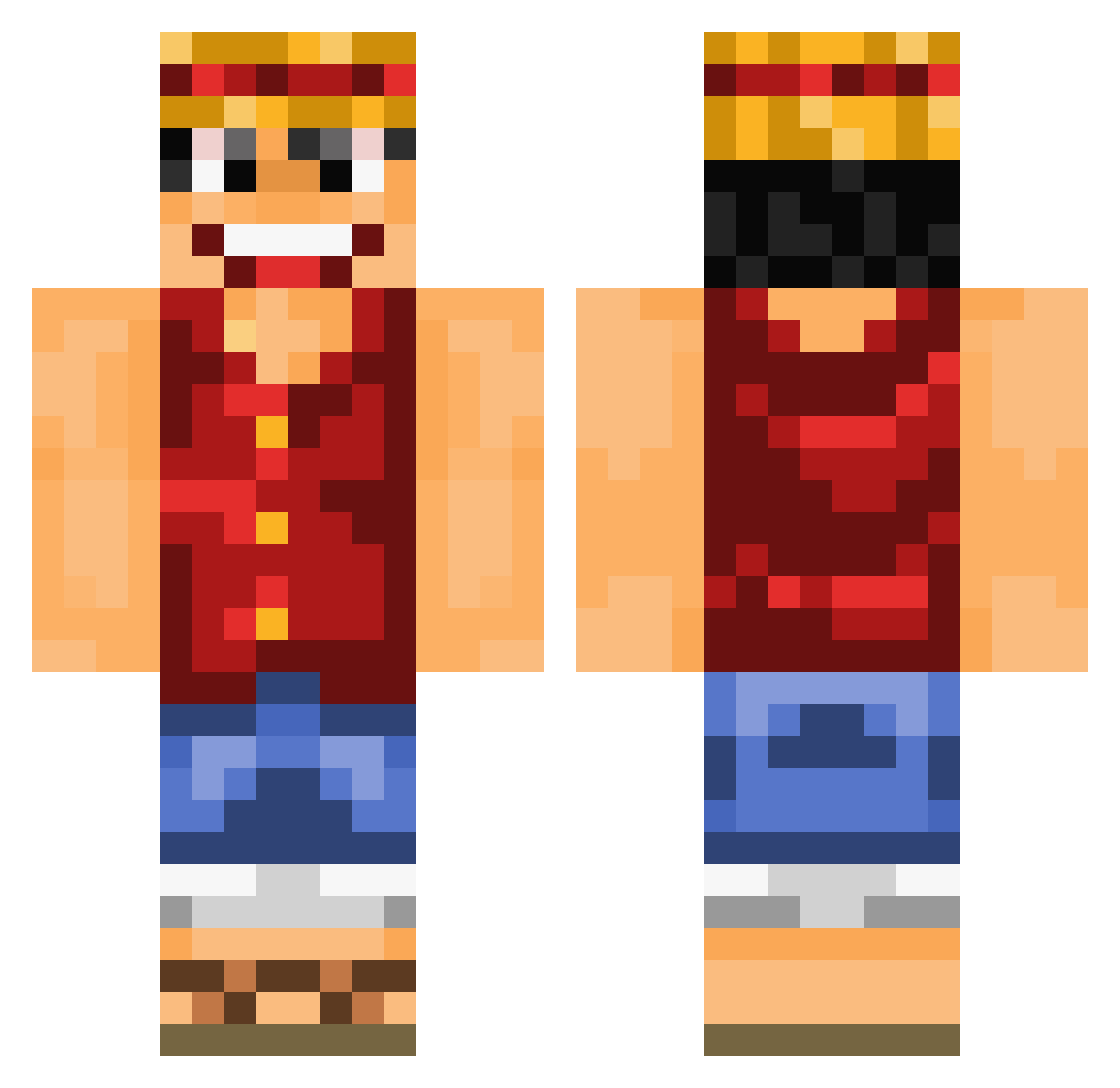
Other players with this skin (838)
Adamcmm was the 816th player we have seen with this skin, first spotted on 29.10.2026. The same skin was seen on these players. Open a nickname to see their current skin and skin history.
 Trivergente depardieugerard _MonkeyDLuffy_ Jetlarsson TheJusanMC BigFatSheep RurouniRisu KSA_H7 AhmadIbrahim Maxdoux D1T0X Yasone Crazytaco753 Nuguri01 juan941901 eziggy8 Caasas Tombs_Stone InfiniteGas k0sp BeeJeeBoucher Ch1ldofG0d _anaY_ servant333 Pocceschi98 JGReed baki_cl Cutebabe MTGxManish fxwf9920 nanung GoldenBoyFloyd biriyani NathanBousq Qupel s1oks tivda Duncanzn sVv3zZy FuzzyTurtle8006 Pfadi29 LoKout81 JunSuGod CalmDown96 Rolenzo11 HeySnapchat Darek23 FlyteGuy paz7 NooTrue Ruisung TheMarvinski Deltanium_ Cooperisseggsy Lostbloodsoul opgamermoment BingBongChu guigu_chuanqi xGhxsty lxDeathl
More Monkey D Luffy Minecraft skins
See all 924 Monkey D Luffy skins
How to install the Adamcmm skin
- Press the Download button above to save the skin as a PNG file.
- Minecraft: Bedrock Edition (PE): open the Dressing Room from the main menu (or tap your character → Edit Character), go to Classic Skins → Owned, press the + (new skin) button, choose the downloaded PNG and pick the Classic (Steve) model. Works on PC and mobile; consoles cannot import custom skins.
- Minecraft: Java Edition: open the Minecraft Launcher, go to the Skins tab, click New Skin, load the PNG, pick the Classic (Steve) model and press Save & Use. You can also upload it at minecraft.net → Profile → Change Skin.
The skin does not show up after import - what should I do?
Restart Minecraft and open the Dressing Room again - imported skins sometimes appear only after a restart. Also make sure you selected the imported skin and picked the Classic (Steve) model.
Which model should I choose, Classic or Slim?
This skin is designed for the Classic (Steve) model. If you pick the wrong model, the arms of the skin will look stretched or squeezed.
Is the skin of Adamcmm free to download?
Yes. Press Download, save the PNG file and use it in Minecraft: Bedrock Edition or Java Edition - no payment or registration needed. The skin also works on multiplayer servers and Realms.
More skins
Looking for more? Go back to all Minecraft skins and check the top skins of the week, month and all time, or find any player's skin by nickname.