
ABC110506 - Minecraft Skins & Skin History
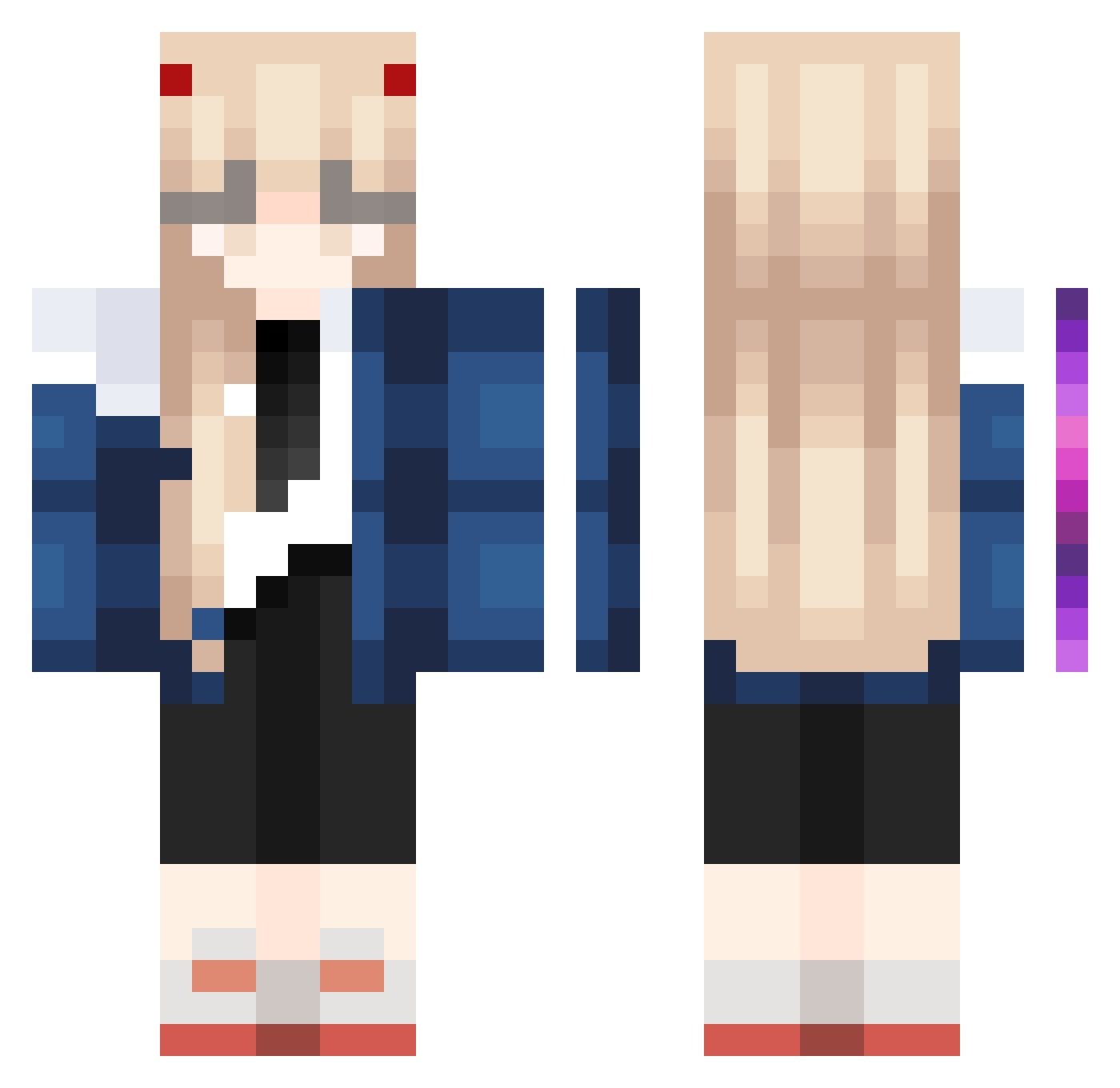
Current Minecraft skin of the player ABC110506, loaded from the official Mojang API. Rotate the 3D model with your mouse or finger, then download the skin as a PNG file and use it in Minecraft: Bedrock Edition or Java Edition for free. When ABC110506 changes their skin, this page updates automatically and the old skin stays in the history below.
Other players with this skin (1023)
ABC110506 was the 953rd player we have seen with this skin, first spotted on 30.10.2026. The same skin was seen on these players. Open a nickname to see their current skin and skin history.
 YERUANY SlaySage Tessbones ytroba PanuggGame Katelynn_Plays GEYYDS TheAkachan ryuusan814 SaMoaraRadu maockk RunYourShawty Sl1nkYT lesliemiauwu Sinnu1 Toships flow228 Mxlmoon DnialV lucile_101 pekesan612 Velonica4 Marinxz Goqo3 OrlandoSex DerRichterV wangyan9541 achuua blackshine_ ninaarachel TheCat_exe kittenfruitcake Armyghost32 Ningz512 Aacker_ Nimichew ifyrmm Ruka1114 Hunter_Crazy GenYuanY Tusk4ro EgeArtikHesapAl _Montyy semetensaelano TeresaXiao Emperor1Ricky Maikelss Noevia Sheep4545 LeighKie1019 hcxixi rinu465 Aetitia Spazso_ Vreith0 Mggchn itsNightmaree Kim0chi_ jin_926 Shyynop
More Zero Two Minecraft skins
How to install the ABC110506 skin
- Press the Download button above to save the skin as a PNG file.
- Minecraft: Bedrock Edition (PE): open the Dressing Room from the main menu (or tap your character → Edit Character), go to Classic Skins → Owned, press the + (new skin) button, choose the downloaded PNG and pick the Classic (Steve) model. Works on PC and mobile; consoles cannot import custom skins.
- Minecraft: Java Edition: open the Minecraft Launcher, go to the Skins tab, click New Skin, load the PNG, pick the Classic (Steve) model and press Save & Use. You can also upload it at minecraft.net → Profile → Change Skin.
The skin does not show up after import - what should I do?
Restart Minecraft and open the Dressing Room again - imported skins sometimes appear only after a restart. Also make sure you selected the imported skin and picked the Classic (Steve) model.
Which model should I choose, Classic or Slim?
This skin is designed for the Classic (Steve) model. If you pick the wrong model, the arms of the skin will look stretched or squeezed.
Is the skin of ABC110506 free to download?
Yes. Press Download, save the PNG file and use it in Minecraft: Bedrock Edition or Java Edition - no payment or registration needed. The skin also works on multiplayer servers and Realms.
More skins
Looking for more? Go back to all Minecraft skins and check the top skins of the week, month and all time, or find any player's skin by nickname.