
zinnie02 - Minecraft Skins & Skin History
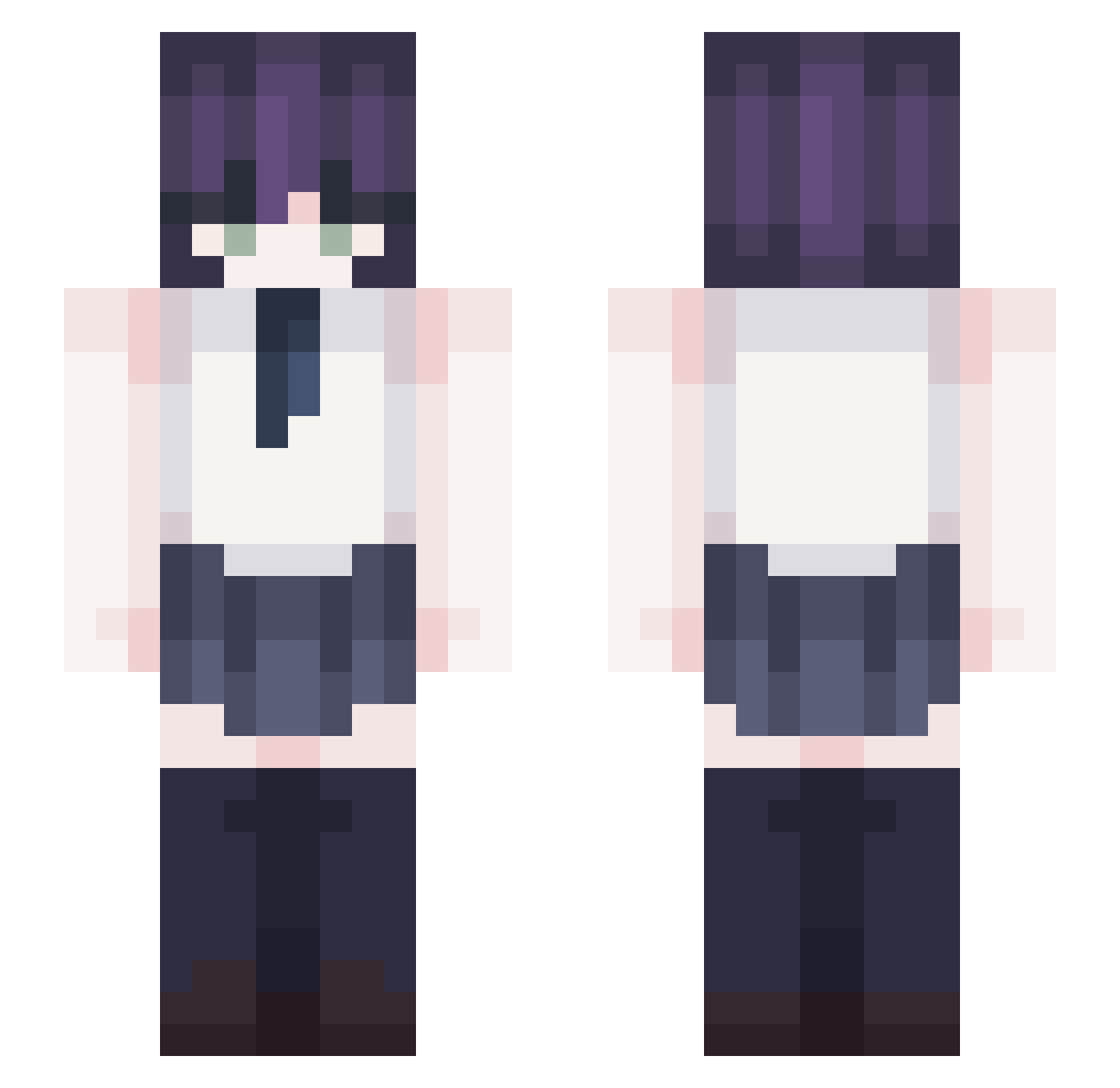
Current Minecraft skin of the player zinnie02, loaded from the official Mojang API. Rotate the 3D model with your mouse or finger, then download the skin as a PNG file and use it in Minecraft: Bedrock Edition or Java Edition for free. When zinnie02 changes their skin, this page updates automatically and the old skin stays in the history below.
Other players with this skin (367)
zinnie02 was the 274th player we have seen with this skin, first spotted on 10.10.2026. The same skin was seen on these players. Open a nickname to see their current skin and skin history.
 willbecaught WeiCarryU DRXPpak _SangJin wenrt sawao0320 Karna___ catzuuu AmandeMchn tsubasafuku uyng_00 sayboy0 Eltriuk velvcties LilZony_ Ledget dldmstjd0717 81snw_ QiShiYi_0519 IWillMogU OtonkoMark LemonBisquit KhanhsPeanut_ kycool12 jeyeonseon MINT_WINE GenjiOW ash1s FBKsukonbu Maybenotacat01 XRXallen ArcBlueX Yeun_12 zerotwolul quittingthisgame Eson_D4C Viczzzka ATongzi Spillner_ Kroniiii maybeJessie bluefox2015 QSXDRGBHUK MPR666 keanping CollapseDeep GabrielMGR hyunu3555 paka0812 jessiica11 _mushroomy hanle12 RezeAddict tarobobacat Stay4Me Kirschbluten Megumiiuwu _VoiD_x akiradth Sr_Dantrex
More School Uniform Minecraft skins
See all 6889 School Uniform skins
How to install the zinnie02 skin
- Press the Download button above to save the skin as a PNG file.
- Minecraft: Bedrock Edition (PE): open the Dressing Room from the main menu (or tap your character → Edit Character), go to Classic Skins → Owned, press the + (new skin) button, choose the downloaded PNG and pick the Slim (Alex) model. Works on PC and mobile; consoles cannot import custom skins.
- Minecraft: Java Edition: open the Minecraft Launcher, go to the Skins tab, click New Skin, load the PNG, pick the Slim (Alex) model and press Save & Use. You can also upload it at minecraft.net → Profile → Change Skin.
The skin does not show up after import - what should I do?
Restart Minecraft and open the Dressing Room again - imported skins sometimes appear only after a restart. Also make sure you selected the imported skin and picked the Slim (Alex) model.
Which model should I choose, Classic or Slim?
This skin is designed for the Slim (Alex) model. If you pick the wrong model, the arms of the skin will look stretched or squeezed.
Is the skin of zinnie02 free to download?
Yes. Press Download, save the PNG file and use it in Minecraft: Bedrock Edition or Java Edition - no payment or registration needed. The skin also works on multiplayer servers and Realms.
More skins
Looking for more? Go back to all Minecraft skins and check the top skins of the week, month and all time, or find any player's skin by nickname.