
yusufwsm - Minecraft Skins & Skin History
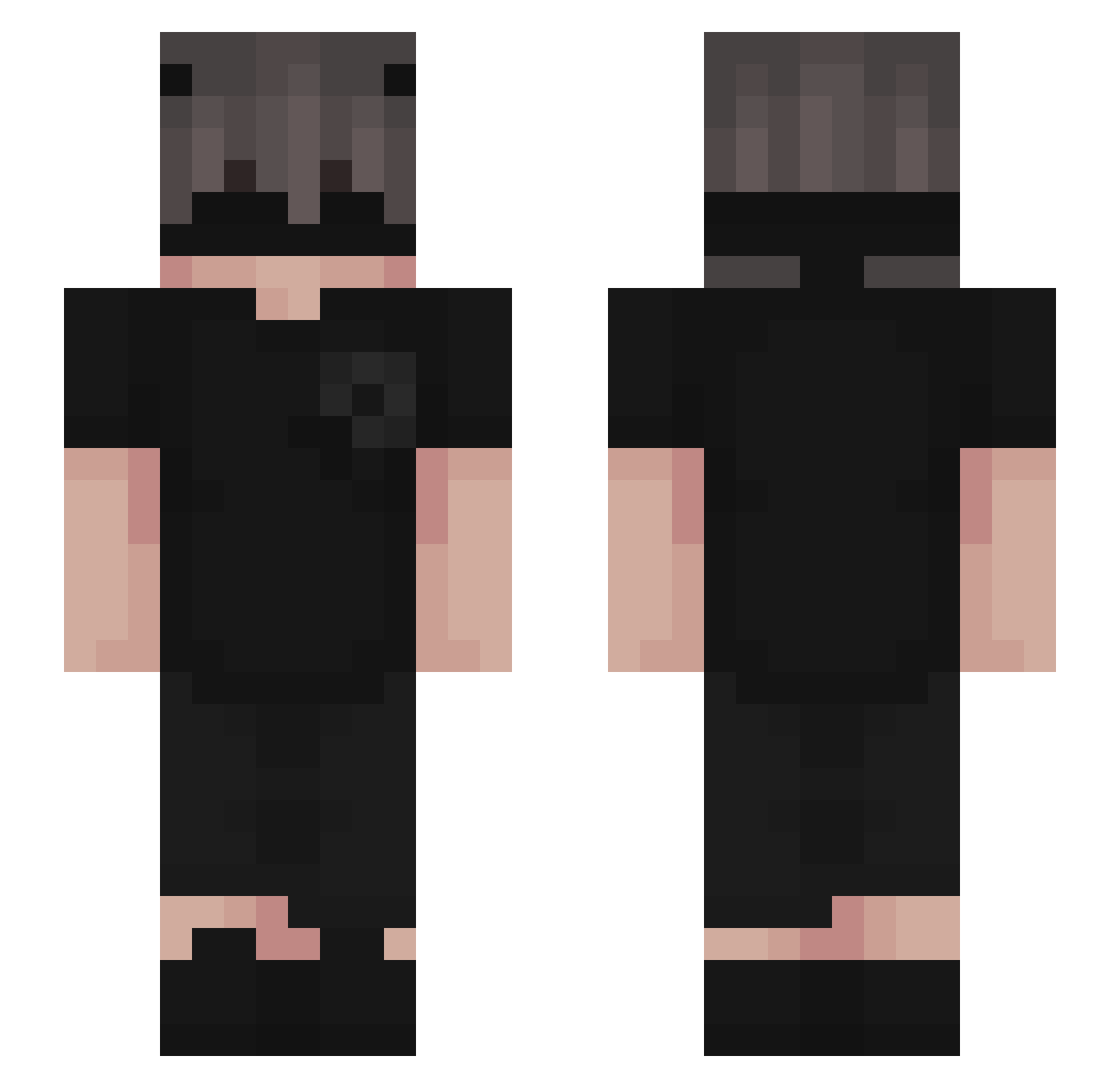
Current Minecraft skin of the player yusufwsm, loaded from the official Mojang API. Rotate the 3D model with your mouse or finger, then download the skin as a PNG file and use it in Minecraft: Bedrock Edition or Java Edition for free. When yusufwsm changes their skin, this page updates automatically and the old skin stays in the history below.
Other players with this skin (226)
yusufwsm was the 158th player we have seen with this skin, first spotted on 08.10.2026. The same skin was seen on these players. Open a nickname to see their current skin and skin history.
 mossymonkey 19xr yungtadpole z33ker Mqthic Merzit ItsRodi w3le Iganazzio spro722x RyZeSpT MSK44 tantorb22 SHINIGAMICR08 Frexva killjoy1253 Oinight daboss808080 Madison4345 AbuS3o Tellyz1k BomBAYbo Getmee Nakbar MPDrogada xXClown_CrownXx warlikkk699 MattPist KunaiLive SB_Aron zach1234_ HolySavageMF SasinP Boemstem_ conterstun Cobalt37 yuxi1115 bennett753 _Jubby786_ MysticYT_ nytos00 ItzXStrikePlex xzzombied_ CrisFuentes Nighttsx Simpatiq iN1cohp FEENQ IDM_TAR prdangel94 Ktl2jAx_isBack kebish nacholagb ThatAintRuzz Crxzy_ s6out Gianlq jshbnnt guuhkk izaid1165
More Emo Minecraft skins
How to install the yusufwsm skin
- Press the Download button above to save the skin as a PNG file.
- Minecraft: Bedrock Edition (PE): open the Dressing Room from the main menu (or tap your character → Edit Character), go to Classic Skins → Owned, press the + (new skin) button, choose the downloaded PNG and pick the Slim (Alex) model. Works on PC and mobile; consoles cannot import custom skins.
- Minecraft: Java Edition: open the Minecraft Launcher, go to the Skins tab, click New Skin, load the PNG, pick the Slim (Alex) model and press Save & Use. You can also upload it at minecraft.net → Profile → Change Skin.
The skin does not show up after import - what should I do?
Restart Minecraft and open the Dressing Room again - imported skins sometimes appear only after a restart. Also make sure you selected the imported skin and picked the Slim (Alex) model.
Which model should I choose, Classic or Slim?
This skin is designed for the Slim (Alex) model. If you pick the wrong model, the arms of the skin will look stretched or squeezed.
Is the skin of yusufwsm free to download?
Yes. Press Download, save the PNG file and use it in Minecraft: Bedrock Edition or Java Edition - no payment or registration needed. The skin also works on multiplayer servers and Realms.
More skins
Looking for more? Go back to all Minecraft skins and check the top skins of the week, month and all time, or find any player's skin by nickname.