
Seven7s_ - Minecraft Skins & Skin History
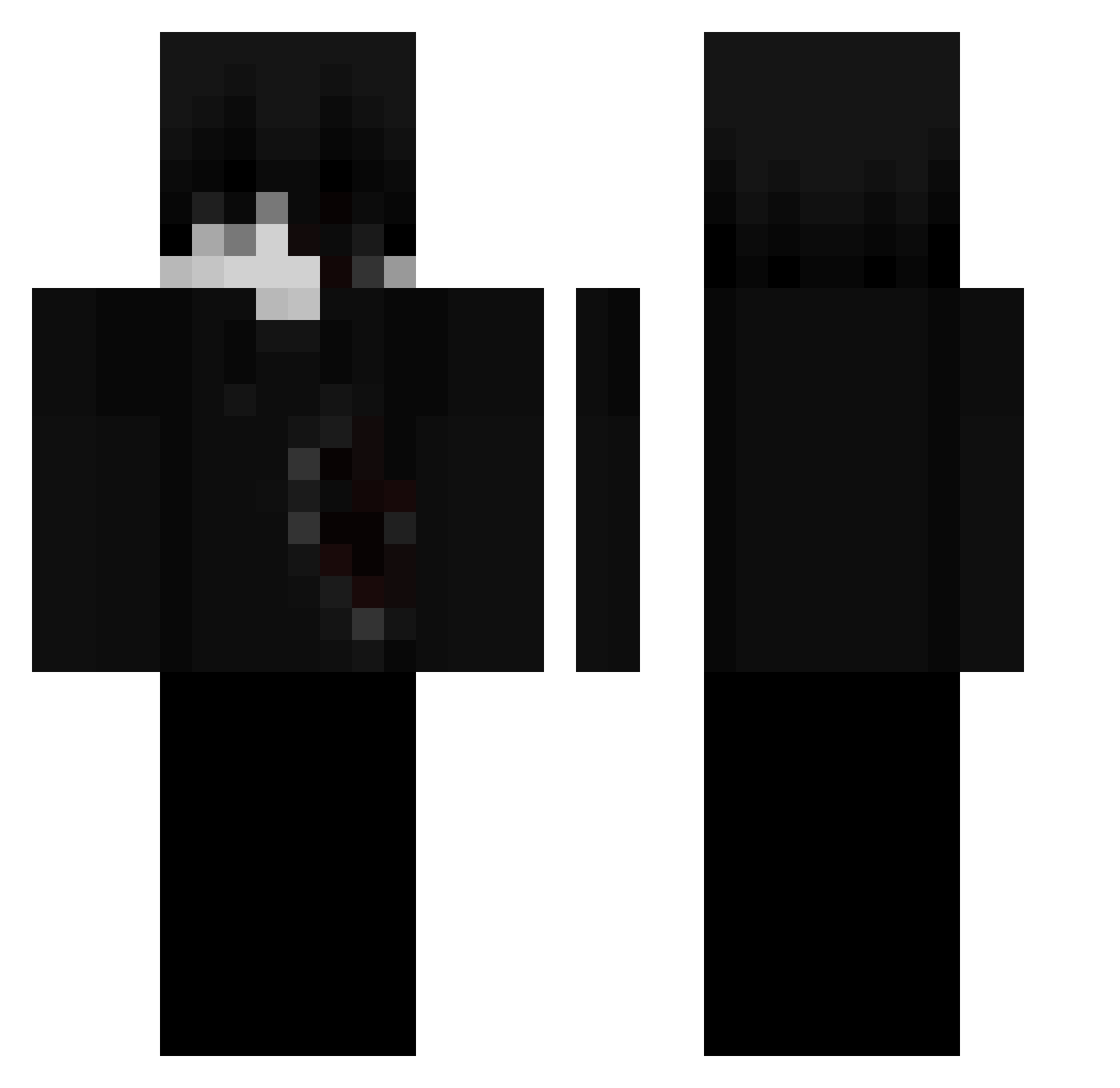
Current Minecraft skin of the player Seven7s_, loaded from the official Mojang API. Rotate the 3D model with your mouse or finger, then download the skin as a PNG file and use it in Minecraft: Bedrock Edition or Java Edition for free. When Seven7s_ changes their skin, this page updates automatically and the old skin stays in the history below.
Other players with this skin (68)
Seven7s_ was the 1st player we have seen with this skin, first spotted on 20.07.2026. The same skin was seen on these players. Open a nickname to see their current skin and skin history.
 waltuhputyodicc falkness zEgrin_
 Zando10 MommyLover67 GD1MA windywinds xLukasxGoty
 veryCozyperson
 a777kx Flexpuma Matrix3 Neck0 Swarthevil_MC2 Luhvhr Jukileure Emirhn07x rgenn
 oZtrx
oZtrx YETER12
 SAJMC Mangatuff bossInWzaa Eloso702 4il3 yuyumi77 rezzywru Hennenri Thomas_Hunter mar3ele1 itzRyk notnited emotionully Squezee7184 noxy54 SuzukiSSSwift DR4X_DARK callmenashiii joaquiinpro777 Al7_L0st SkyjrVB sunsetstance JUAO2212 yv2k xmn1215 Merr1x SniperSnow Keemz96 7olus _Slums_ gustavooooooo225 VyxrT3 shazamowo TrustMeYouLoveIt xeyoto mi_chen XMRenthusiast sergiudemon Henrii13 matadorloko6
More Bleeding Minecraft skins
How to install the Seven7s_ skin
- Press the Download button above to save the skin as a PNG file.
- Minecraft: Bedrock Edition (PE): open the Dressing Room from the main menu (or tap your character → Edit Character), go to Classic Skins → Owned, press the + (new skin) button, choose the downloaded PNG and pick the Classic (Steve) model. Works on PC and mobile; consoles cannot import custom skins.
- Minecraft: Java Edition: open the Minecraft Launcher, go to the Skins tab, click New Skin, load the PNG, pick the Classic (Steve) model and press Save & Use. You can also upload it at minecraft.net → Profile → Change Skin.
The skin does not show up after import - what should I do?
Restart Minecraft and open the Dressing Room again - imported skins sometimes appear only after a restart. Also make sure you selected the imported skin and picked the Classic (Steve) model.
Which model should I choose, Classic or Slim?
This skin is designed for the Classic (Steve) model. If you pick the wrong model, the arms of the skin will look stretched or squeezed.
Is the skin of Seven7s_ free to download?
Yes. Press Download, save the PNG file and use it in Minecraft: Bedrock Edition or Java Edition - no payment or registration needed. The skin also works on multiplayer servers and Realms.
More skins
Looking for more? Go back to all Minecraft skins and check the top skins of the week, month and all time, or find any player's skin by nickname.