
wxx11123 - Minecraft Skins & Skin History
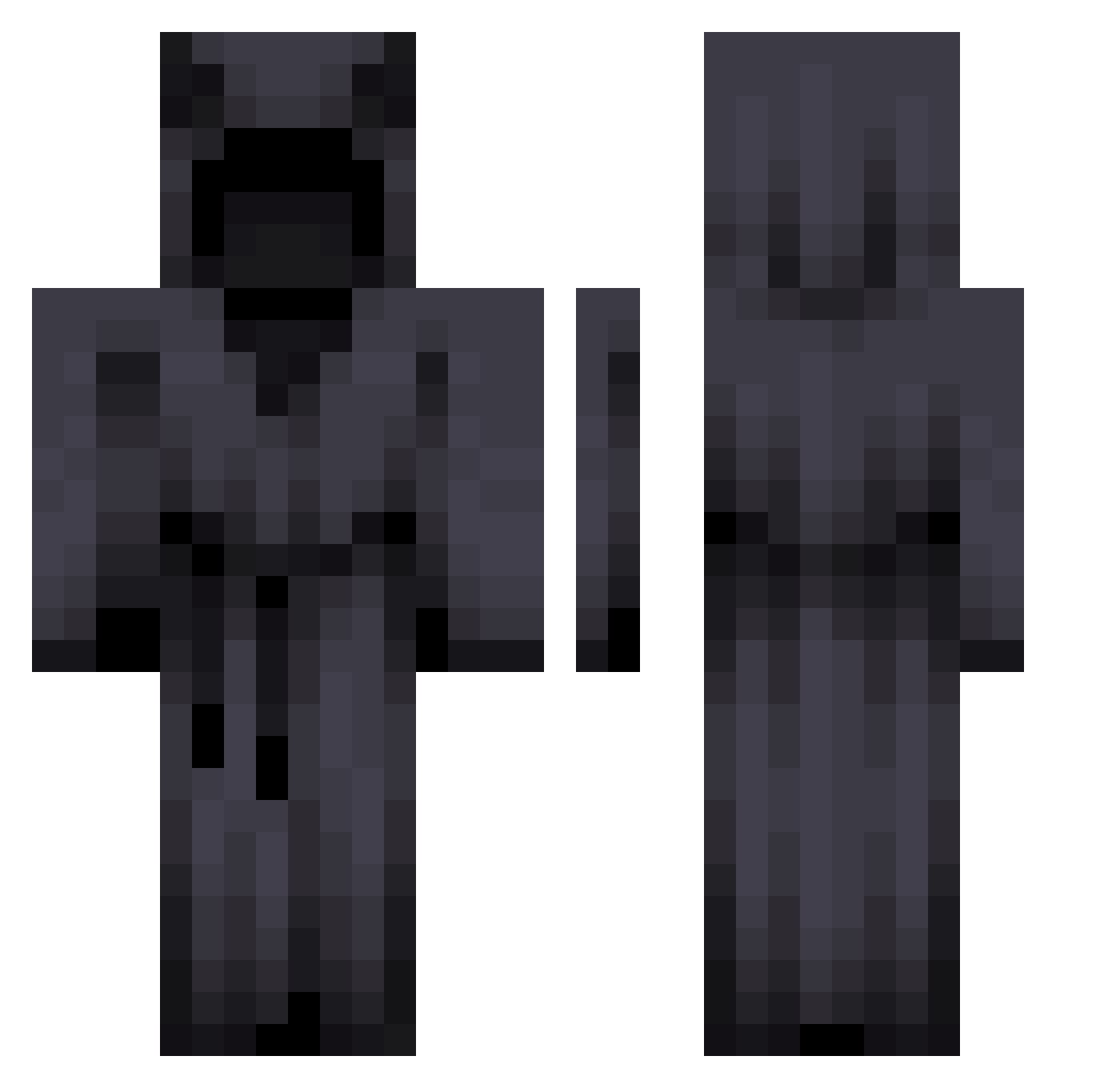
Current Minecraft skin of the player wxx11123, loaded from the official Mojang API. Rotate the 3D model with your mouse or finger, then download the skin as a PNG file and use it in Minecraft: Bedrock Edition or Java Edition for free. When wxx11123 changes their skin, this page updates automatically and the old skin stays in the history below.
Other players with this skin (278)
wxx11123 was the 96th player we have seen with this skin, first spotted on 26.08.2026. The same skin was seen on these players. Open a nickname to see their current skin and skin history.
 sshorty01 fua_0611 JinJim66 UltraBaker1 jah6 Pazeko S4plex GGBalls32 BBNB4K XxMarlboroManxX mrsad2136 ETHEREAL2007 MENDEZHOEE xzhils Presslufthammer1 ubreadu F4rtacus Pentagram__ Atanator juanberxd Chiefhog22 bobismeiambob12 ShadoXII cattyrr an0130 denmanYTB Champixn arguableDull Retaliationz IeuanM XD_Spike 9LX9VE9 wsws1302 AYDESPACITO FerForter Rariality kaedetree Tiny3vil lukutiswastaken Sightm iGaemz Jadougie LEGENDVENOM1249 markuzaurs nNiru1 TrillVC CHRXSFOOLXSH ShailBoats Matty_Ice_69 CallMeFish_ yyeternal Quankzyy Lawson1313 Palaku woodchunk Bunkercasino_CBE 4Ecelcrius SBGSilent00 J_bardella NachoDM11
More Cultist Minecraft skins
How to install the wxx11123 skin
- Press the Download button above to save the skin as a PNG file.
- Minecraft: Bedrock Edition (PE): open the Dressing Room from the main menu (or tap your character → Edit Character), go to Classic Skins → Owned, press the + (new skin) button, choose the downloaded PNG and pick the Classic (Steve) model. Works on PC and mobile; consoles cannot import custom skins.
- Minecraft: Java Edition: open the Minecraft Launcher, go to the Skins tab, click New Skin, load the PNG, pick the Classic (Steve) model and press Save & Use. You can also upload it at minecraft.net → Profile → Change Skin.
The skin does not show up after import - what should I do?
Restart Minecraft and open the Dressing Room again - imported skins sometimes appear only after a restart. Also make sure you selected the imported skin and picked the Classic (Steve) model.
Which model should I choose, Classic or Slim?
This skin is designed for the Classic (Steve) model. If you pick the wrong model, the arms of the skin will look stretched or squeezed.
Is the skin of wxx11123 free to download?
Yes. Press Download, save the PNG file and use it in Minecraft: Bedrock Edition or Java Edition - no payment or registration needed. The skin also works on multiplayer servers and Realms.
More skins
Looking for more? Go back to all Minecraft skins and check the top skins of the week, month and all time, or find any player's skin by nickname.