
wooddadda0 - Minecraft Skins & Skin History
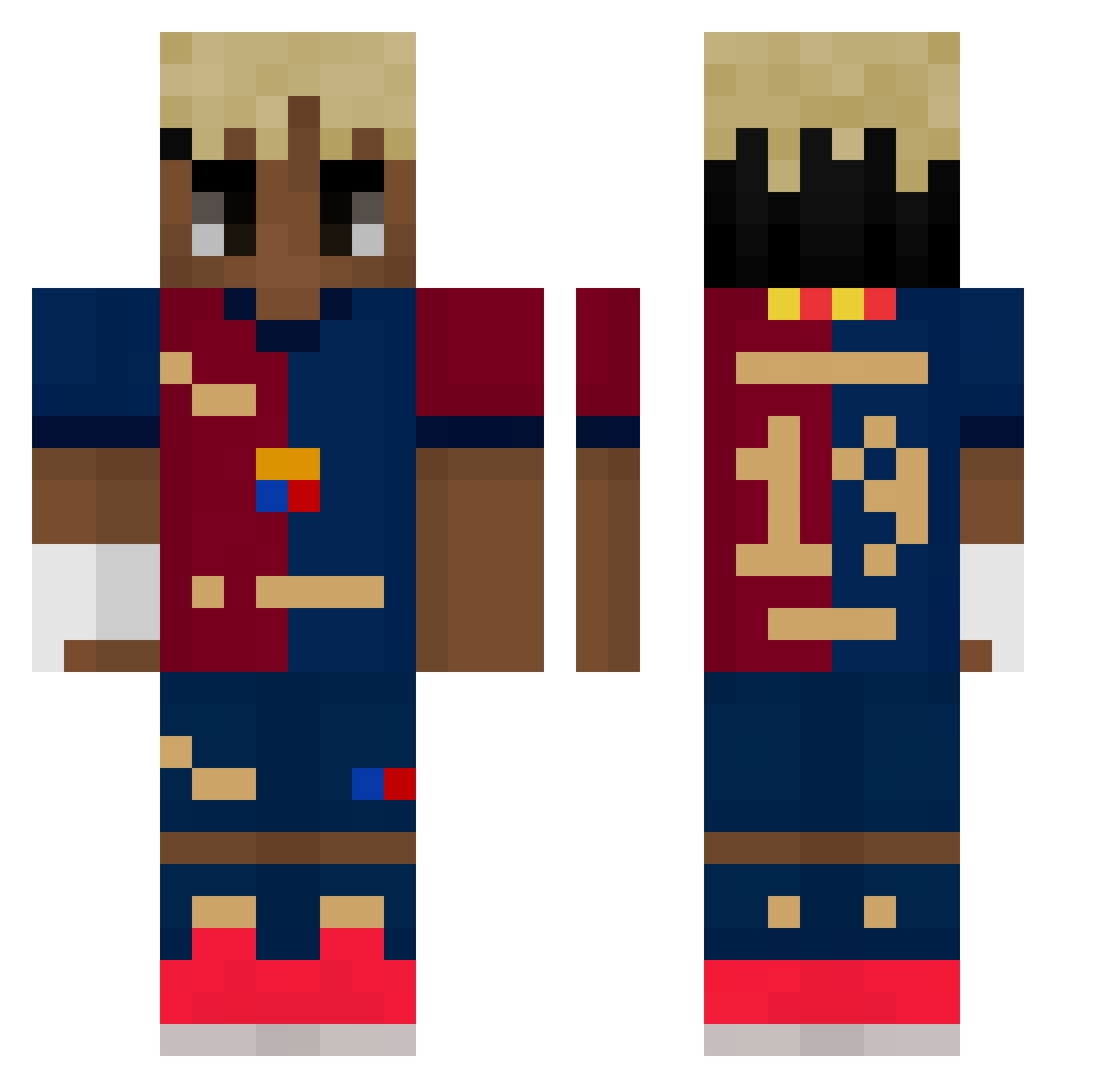
Current Minecraft skin of the player wooddadda0, loaded from the official Mojang API. Rotate the 3D model with your mouse or finger, then download the skin as a PNG file and use it in Minecraft: Bedrock Edition or Java Edition for free. When wooddadda0 changes their skin, this page updates automatically and the old skin stays in the history below.
Other players with this skin (498)
wooddadda0 was the 114th player we have seen with this skin, first spotted on 16.08.2026. The same skin was seen on these players. Open a nickname to see their current skin and skin history.
 rp00i
rp00i Exordial
 BeamedByTiers mikolaaj13 Lam1ne_Yamal Kalter28 onkeng Narutoo16 nachitoooooo
 HOPE25505 ItsJasperT KaMS0N Bertei CHAUSSETTEEEEEEE L3V1_07 adastrony_pro Basti_ProPlayer rishin0
 respiraciones jorge1326 Manu_UD_9 sloth7733 MeuhmeuhMuu jkeawinta Yousif123gf43t34 cdrik10 akustycznajulka PKY10 juha9485 Augustin_1 OKULARNIK2013 AyaksizOyuncu
 Inujjang Vortex_Sebdn Davixighno 0_Revuxor_0 Hiwyus Sjwoo crude_009 adidasfootball rey78 Alinaseem78 FlipSalahBim iPekee Idris31 Thibo18 FledSummer Huskich_ hazard9g DOUNADOS Davx07_ WalterDamus Kihoonne ooverlytrimbaby BIGGABOY hachiming83 _Sa_bo_ Ripaa_ ToNh0122991 LamiiineYamal
More Soccer Kit Minecraft skins
How to install the wooddadda0 skin
- Press the Download button above to save the skin as a PNG file.
- Minecraft: Bedrock Edition (PE): open the Dressing Room from the main menu (or tap your character → Edit Character), go to Classic Skins → Owned, press the + (new skin) button, choose the downloaded PNG and pick the Classic (Steve) model. Works on PC and mobile; consoles cannot import custom skins.
- Minecraft: Java Edition: open the Minecraft Launcher, go to the Skins tab, click New Skin, load the PNG, pick the Classic (Steve) model and press Save & Use. You can also upload it at minecraft.net → Profile → Change Skin.
The skin does not show up after import - what should I do?
Restart Minecraft and open the Dressing Room again - imported skins sometimes appear only after a restart. Also make sure you selected the imported skin and picked the Classic (Steve) model.
Which model should I choose, Classic or Slim?
This skin is designed for the Classic (Steve) model. If you pick the wrong model, the arms of the skin will look stretched or squeezed.
Is the skin of wooddadda0 free to download?
Yes. Press Download, save the PNG file and use it in Minecraft: Bedrock Edition or Java Edition - no payment or registration needed. The skin also works on multiplayer servers and Realms.
More skins
Looking for more? Go back to all Minecraft skins and check the top skins of the week, month and all time, or find any player's skin by nickname.