
tinnen1015 - Minecraft Skins & Skin History
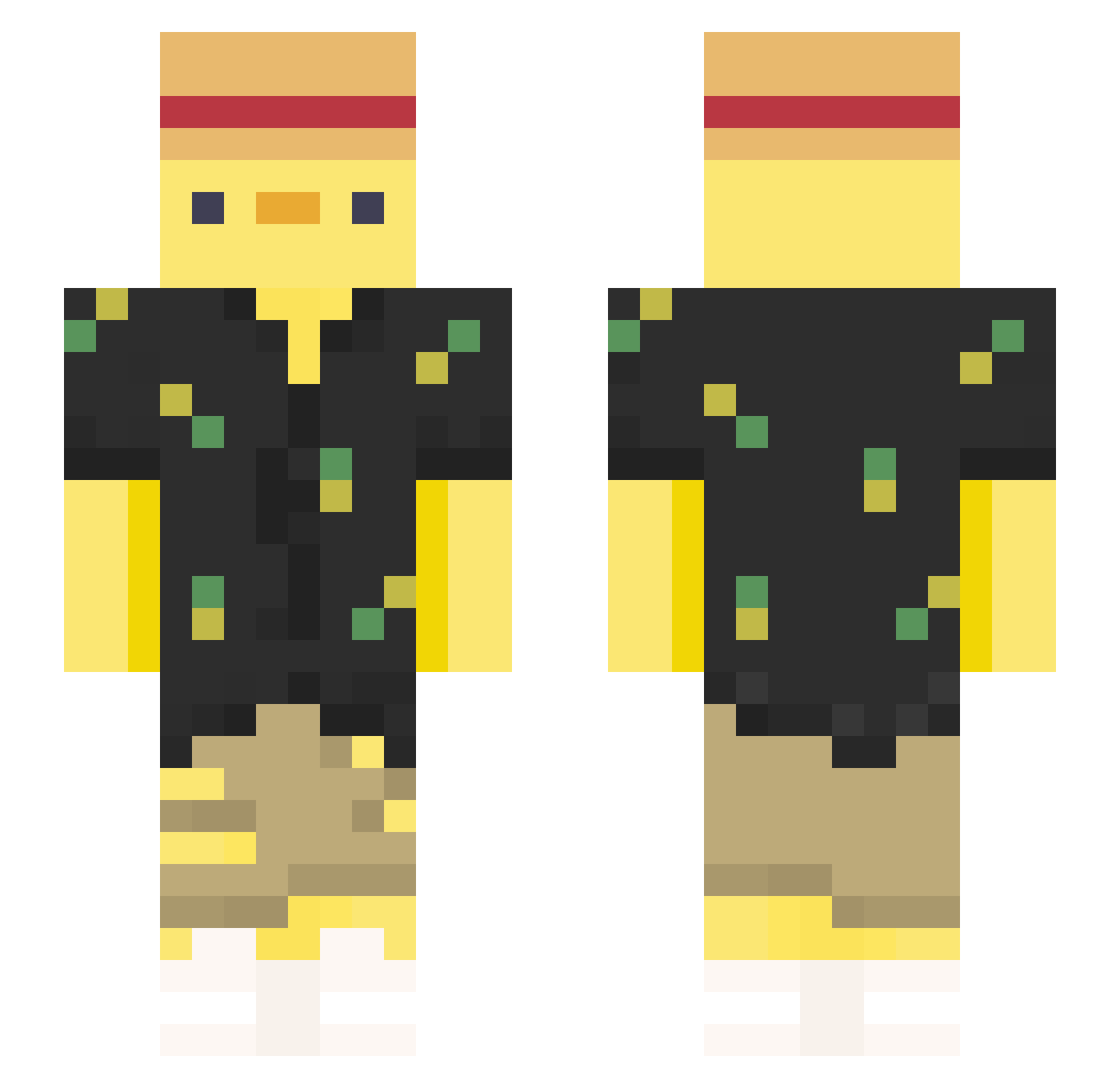
Current Minecraft skin of the player tinnen1015, loaded from the official Mojang API. Rotate the 3D model with your mouse or finger, then download the skin as a PNG file and use it in Minecraft: Bedrock Edition or Java Edition for free. When tinnen1015 changes their skin, this page updates automatically and the old skin stays in the history below.
Other players with this skin (377)
tinnen1015 was the 127th player we have seen with this skin, first spotted on 31.08.2026. The same skin was seen on these players. Open a nickname to see their current skin and skin history.
 SpinoUwU Special_duck_ Pion3kk Zipzeee longlingOne BuzzMei CharacterMocha fafe999 ywEN1 hellvespers Harry__Deso zQlips_ Tomattez Flyxutcl
 angelohabile turtleneck44 jjaggu EsIstAlex Mato83 Dr_Shoemaker Big_Wowee obese_henry Speisemeister Stavebert ramaa94 Rick91236 Grumpy___Duck sebsmor NotStubby KStains TheViter PIOLO384 atunosuke24
 OMGitsDiamond timeflower2010 YesSoundNoClap JJoshAllardd xRazen_ Shervin44sin Duck_Asti _Zekoo_ LeeGodie youmotry alladinz fil792 DouglasOff Masivkumshot69 Chargecow Lardyck Bond186 Neishin DemDem__ _Am3li3_ KATALEBEST goodgamerr Stoffls ericwu981223 Hel_lias i_found_you Kazelrov
More Straw Hat Minecraft skins
How to install the tinnen1015 skin
- Press the Download button above to save the skin as a PNG file.
- Minecraft: Bedrock Edition (PE): open the Dressing Room from the main menu (or tap your character → Edit Character), go to Classic Skins → Owned, press the + (new skin) button, choose the downloaded PNG and pick the Slim (Alex) model. Works on PC and mobile; consoles cannot import custom skins.
- Minecraft: Java Edition: open the Minecraft Launcher, go to the Skins tab, click New Skin, load the PNG, pick the Slim (Alex) model and press Save & Use. You can also upload it at minecraft.net → Profile → Change Skin.
The skin does not show up after import - what should I do?
Restart Minecraft and open the Dressing Room again - imported skins sometimes appear only after a restart. Also make sure you selected the imported skin and picked the Slim (Alex) model.
Which model should I choose, Classic or Slim?
This skin is designed for the Slim (Alex) model. If you pick the wrong model, the arms of the skin will look stretched or squeezed.
Is the skin of tinnen1015 free to download?
Yes. Press Download, save the PNG file and use it in Minecraft: Bedrock Edition or Java Edition - no payment or registration needed. The skin also works on multiplayer servers and Realms.
More skins
Looking for more? Go back to all Minecraft skins and check the top skins of the week, month and all time, or find any player's skin by nickname.