
taso_soson - Minecraft Skins & Skin History
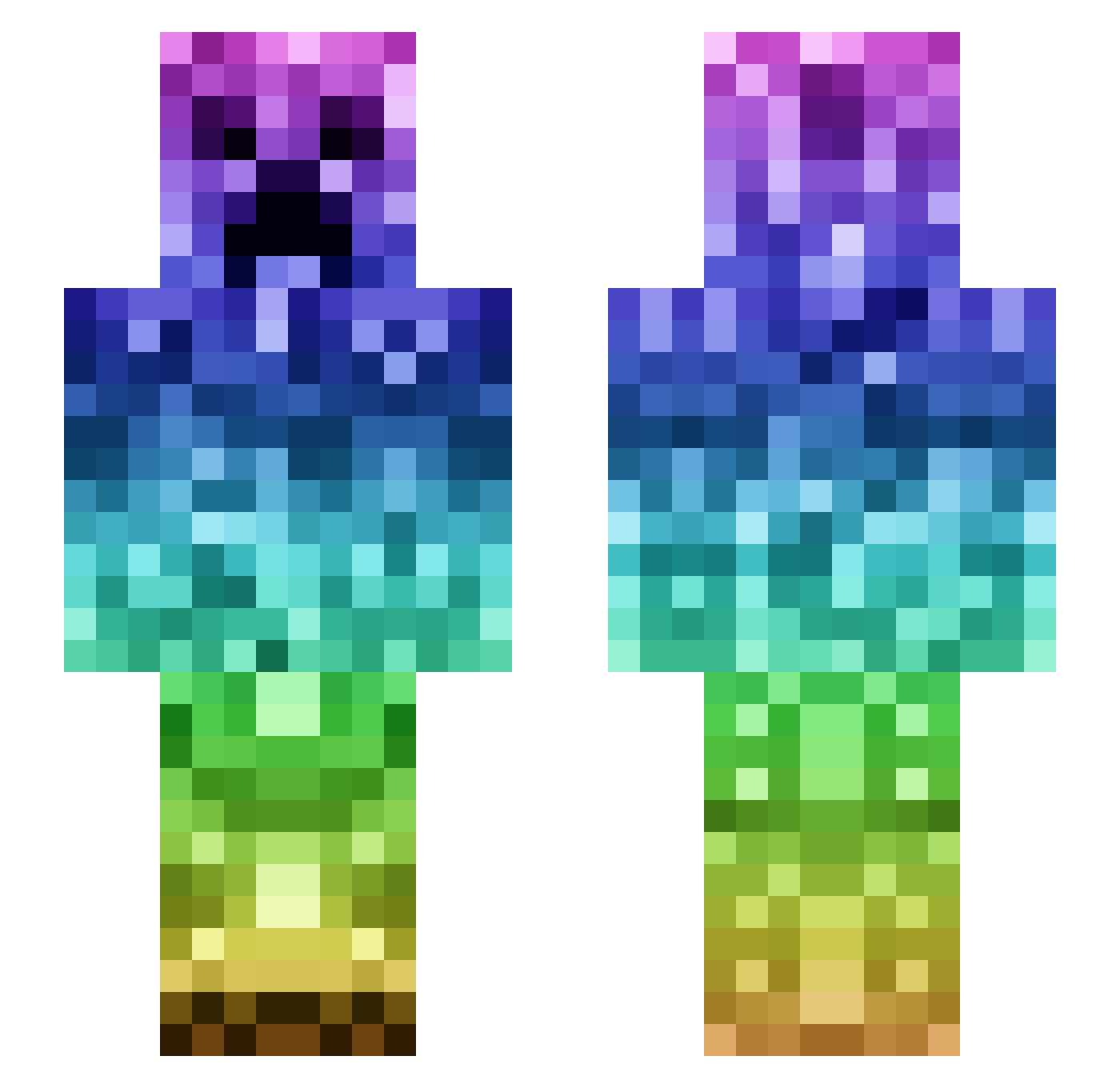
Current Minecraft skin of the player taso_soson, loaded from the official Mojang API. Rotate the 3D model with your mouse or finger, then download the skin as a PNG file and use it in Minecraft: Bedrock Edition or Java Edition for free. When taso_soson changes their skin, this page updates automatically and the old skin stays in the history below.
Other players with this skin (95)
taso_soson was the 34th player we have seen with this skin, first spotted on 08.09.2026. The same skin was seen on these players. Open a nickname to see their current skin and skin history.
 694206942069420 MegaMaxs Mosted6289 KBADROBER Zelto_116 BrayBerry Yan_Dezhan tequil_0 PunketoSolitario fgc29 niauge crk15 byring mHelloS Fajkyy Gensunte EMA0127 Allo10 kalfy_54 Cl3M49 Gold_G Naisk Kai_1002 zzzkkk6974 yuubii YOUNOH Axelotl2011 Ruebe_09 Vasili4ka aQbaPlayGames yukishiro53 Raphp0wer Pmaster321 CROMOSSOMO Kaytch uchan63 RealPrince Hawkhit McHughSnifsBalz chiayu0 nardwhale misiek27 DrunkenTurtl2 kinako243 chen235 ebeb0126 caster7se RainyWife Domxto GyaLuLu Blanka2010
 Leo313 vojtacerma Fan_Lin_Lin_Lei ET_3289 Willi_mit_Brilli RavenNK mamahorse haribotesun FrokkroF
More Rainbow Minecraft skins
How to install the taso_soson skin
- Press the Download button above to save the skin as a PNG file.
- Minecraft: Bedrock Edition (PE): open the Dressing Room from the main menu (or tap your character → Edit Character), go to Classic Skins → Owned, press the + (new skin) button, choose the downloaded PNG and pick the Slim (Alex) model. Works on PC and mobile; consoles cannot import custom skins.
- Minecraft: Java Edition: open the Minecraft Launcher, go to the Skins tab, click New Skin, load the PNG, pick the Slim (Alex) model and press Save & Use. You can also upload it at minecraft.net → Profile → Change Skin.
The skin does not show up after import - what should I do?
Restart Minecraft and open the Dressing Room again - imported skins sometimes appear only after a restart. Also make sure you selected the imported skin and picked the Slim (Alex) model.
Which model should I choose, Classic or Slim?
This skin is designed for the Slim (Alex) model. If you pick the wrong model, the arms of the skin will look stretched or squeezed.
Is the skin of taso_soson free to download?
Yes. Press Download, save the PNG file and use it in Minecraft: Bedrock Edition or Java Edition - no payment or registration needed. The skin also works on multiplayer servers and Realms.
More skins
Looking for more? Go back to all Minecraft skins and check the top skins of the week, month and all time, or find any player's skin by nickname.