
szekibaa - Minecraft Skins & Skin History
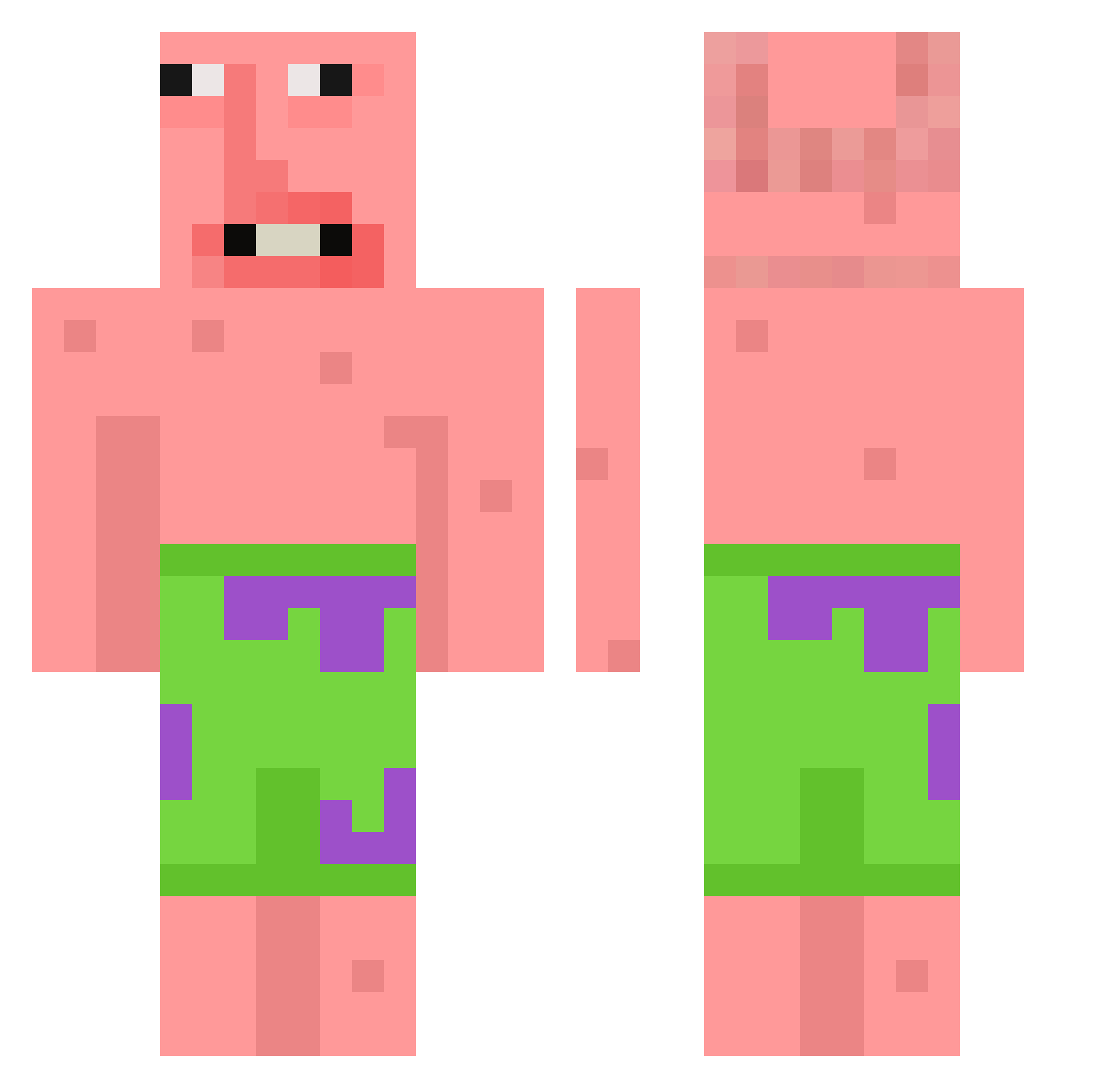
Current Minecraft skin of the player szekibaa, loaded from the official Mojang API. Rotate the 3D model with your mouse or finger, then download the skin as a PNG file and use it in Minecraft: Bedrock Edition or Java Edition for free. When szekibaa changes their skin, this page updates automatically and the old skin stays in the history below.
Other players with this skin (128)
szekibaa was the 50th player we have seen with this skin, first spotted on 30.08.2026. The same skin was seen on these players. Open a nickname to see their current skin and skin history.
 IcyBear20 Aras_Can123 TUXEDOSOM ElProfanador3k
 szymsii_ St4n_xD JayCaliente EzMar007 JustGabe19 TangJ1a Moonys_ _E4ZY_ KIYU723K Tiagoowwo Hanysek04 yClaws
 JapaS12 t3tty xlun111 thatsvoodoo
 mvainer Edardin fubaba_06 prodigyjr06 ChoccyMilkSins jackyiiy Woosy2 dentianhai Spoomply
 Jeomsoi Derk_a Fold666 xQuerto PatricioConDown_ HerbataZWisni HanssoniT qwfh shrekbigtoe Bommelpate Chwevels ufukpipimeoturuk
 SVKBA canti4 Szess kofir__
 DellyBean_ RemmyTT Maciejkocur Drizy__ Chefs_kiss1 chu_z xMichaleqx MrNeegy
 ReikaHina WHISH233 ingusch09 SpeedRacer12 Kosagi_0 plui123 ninjaturrtle
More Patrick Star Minecraft skins
See all 636 Patrick Star skins
How to install the szekibaa skin
- Press the Download button above to save the skin as a PNG file.
- Minecraft: Bedrock Edition (PE): open the Dressing Room from the main menu (or tap your character → Edit Character), go to Classic Skins → Owned, press the + (new skin) button, choose the downloaded PNG and pick the Classic (Steve) model. Works on PC and mobile; consoles cannot import custom skins.
- Minecraft: Java Edition: open the Minecraft Launcher, go to the Skins tab, click New Skin, load the PNG, pick the Classic (Steve) model and press Save & Use. You can also upload it at minecraft.net → Profile → Change Skin.
The skin does not show up after import - what should I do?
Restart Minecraft and open the Dressing Room again - imported skins sometimes appear only after a restart. Also make sure you selected the imported skin and picked the Classic (Steve) model.
Which model should I choose, Classic or Slim?
This skin is designed for the Classic (Steve) model. If you pick the wrong model, the arms of the skin will look stretched or squeezed.
Is the skin of szekibaa free to download?
Yes. Press Download, save the PNG file and use it in Minecraft: Bedrock Edition or Java Edition - no payment or registration needed. The skin also works on multiplayer servers and Realms.
More skins
Looking for more? Go back to all Minecraft skins and check the top skins of the week, month and all time, or find any player's skin by nickname.