
qRaze42 - Minecraft Skins & Skin History
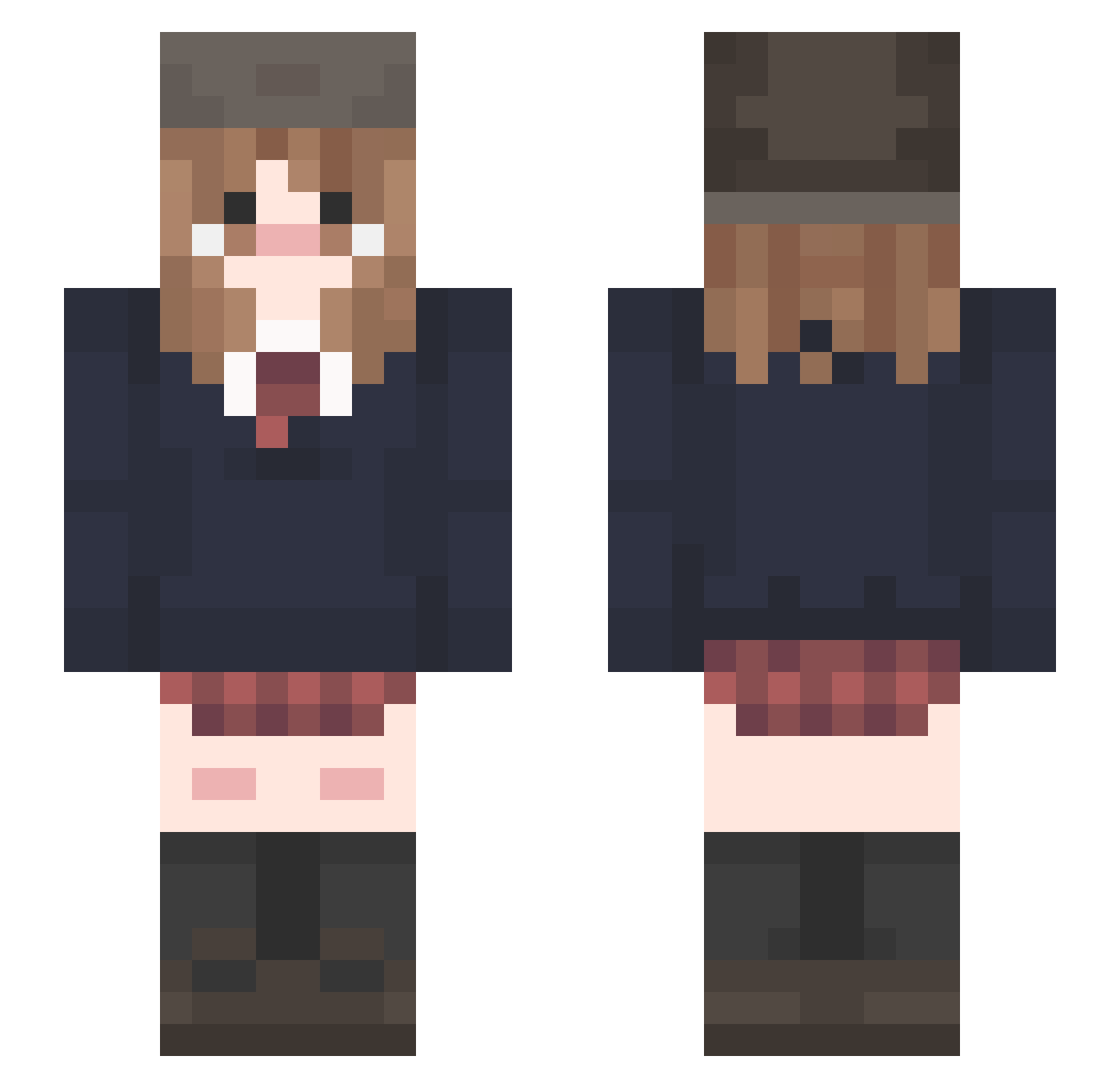
Current Minecraft skin of the player qRaze42, loaded from the official Mojang API. Rotate the 3D model with your mouse or finger, then download the skin as a PNG file and use it in Minecraft: Bedrock Edition or Java Edition for free. When qRaze42 changes their skin, this page updates automatically and the old skin stays in the history below.
Other players with this skin (215)
qRaze42 was the 159th player we have seen with this skin, first spotted on 11.10.2026. The same skin was seen on these players. Open a nickname to see their current skin and skin history.
 mariaumi Nekuuuu Kahila sigmamewer67mini Cattycat98 Uncountednumber IccleGible _Sunsshine_ ISt0leTheC00kie NickShar Shrimpman38 UAISBEST heng_jia566 libailiu123 milanco kawayka augustdazee Jetorade Jeiixlv SoulJu_ lemonchann Ring0121 almondnutbutter Rinn_ie shime18 mumuelo Swiills sibuhly Carterchan mnmpgg Rhollus LenaB007 hgyeol_ Ab4ra Gemloly chachamocha bereizzan jony1984 KookieEm Pixie_Artz PoppingBee wejdz Nierbla Glammous PlayerAutumn youli0 Choukinette ishenrike Twilightfan69 Dokuuuuu Yeniseii 67deante BelowTemp jasonGRANDON Linii6 sherlocked1 joseph2fast liyu030305 CatMentor yune22
More School Uniform Minecraft skins
See all 6887 School Uniform skins
How to install the qRaze42 skin
- Press the Download button above to save the skin as a PNG file.
- Minecraft: Bedrock Edition (PE): open the Dressing Room from the main menu (or tap your character → Edit Character), go to Classic Skins → Owned, press the + (new skin) button, choose the downloaded PNG and pick the Slim (Alex) model. Works on PC and mobile; consoles cannot import custom skins.
- Minecraft: Java Edition: open the Minecraft Launcher, go to the Skins tab, click New Skin, load the PNG, pick the Slim (Alex) model and press Save & Use. You can also upload it at minecraft.net → Profile → Change Skin.
The skin does not show up after import - what should I do?
Restart Minecraft and open the Dressing Room again - imported skins sometimes appear only after a restart. Also make sure you selected the imported skin and picked the Slim (Alex) model.
Which model should I choose, Classic or Slim?
This skin is designed for the Slim (Alex) model. If you pick the wrong model, the arms of the skin will look stretched or squeezed.
Is the skin of qRaze42 free to download?
Yes. Press Download, save the PNG file and use it in Minecraft: Bedrock Edition or Java Edition - no payment or registration needed. The skin also works on multiplayer servers and Realms.
More skins
Looking for more? Go back to all Minecraft skins and check the top skins of the week, month and all time, or find any player's skin by nickname.