
pvpgamer92 - Minecraft Skins & Skin History
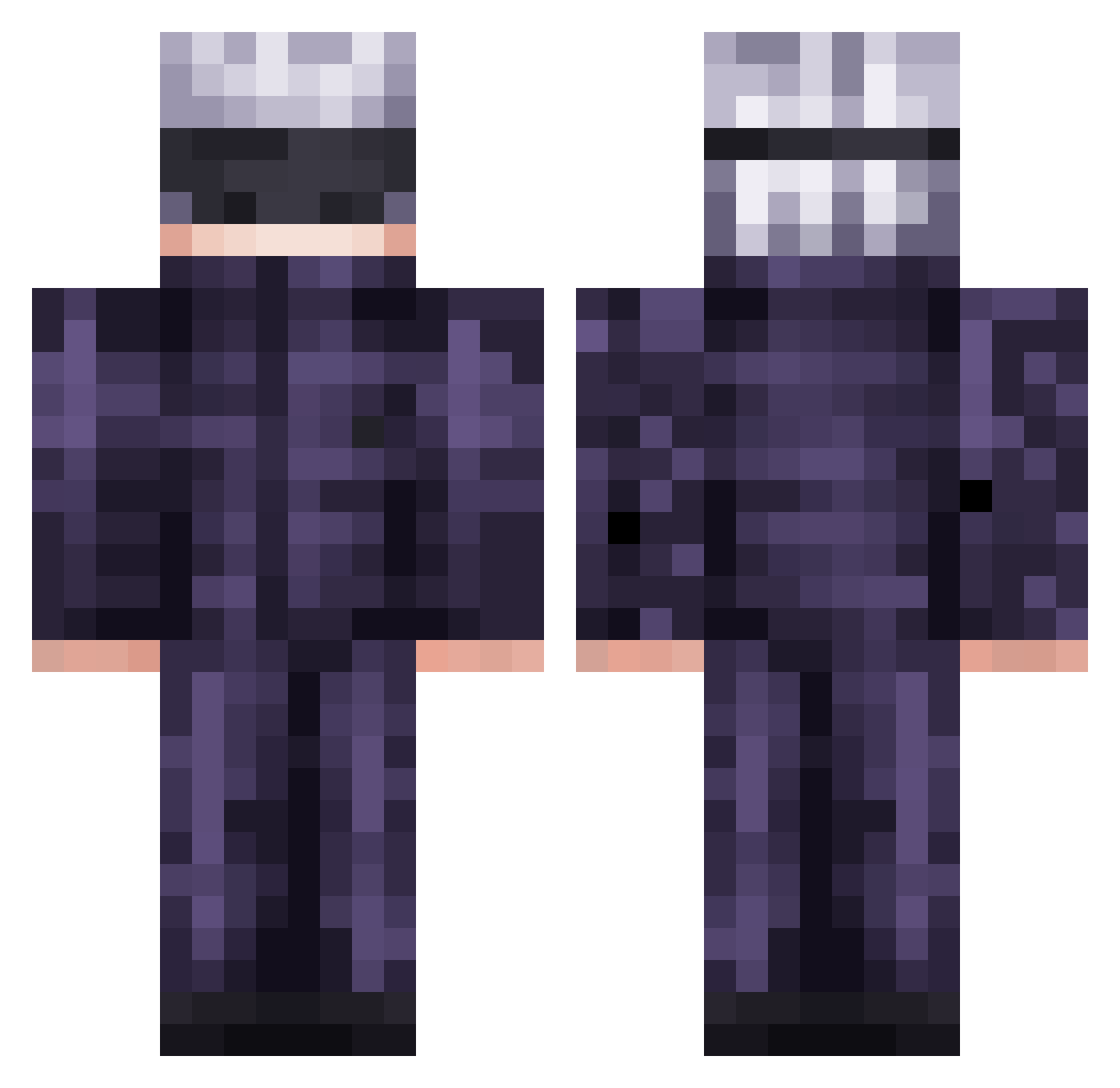
Current Minecraft skin of the player pvpgamer92, loaded from the official Mojang API. Rotate the 3D model with your mouse or finger, then download the skin as a PNG file and use it in Minecraft: Bedrock Edition or Java Edition for free. When pvpgamer92 changes their skin, this page updates automatically and the old skin stays in the history below.
Other players with this skin (474)
pvpgamer92 was the 45th player we have seen with this skin, first spotted on 04.08.2026. The same skin was seen on these players. Open a nickname to see their current skin and skin history.
 AKtAmi_1 Lovemods TheKamuli EmmaYa04 Tavo22 GNYKN07 VotrexSoul Satoru_Gojo420 Ironjaicer speefide JustCallMeParz hamzafaisalkhan5 NPHKing NDenny lopata459 Ellunavi BrianaHoshi kris7chin ardactn melaambe
 PokeSkyyz aaxse NicksVessel nxgoonfire HeyyItsAndy Celenti _Luminia_ ItsAceRL fi4ip123l 78mike Zillato WhyCaptainscarr FiendinForFeet guedss
 Chickenfoottv awernet Zone62 the_kat_ Zetacud J_U_L_I_A catboo484848 9_mar FreeSalad_ AdamasAbi Turbobiela
 HT07 Fernando_ml1 gianvdhoeven Biffat edu_hdp Moura_1711 IAloneAm peanutter22 PanBrudas nihele DanDan08 Kotbart maxmito5193 RolledbyLunix Yaquito
More Satoru Gojo Minecraft skins
See all 1222 Satoru Gojo skins
How to install the pvpgamer92 skin
- Press the Download button above to save the skin as a PNG file.
- Minecraft: Bedrock Edition (PE): open the Dressing Room from the main menu (or tap your character → Edit Character), go to Classic Skins → Owned, press the + (new skin) button, choose the downloaded PNG and pick the Classic (Steve) model. Works on PC and mobile; consoles cannot import custom skins.
- Minecraft: Java Edition: open the Minecraft Launcher, go to the Skins tab, click New Skin, load the PNG, pick the Classic (Steve) model and press Save & Use. You can also upload it at minecraft.net → Profile → Change Skin.
The skin does not show up after import - what should I do?
Restart Minecraft and open the Dressing Room again - imported skins sometimes appear only after a restart. Also make sure you selected the imported skin and picked the Classic (Steve) model.
Which model should I choose, Classic or Slim?
This skin is designed for the Classic (Steve) model. If you pick the wrong model, the arms of the skin will look stretched or squeezed.
Is the skin of pvpgamer92 free to download?
Yes. Press Download, save the PNG file and use it in Minecraft: Bedrock Edition or Java Edition - no payment or registration needed. The skin also works on multiplayer servers and Realms.
More skins
Looking for more? Go back to all Minecraft skins and check the top skins of the week, month and all time, or find any player's skin by nickname.