
protivahater - Minecraft Skins & Skin History
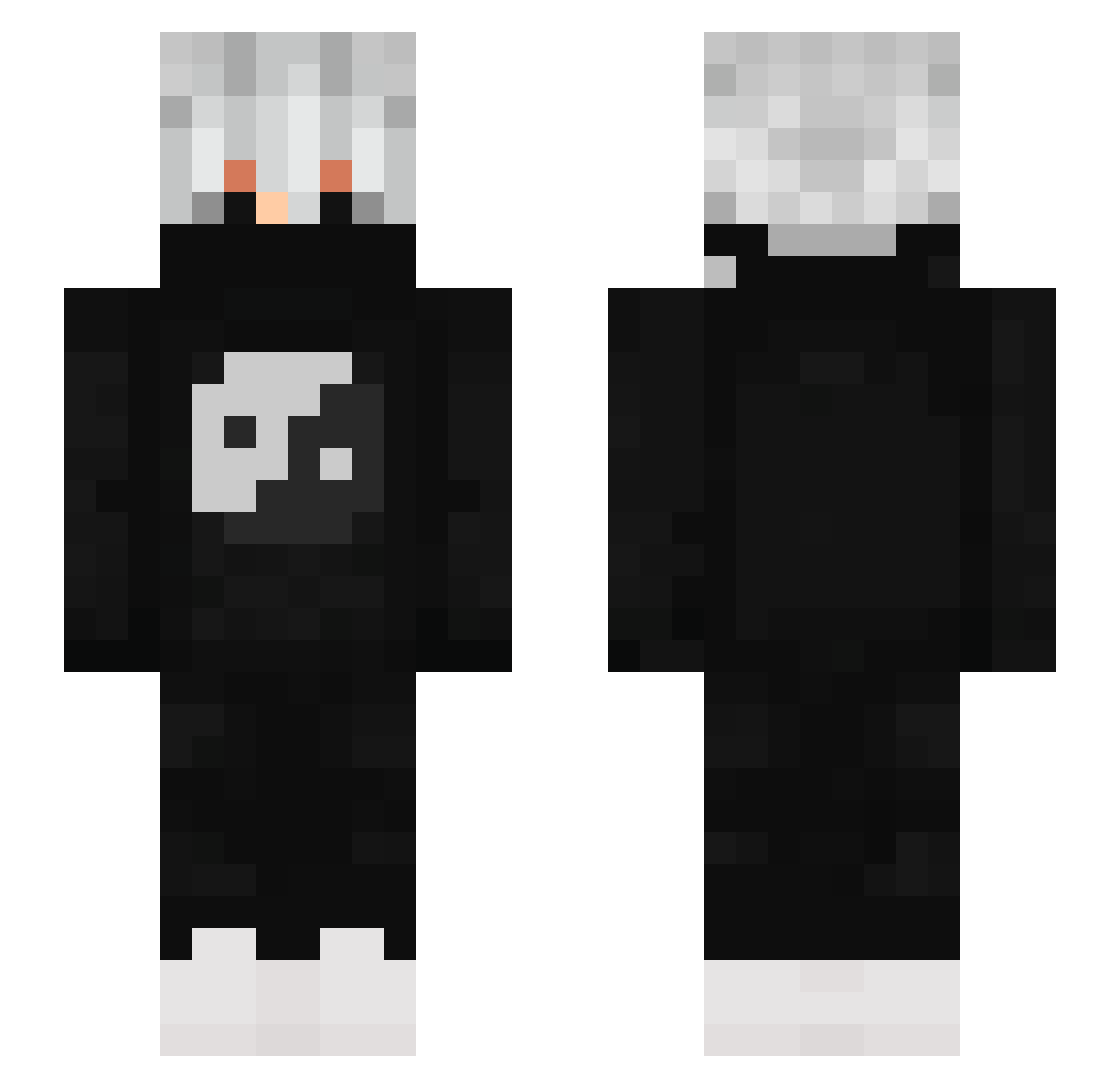
Current Minecraft skin of the player protivahater, loaded from the official Mojang API. Rotate the 3D model with your mouse or finger, then download the skin as a PNG file and use it in Minecraft: Bedrock Edition or Java Edition for free. When protivahater changes their skin, this page updates automatically and the old skin stays in the history below.
Other players with this skin (881)
protivahater was the 343rd player we have seen with this skin, first spotted on 08.09.2026. The same skin was seen on these players. Open a nickname to see their current skin and skin history.
 ufolkek Bartolini_APEX Hydrophiinae1 Jettser Gojop Ristyyyyy Sateks _Michal_1942_ jdogshire GuiTlk Focus_UP Ricky_GamerzYT
 Keylord_ Itaidesu1212 LianMB HENZARDLEESGAMER OG_Mark TReleton Ichaksan2602 SrShaka
 exoctic2elevated canyouone JotaVvv lonyKawaiizinho Master_Zombar Itz_kekixcz Joaozin_xD NIco_0711 Lost_guy69 Ridax2K 7moun XLOB0 Ls_Chan Damsi_Damso HX_D Nnahoy Paniczones JuanCarlos89 KELVEM ZeBzIoO CHATFELIX vithallys wgf_3011 xx_Tw1_xx caua092010 Babooma ThebryangameR23 Picmac STARLORD_ARP Lion_Qr Royglee Yato_6 Aysmow Semaj_FS Excali_ _M23 Dudu_14 deinermudda TNWover NOT_SPEAR
More Yin Yang Minecraft skins
How to install the protivahater skin
- Press the Download button above to save the skin as a PNG file.
- Minecraft: Bedrock Edition (PE): open the Dressing Room from the main menu (or tap your character → Edit Character), go to Classic Skins → Owned, press the + (new skin) button, choose the downloaded PNG and pick the Slim (Alex) model. Works on PC and mobile; consoles cannot import custom skins.
- Minecraft: Java Edition: open the Minecraft Launcher, go to the Skins tab, click New Skin, load the PNG, pick the Slim (Alex) model and press Save & Use. You can also upload it at minecraft.net → Profile → Change Skin.
The skin does not show up after import - what should I do?
Restart Minecraft and open the Dressing Room again - imported skins sometimes appear only after a restart. Also make sure you selected the imported skin and picked the Slim (Alex) model.
Which model should I choose, Classic or Slim?
This skin is designed for the Slim (Alex) model. If you pick the wrong model, the arms of the skin will look stretched or squeezed.
Is the skin of protivahater free to download?
Yes. Press Download, save the PNG file and use it in Minecraft: Bedrock Edition or Java Edition - no payment or registration needed. The skin also works on multiplayer servers and Realms.
More skins
Looking for more? Go back to all Minecraft skins and check the top skins of the week, month and all time, or find any player's skin by nickname.