
pockyheart - Minecraft Skins & Skin History
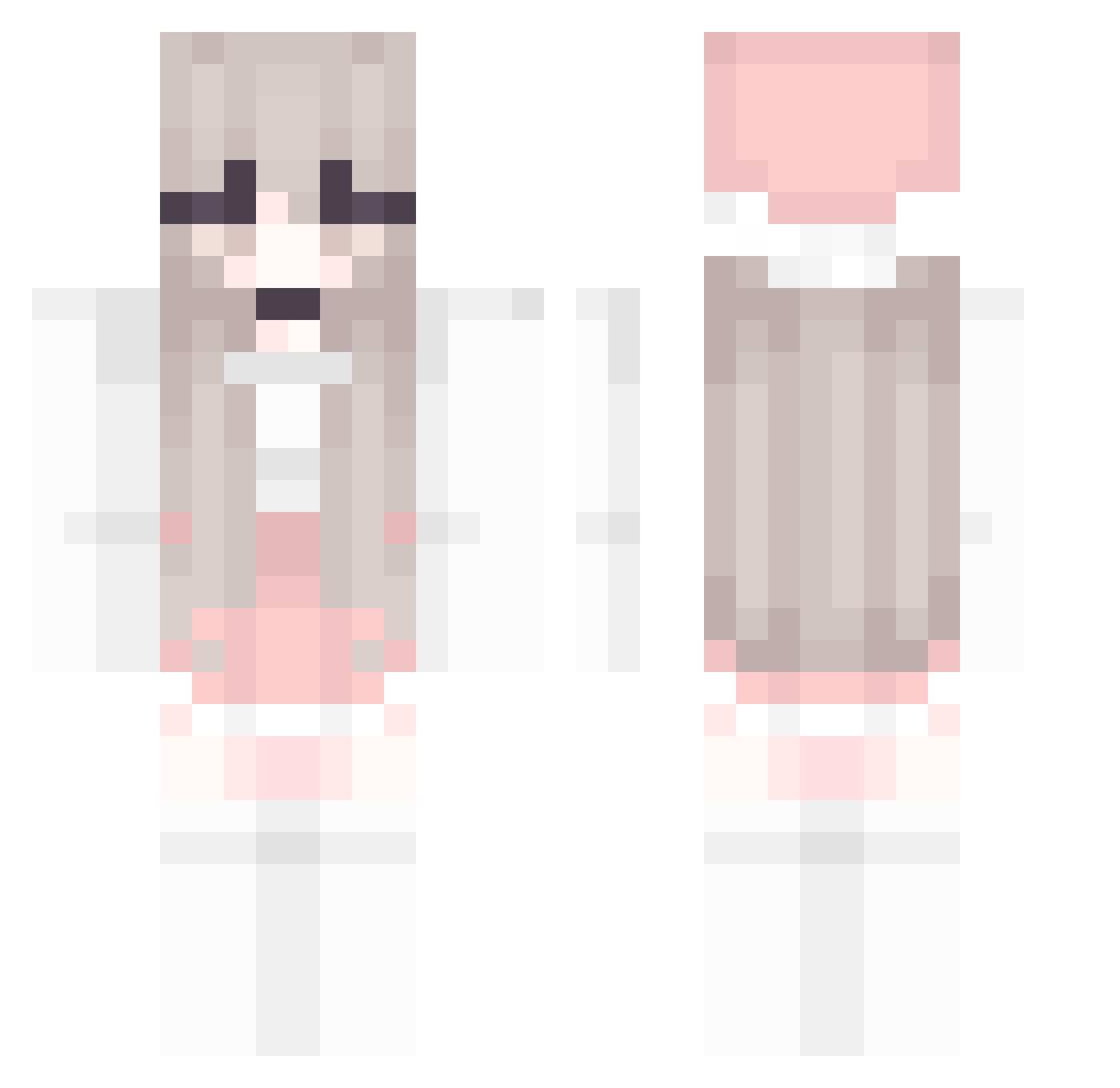
Current Minecraft skin of the player pockyheart, loaded from the official Mojang API. Rotate the 3D model with your mouse or finger, then download the skin as a PNG file and use it in Minecraft: Bedrock Edition or Java Edition for free. When pockyheart changes their skin, this page updates automatically and the old skin stays in the history below.
Other players with this skin (190)
pockyheart was the 123rd player we have seen with this skin, first spotted on 05.10.2026. The same skin was seen on these players. Open a nickname to see their current skin and skin history.
 daisy_69 michan1885 mocha0409 KRGrx Justjiha_ Bulyeong Rubirubie odanex Dream940718 deathene Sweet_Heart953 ShrimpPuff Faming Beccasblue cutegunwoo calvinliu Antalantes Dae_mori EMMA903 Brenda93705 e56 ZZCer LibelousRobin73 YGTQ Ainemo 66669999 mozzi00 kimh0508123 Aboba_kun Ruchhh Xli_zi tinniw SonoCute CanmEltheMatador CherryCuteMC BlurryDays em0gf_ MartynkaMc Oreki4Life Downcut Shiraeno edeagwawd Mqximoose Agata111 LYXXXXXXXX Miju LoveHerForever SelkaChan arkazeen BubbleGumMarisa ZOE0227 Babybelle9 AthenaFaris oxoairin MyBodyPillow Yun_79 rhino7zero NMSL41 BlondieFaux crisphy
More Pastel Minecraft skins
How to install the pockyheart skin
- Press the Download button above to save the skin as a PNG file.
- Minecraft: Bedrock Edition (PE): open the Dressing Room from the main menu (or tap your character → Edit Character), go to Classic Skins → Owned, press the + (new skin) button, choose the downloaded PNG and pick the Classic (Steve) model. Works on PC and mobile; consoles cannot import custom skins.
- Minecraft: Java Edition: open the Minecraft Launcher, go to the Skins tab, click New Skin, load the PNG, pick the Classic (Steve) model and press Save & Use. You can also upload it at minecraft.net → Profile → Change Skin.
The skin does not show up after import - what should I do?
Restart Minecraft and open the Dressing Room again - imported skins sometimes appear only after a restart. Also make sure you selected the imported skin and picked the Classic (Steve) model.
Which model should I choose, Classic or Slim?
This skin is designed for the Classic (Steve) model. If you pick the wrong model, the arms of the skin will look stretched or squeezed.
Is the skin of pockyheart free to download?
Yes. Press Download, save the PNG file and use it in Minecraft: Bedrock Edition or Java Edition - no payment or registration needed. The skin also works on multiplayer servers and Realms.
More skins
Looking for more? Go back to all Minecraft skins and check the top skins of the week, month and all time, or find any player's skin by nickname.