
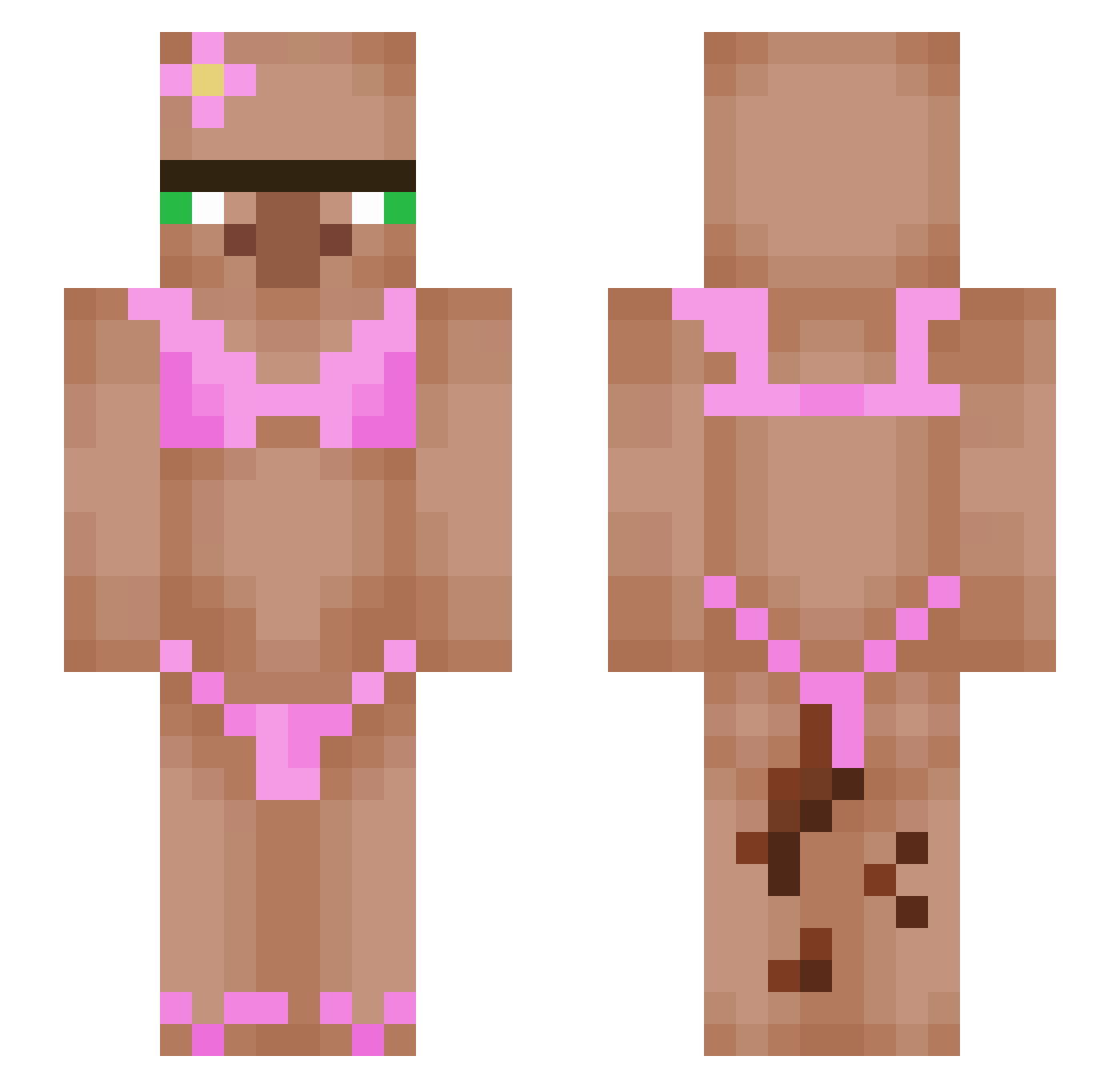
Current Minecraft skin of the player oDex_21, loaded from the official Mojang API. Rotate the 3D model with your mouse or finger, then download the skin as a PNG file and use it in Minecraft: Bedrock Edition or Java Edition for free. When oDex_21 changes their skin, this page updates automatically and the old skin stays in the history below.
Other players with this skin (437)
oDex_21 was the 175th player we have seen with this skin, first spotted on 28.08.2026. The same skin was seen on these players. Open a nickname to see their current skin and skin history.
 N3W_adr1 logan2985 Yomasung1 BanjoBimb0 Alewid1 sedllakej
 M3THEO88700 ViperineRxse Spacgetti WillianTomate_
 Evo7170 Taliak101 Bindyy Twitch_Shakywitc oscar201009 percontoast Simplyjustghost monched111 jazzghos GoldenJohnson Nikkiri Floki_BLZ user4903027 willygirl35 B4ldyOv3rTh3re VenaticZ_BeatZz T3KKNO1D Nexus1161 Tio_Lipe_ gulhgluh3000 Jidi89 SimbaVG Sphenic6 iLeyaa Ykaro012 bergigga super_cat69 QJordanQ Kaironinit Valenprogess BallFondl3r69420 daniel131245 louuie Deceiiving DaddyLogan_ anousinek slasher076 Thehulk123419 Lennard2231 gavoxoxo Krztixn shiyi527 Dnzzz_333
 imperium71 Pizzafuesschen MV82 Ziggygou Quintana98 SamotBababooey XxRorroPirroroxX
More Bikini Minecraft skins
How to install the oDex_21 skin
- Press the Download button above to save the skin as a PNG file.
- Minecraft: Bedrock Edition (PE): open the Dressing Room from the main menu (or tap your character → Edit Character), go to Classic Skins → Owned, press the + (new skin) button, choose the downloaded PNG and pick the Slim (Alex) model. Works on PC and mobile; consoles cannot import custom skins.
- Minecraft: Java Edition: open the Minecraft Launcher, go to the Skins tab, click New Skin, load the PNG, pick the Slim (Alex) model and press Save & Use. You can also upload it at minecraft.net → Profile → Change Skin.
The skin does not show up after import - what should I do?
Restart Minecraft and open the Dressing Room again - imported skins sometimes appear only after a restart. Also make sure you selected the imported skin and picked the Slim (Alex) model.
Which model should I choose, Classic or Slim?
This skin is designed for the Slim (Alex) model. If you pick the wrong model, the arms of the skin will look stretched or squeezed.
Is the skin of oDex_21 free to download?
Yes. Press Download, save the PNG file and use it in Minecraft: Bedrock Edition or Java Edition - no payment or registration needed. The skin also works on multiplayer servers and Realms.
More skins
Looking for more? Go back to all Minecraft skins and check the top skins of the week, month and all time, or find any player's skin by nickname.