
miuiuuq - Minecraft Skins & Skin History
Current Minecraft skin of the player miuiuuq, loaded from the official Mojang API. Rotate the 3D model with your mouse or finger, then download the skin as a PNG file and use it in Minecraft: Bedrock Edition or Java Edition for free. When miuiuuq changes their skin, this page updates automatically and the old skin stays in the history below.
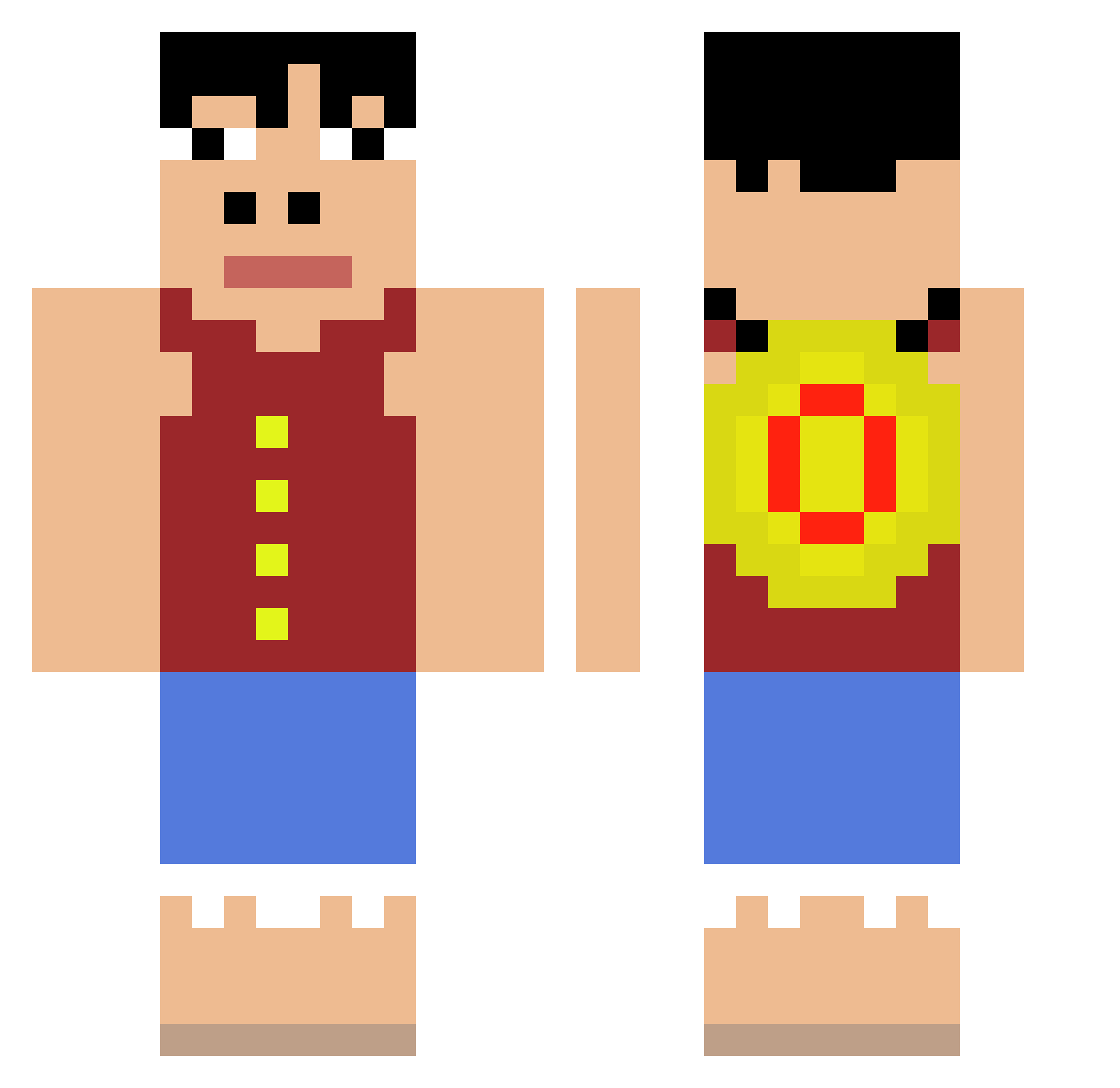
Other players with this skin (80)
miuiuuq was the 43rd player we have seen with this skin, first spotted on 26.09.2026. The same skin was seen on these players. Open a nickname to see their current skin and skin history.
 _ratnon squidpbn JonnForest jonporkis ponch_pirate ChoppaJo Chrism071910 Scowlingdonut Anixador IRONBEN11 _qx5 Mnpel Nihatteoman UHUHUHUHUHUHUUUH YoungBukowski YrFellowNwYorker cream34 KDR_ an112dz MadMax723 echotic benhakons Je_Suis_IPDL Biggestgamer011 ritchiewyd Ju1cy2 ikabutts arthurosascaense Emil10Lime dhmnge 1fuh szczur_1 potascio Noooey Tanarat Xx_xXchast Corsuu Kjuubii
 sweetc0rnn yeaah_ Eriasui IMHETRAX Abrahammmsillo _Musicalian RaulExO BuddyTheGoat BruumBazzZ Bri030804
 APOXZXZ Qurem Diguinho_Plays Lopan0701 leesd52 zAndre14 Brandon_123_69 minlul Hyp3rBeVibin skin019 Bnitez05
 OsDimasek
More Monkey D Luffy Minecraft skins
See all 925 Monkey D Luffy skins
How to install the miuiuuq skin
- Press the Download button above to save the skin as a PNG file.
- Minecraft: Bedrock Edition (PE): open the Dressing Room from the main menu (or tap your character → Edit Character), go to Classic Skins → Owned, press the + (new skin) button, choose the downloaded PNG and pick the Classic (Steve) model. Works on PC and mobile; consoles cannot import custom skins.
- Minecraft: Java Edition: open the Minecraft Launcher, go to the Skins tab, click New Skin, load the PNG, pick the Classic (Steve) model and press Save & Use. You can also upload it at minecraft.net → Profile → Change Skin.
The skin does not show up after import - what should I do?
Restart Minecraft and open the Dressing Room again - imported skins sometimes appear only after a restart. Also make sure you selected the imported skin and picked the Classic (Steve) model.
Which model should I choose, Classic or Slim?
This skin is designed for the Classic (Steve) model. If you pick the wrong model, the arms of the skin will look stretched or squeezed.
Is the skin of miuiuuq free to download?
Yes. Press Download, save the PNG file and use it in Minecraft: Bedrock Edition or Java Edition - no payment or registration needed. The skin also works on multiplayer servers and Realms.
More skins
Looking for more? Go back to all Minecraft skins and check the top skins of the week, month and all time, or find any player's skin by nickname.