
lussux - Minecraft Skins & Skin History
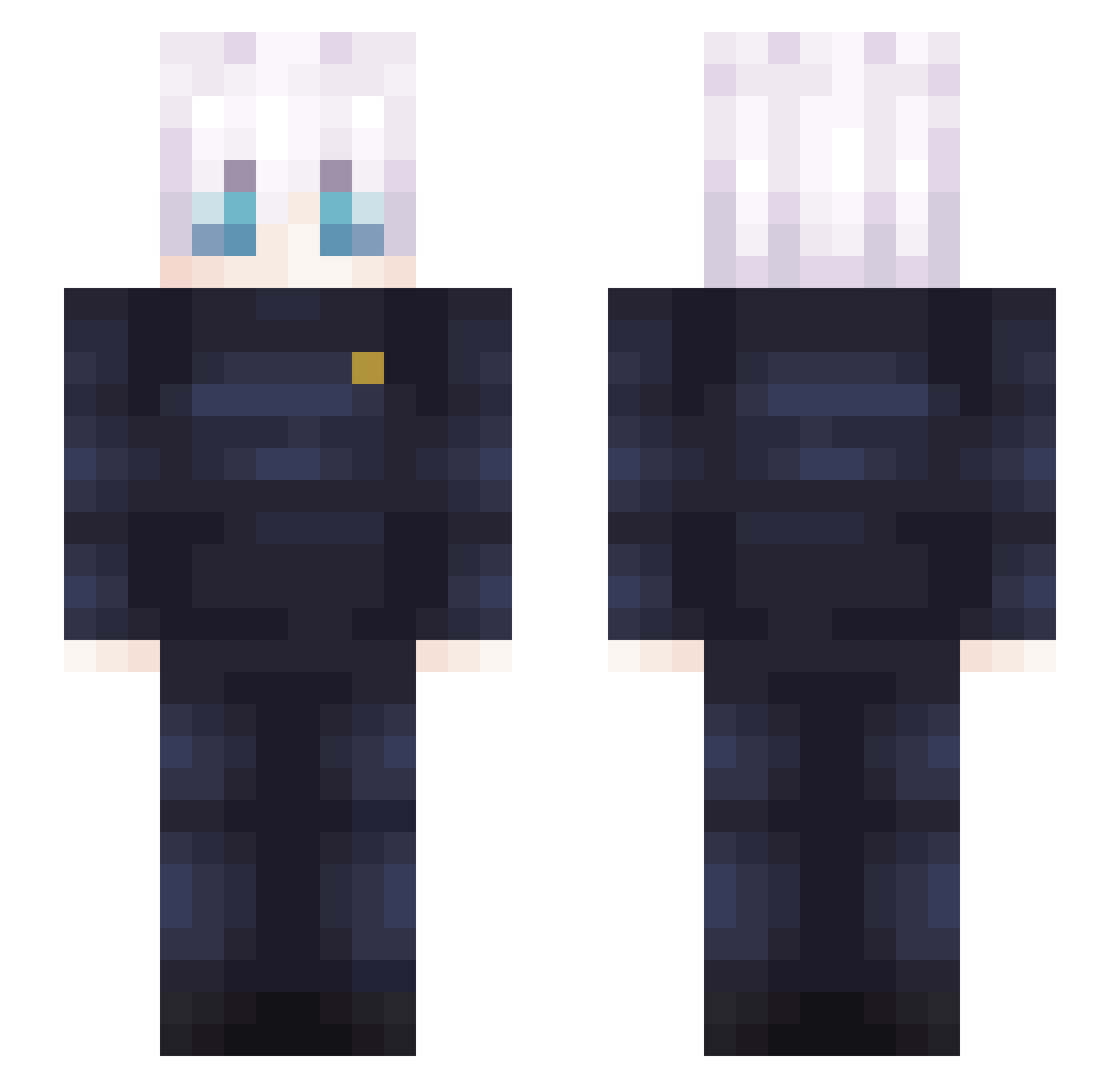
Current Minecraft skin of the player lussux, loaded from the official Mojang API. Rotate the 3D model with your mouse or finger, then download the skin as a PNG file and use it in Minecraft: Bedrock Edition or Java Edition for free. When lussux changes their skin, this page updates automatically and the old skin stays in the history below.
Other players with this skin (408)
lussux was the 102nd player we have seen with this skin, first spotted on 23.08.2026. The same skin was seen on these players. Open a nickname to see their current skin and skin history.
 pvtluqi MasterOn9 R3QU1EM_ RuxGame seb161125 green9487 BruHyuuga16 mTkzzz Atlas194 ynsade Soltoru shihchengliu Vortemix Gizmioto HITLERRRRRR M5ds ItzBlueMoon4334 pp7406 cyan129 Olcia224 Sartogame JJang_Geon Capitansalami35 Agc9Agc Hobiit DerWegIstDasZiel Slimsheriff GamerLuna01 yumeutsutsuuu nuxunix
 ItzTwT DigitalJPG h4ti_08 Fausto5667 PlayFael Dmoar7 EZliang kittyslayyermatt huicho777 allexx47 Thanosteell unfaeR Milyushka11 Yukijudiai Chen0909 Jeramiess komqww Chainsaw_M4n Kyuke kazciatarr ravoliibwef ManyJordan927 pablopropvp gojoglazer999 Han_meow11 volioh IAmArcticFox Dani292014 blackksabbath R0XYH
More Satoru Gojo Minecraft skins
See all 1375 Satoru Gojo skins
How to install the lussux skin
- Press the Download button above to save the skin as a PNG file.
- Minecraft: Bedrock Edition (PE): open the Dressing Room from the main menu (or tap your character → Edit Character), go to Classic Skins → Owned, press the + (new skin) button, choose the downloaded PNG and pick the Slim (Alex) model. Works on PC and mobile; consoles cannot import custom skins.
- Minecraft: Java Edition: open the Minecraft Launcher, go to the Skins tab, click New Skin, load the PNG, pick the Slim (Alex) model and press Save & Use. You can also upload it at minecraft.net → Profile → Change Skin.
The skin does not show up after import - what should I do?
Restart Minecraft and open the Dressing Room again - imported skins sometimes appear only after a restart. Also make sure you selected the imported skin and picked the Slim (Alex) model.
Which model should I choose, Classic or Slim?
This skin is designed for the Slim (Alex) model. If you pick the wrong model, the arms of the skin will look stretched or squeezed.
Is the skin of lussux free to download?
Yes. Press Download, save the PNG file and use it in Minecraft: Bedrock Edition or Java Edition - no payment or registration needed. The skin also works on multiplayer servers and Realms.
More skins
Looking for more? Go back to all Minecraft skins and check the top skins of the week, month and all time, or find any player's skin by nickname.