
lucvs_ - Minecraft Skins & Skin History
Current Minecraft skin of the player lucvs_, loaded from the official Mojang API. Rotate the 3D model with your mouse or finger, then download the skin as a PNG file and use it in Minecraft: Bedrock Edition or Java Edition for free. When lucvs_ changes their skin, this page updates automatically and the old skin stays in the history below.
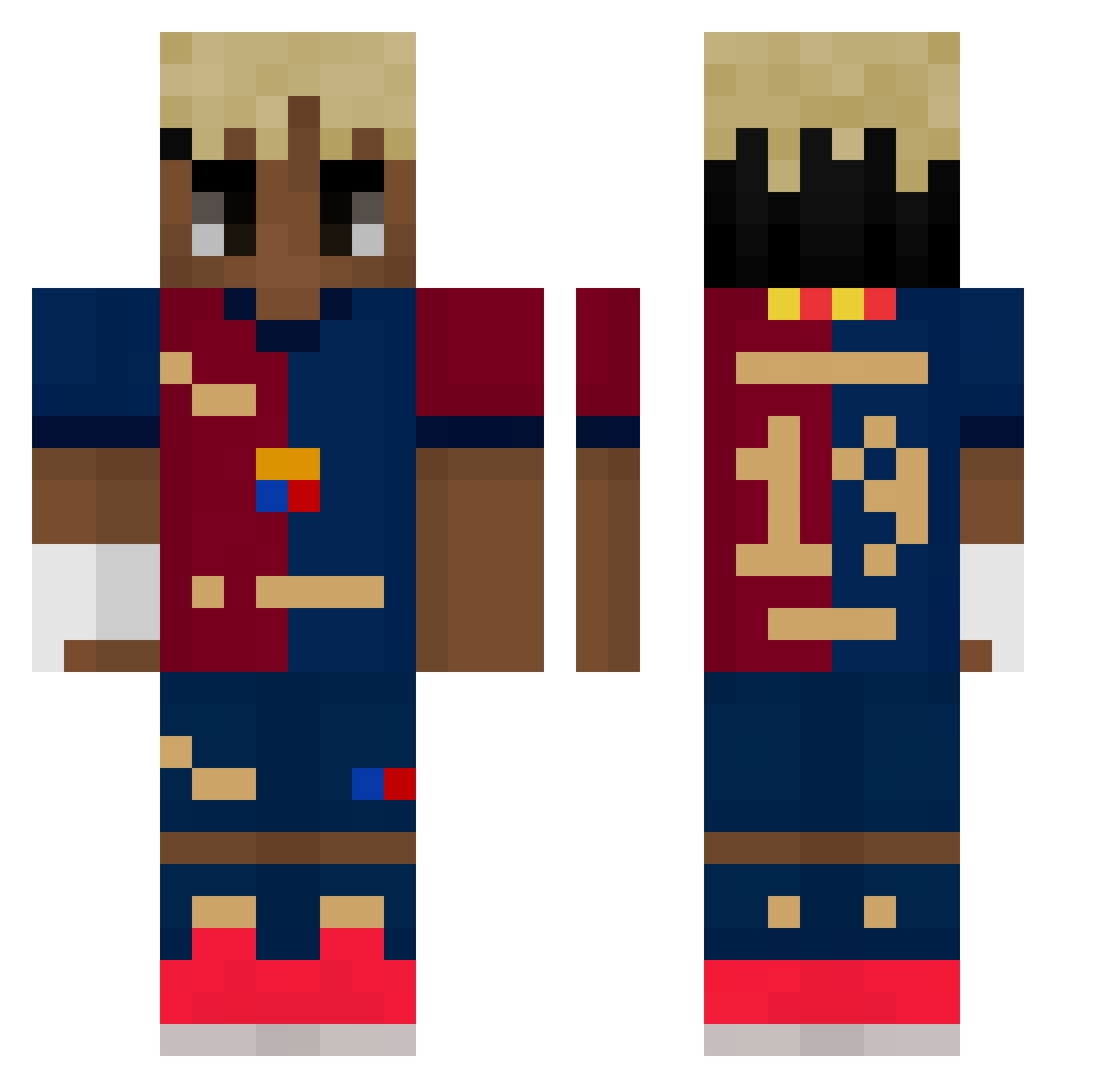
Other players with this skin (498)
lucvs_ was the 38th player we have seen with this skin, first spotted on 30.07.2026. The same skin was seen on these players. Open a nickname to see their current skin and skin history.
 IceeMan99 Topspot123 xmr404 Mariannka2101 _Pr3zydnet Edgar_kpo kaitocookie Sonukuii koarufaker MAOR5151 Kamil_Yamal
 Tone69 Xxeu_10xX SuddenSiren joeritjuhh36 Oliwier_333 Alejor69 SzefKhey AlexEV_26 Lazy_0ff Mr_Bread154 kosnerd
 rubiuswtf LosCodeine
 oxigang zAndresX virgo1090 Yamal17 utd_won Asimote Matigaming13_YT krzysiekz Jacek986 Tr3ys YouHan___ Danipoxer SiNiz_ wastetln wwjordi revokedwashungry S6oooo ghjkl0604 Segun_16 HappyRoyer LaminekYamalek ohs8976 Rarem019 quantexiss_ jeremi2402
 PILKAC TheWalker1999 farmerboy15 sanmon_ DDarkson Lamine_Yamal10 ElCenizas BroGHG kubx_on Nati_2013 engaM_
More Soccer Kit Minecraft skins
How to install the lucvs_ skin
- Press the Download button above to save the skin as a PNG file.
- Minecraft: Bedrock Edition (PE): open the Dressing Room from the main menu (or tap your character → Edit Character), go to Classic Skins → Owned, press the + (new skin) button, choose the downloaded PNG and pick the Classic (Steve) model. Works on PC and mobile; consoles cannot import custom skins.
- Minecraft: Java Edition: open the Minecraft Launcher, go to the Skins tab, click New Skin, load the PNG, pick the Classic (Steve) model and press Save & Use. You can also upload it at minecraft.net → Profile → Change Skin.
The skin does not show up after import - what should I do?
Restart Minecraft and open the Dressing Room again - imported skins sometimes appear only after a restart. Also make sure you selected the imported skin and picked the Classic (Steve) model.
Which model should I choose, Classic or Slim?
This skin is designed for the Classic (Steve) model. If you pick the wrong model, the arms of the skin will look stretched or squeezed.
Is the skin of lucvs_ free to download?
Yes. Press Download, save the PNG file and use it in Minecraft: Bedrock Edition or Java Edition - no payment or registration needed. The skin also works on multiplayer servers and Realms.
More skins
Looking for more? Go back to all Minecraft skins and check the top skins of the week, month and all time, or find any player's skin by nickname.