
kokazo95 - Minecraft Skins & Skin History
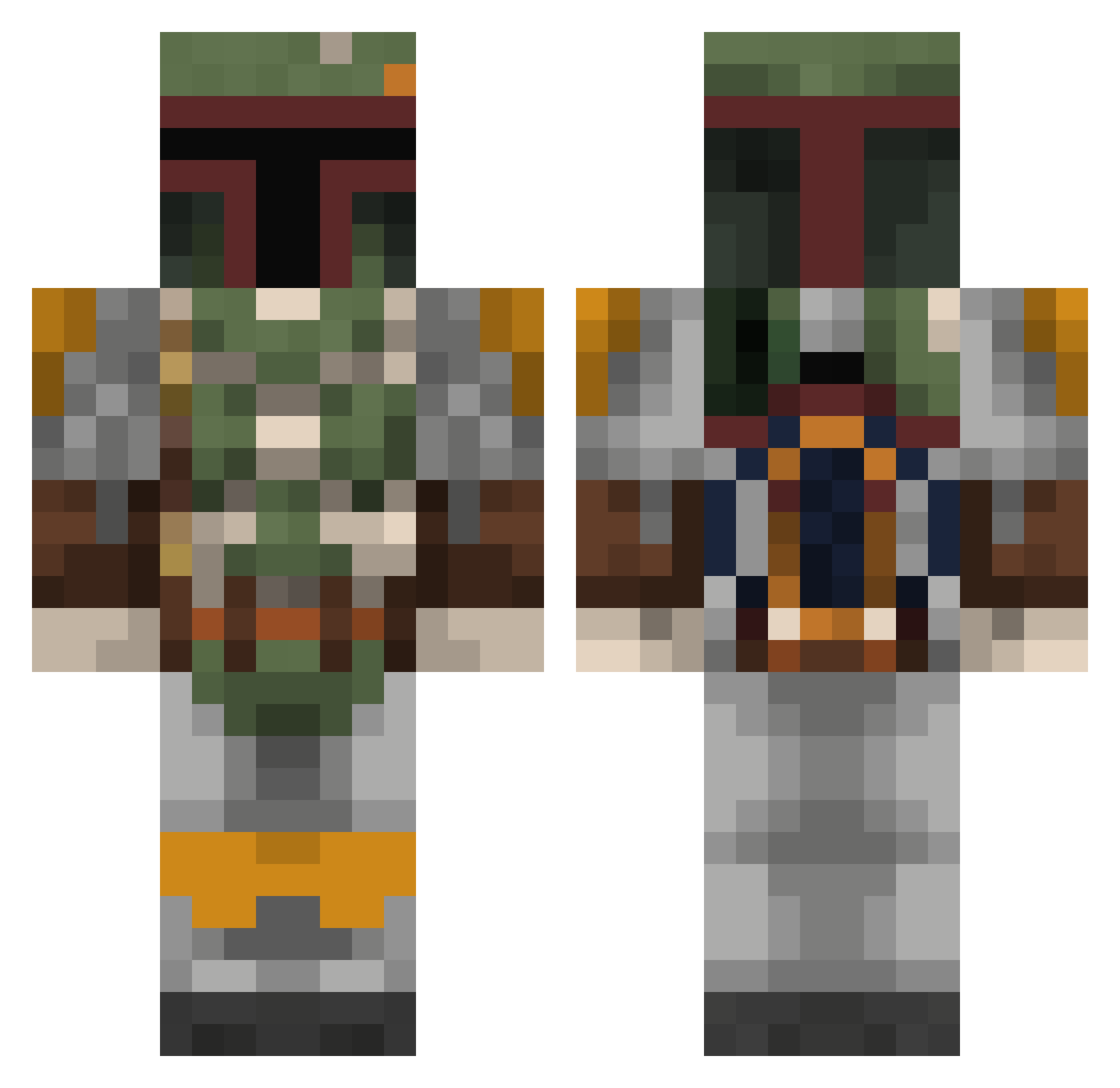
Current Minecraft skin of the player kokazo95, loaded from the official Mojang API. Rotate the 3D model with your mouse or finger, then download the skin as a PNG file and use it in Minecraft: Bedrock Edition or Java Edition for free. When kokazo95 changes their skin, this page updates automatically and the old skin stays in the history below.
Other players with this skin (808)
kokazo95 was the 538th player we have seen with this skin, first spotted on 06.10.2026. The same skin was seen on these players. Open a nickname to see their current skin and skin history.
 vCentury wolfwing2014 buju66 Zeroman514 cleanteeth k_fire68 OfficialBigHen Bogard57 kunak muscleman103 Sith_Spawn mikyong N3vermind ricardozombie Gho_2000 tonydoesstuff MaarnieFtw _Sylar_ WhiteStripe7 Draco_Abalim crp01 techdecklegend Unisol Trubble Peskyblowfish csquance shiftyaz Nepraos OneBlueWolfAD 1Tominator1 Trooma Andreale gustaf_johnson LoafOfDead tcakellaway MaxVoe GrumpyOldDragon laybin ACuriosity arrrrio mogamoga kashington falconmaster11 stocki089 jmar9012 eccoelite crather645 discordiae The_Mandal0rian IronEagle911 Capt_Kicks necrid86 RicoFrico Bordowik ggamwell Big_Master17 Bob3097 DreamChaserDirk InfuriatedSheep FROZ3NBLAZE
More Boba Fett Minecraft skins
How to install the kokazo95 skin
- Press the Download button above to save the skin as a PNG file.
- Minecraft: Bedrock Edition (PE): open the Dressing Room from the main menu (or tap your character → Edit Character), go to Classic Skins → Owned, press the + (new skin) button, choose the downloaded PNG and pick the Classic (Steve) model. Works on PC and mobile; consoles cannot import custom skins.
- Minecraft: Java Edition: open the Minecraft Launcher, go to the Skins tab, click New Skin, load the PNG, pick the Classic (Steve) model and press Save & Use. You can also upload it at minecraft.net → Profile → Change Skin.
The skin does not show up after import - what should I do?
Restart Minecraft and open the Dressing Room again - imported skins sometimes appear only after a restart. Also make sure you selected the imported skin and picked the Classic (Steve) model.
Which model should I choose, Classic or Slim?
This skin is designed for the Classic (Steve) model. If you pick the wrong model, the arms of the skin will look stretched or squeezed.
Is the skin of kokazo95 free to download?
Yes. Press Download, save the PNG file and use it in Minecraft: Bedrock Edition or Java Edition - no payment or registration needed. The skin also works on multiplayer servers and Realms.
More skins
Looking for more? Go back to all Minecraft skins and check the top skins of the week, month and all time, or find any player's skin by nickname.