
kimcap - Minecraft Skins & Skin History
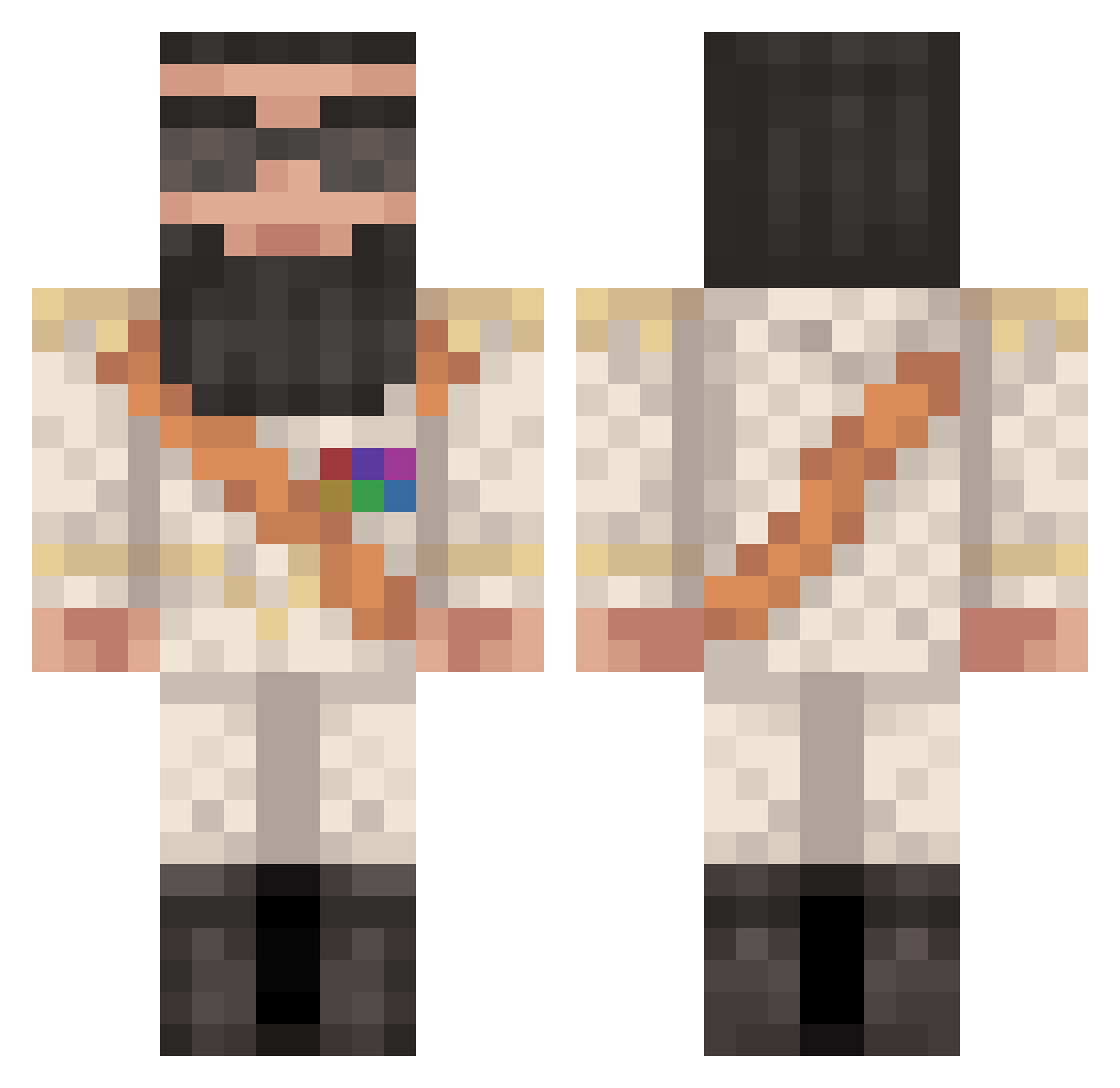
Current Minecraft skin of the player kimcap, loaded from the official Mojang API. Rotate the 3D model with your mouse or finger, then download the skin as a PNG file and use it in Minecraft: Bedrock Edition or Java Edition for free. When kimcap changes their skin, this page updates automatically and the old skin stays in the history below.
Other players with this skin (427)
kimcap was the 306th player we have seen with this skin, first spotted on 07.10.2026. The same skin was seen on these players. Open a nickname to see their current skin and skin history.
 philipsh Nimberries Watiz Gurglus zachwardmentor lifee123 HaDlaw Goodyear Death_Rider42 SIC4R1O ConMasterFlex Moenk Mejclarke wmaster500 GOLD_NOVA_III cheese2662 NairUrHairz jackwsu56 slins0603 dylwad11 JorgeP zouhair Jacobt12345 samzdk 2luxaz2 sesh_mesh GRISTO Neymar2004 bountyhunter2112 DJ_Pascal DislikedDoor pamgy Rigli SCTSCTSCT General_TT elikeating08 kok1947 Mespenes joelofgren11 S1lentbuttdeadly tonk5 poopinaboxx AlmightyDrPepper southpark134 Nachowski10 Chinesemurbs zebuducoca Bezzzin djcaleb25 AlbanianBoy Zigomarrr yellowducky147 kursu Dietz76 aaronhardman3 Karelkip abrarsp mindbuilder222 Stoepsel2001 Hargran
More General Minecraft skins
How to install the kimcap skin
- Press the Download button above to save the skin as a PNG file.
- Minecraft: Bedrock Edition (PE): open the Dressing Room from the main menu (or tap your character → Edit Character), go to Classic Skins → Owned, press the + (new skin) button, choose the downloaded PNG and pick the Classic (Steve) model. Works on PC and mobile; consoles cannot import custom skins.
- Minecraft: Java Edition: open the Minecraft Launcher, go to the Skins tab, click New Skin, load the PNG, pick the Classic (Steve) model and press Save & Use. You can also upload it at minecraft.net → Profile → Change Skin.
The skin does not show up after import - what should I do?
Restart Minecraft and open the Dressing Room again - imported skins sometimes appear only after a restart. Also make sure you selected the imported skin and picked the Classic (Steve) model.
Which model should I choose, Classic or Slim?
This skin is designed for the Classic (Steve) model. If you pick the wrong model, the arms of the skin will look stretched or squeezed.
Is the skin of kimcap free to download?
Yes. Press Download, save the PNG file and use it in Minecraft: Bedrock Edition or Java Edition - no payment or registration needed. The skin also works on multiplayer servers and Realms.
More skins
Looking for more? Go back to all Minecraft skins and check the top skins of the week, month and all time, or find any player's skin by nickname.