
jazzy_121 - Minecraft Skins & Skin History
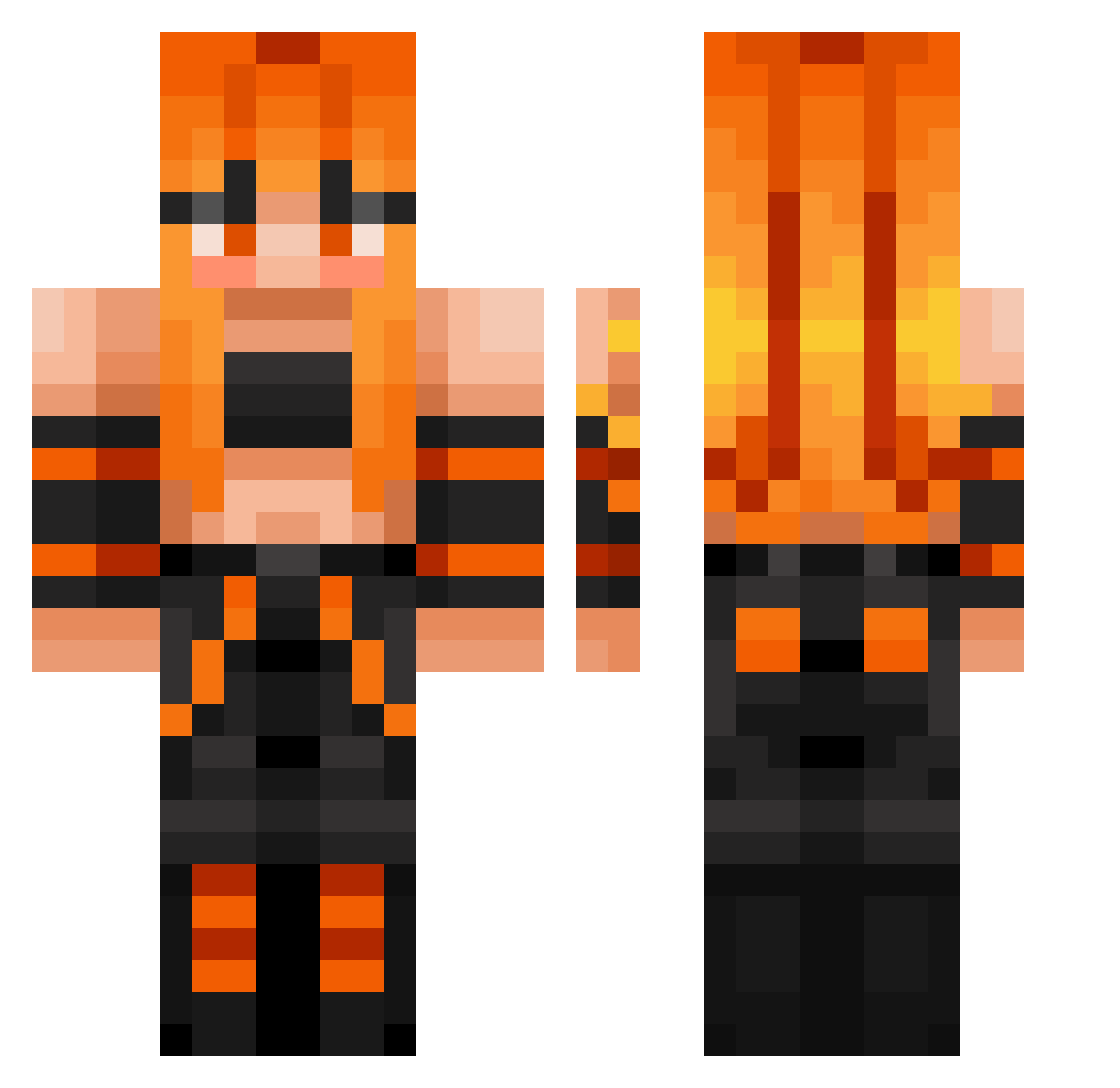
Current Minecraft skin of the player jazzy_121, loaded from the official Mojang API. Rotate the 3D model with your mouse or finger, then download the skin as a PNG file and use it in Minecraft: Bedrock Edition or Java Edition for free. When jazzy_121 changes their skin, this page updates automatically and the old skin stays in the history below.
Other players with this skin (402)
jazzy_121 was the 86th player we have seen with this skin, first spotted on 18.08.2026. The same skin was seen on these players. Open a nickname to see their current skin and skin history.
 MiguelSL Sierj
 Capitano_Foxy jellybean02 Blanchette71 LinaKJ14 einfachKlaus ZiggityCammy duckie MijaT2015 Guthrhin myeongwon0523 Seanthedestory32 Isabellaostm OBELIXMOBELIX ricardo_213
 DRKL7 Neko_Nova madmatt1220 Les7669 lolharley girrrrrrrrrl Daehwasan Mrskeggin Pfftwhatever42 thedugr
 Pickle_Rick_The1 elfracaese tosta476 Diablogameplay TAEYANG3721 Lanchco fantasminogiallo BatmanB50 Primitiv3X DeuSKGB okboomer3x experimen lordskunky Purge69 SAW_35 Arcangel_Anomaly Wika865 Aze666 Valtiner Slimoakleaf silverfox8523 TJplayer tinytoonz05 zekkenez yoitsmandy BestoFriendo2 Zenn_Overload BringTheStorm Hexecutionar WildFang14
 alex_la_jare y4lt4 WRAITHLORDXD Loli_Slayer17
More Girl Minecraft skins
How to install the jazzy_121 skin
- Press the Download button above to save the skin as a PNG file.
- Minecraft: Bedrock Edition (PE): open the Dressing Room from the main menu (or tap your character → Edit Character), go to Classic Skins → Owned, press the + (new skin) button, choose the downloaded PNG and pick the Classic (Steve) model. Works on PC and mobile; consoles cannot import custom skins.
- Minecraft: Java Edition: open the Minecraft Launcher, go to the Skins tab, click New Skin, load the PNG, pick the Classic (Steve) model and press Save & Use. You can also upload it at minecraft.net → Profile → Change Skin.
The skin does not show up after import - what should I do?
Restart Minecraft and open the Dressing Room again - imported skins sometimes appear only after a restart. Also make sure you selected the imported skin and picked the Classic (Steve) model.
Which model should I choose, Classic or Slim?
This skin is designed for the Classic (Steve) model. If you pick the wrong model, the arms of the skin will look stretched or squeezed.
Is the skin of jazzy_121 free to download?
Yes. Press Download, save the PNG file and use it in Minecraft: Bedrock Edition or Java Edition - no payment or registration needed. The skin also works on multiplayer servers and Realms.
More skins
Looking for more? Go back to all Minecraft skins and check the top skins of the week, month and all time, or find any player's skin by nickname.