
hotin07 - Minecraft Skins & Skin History
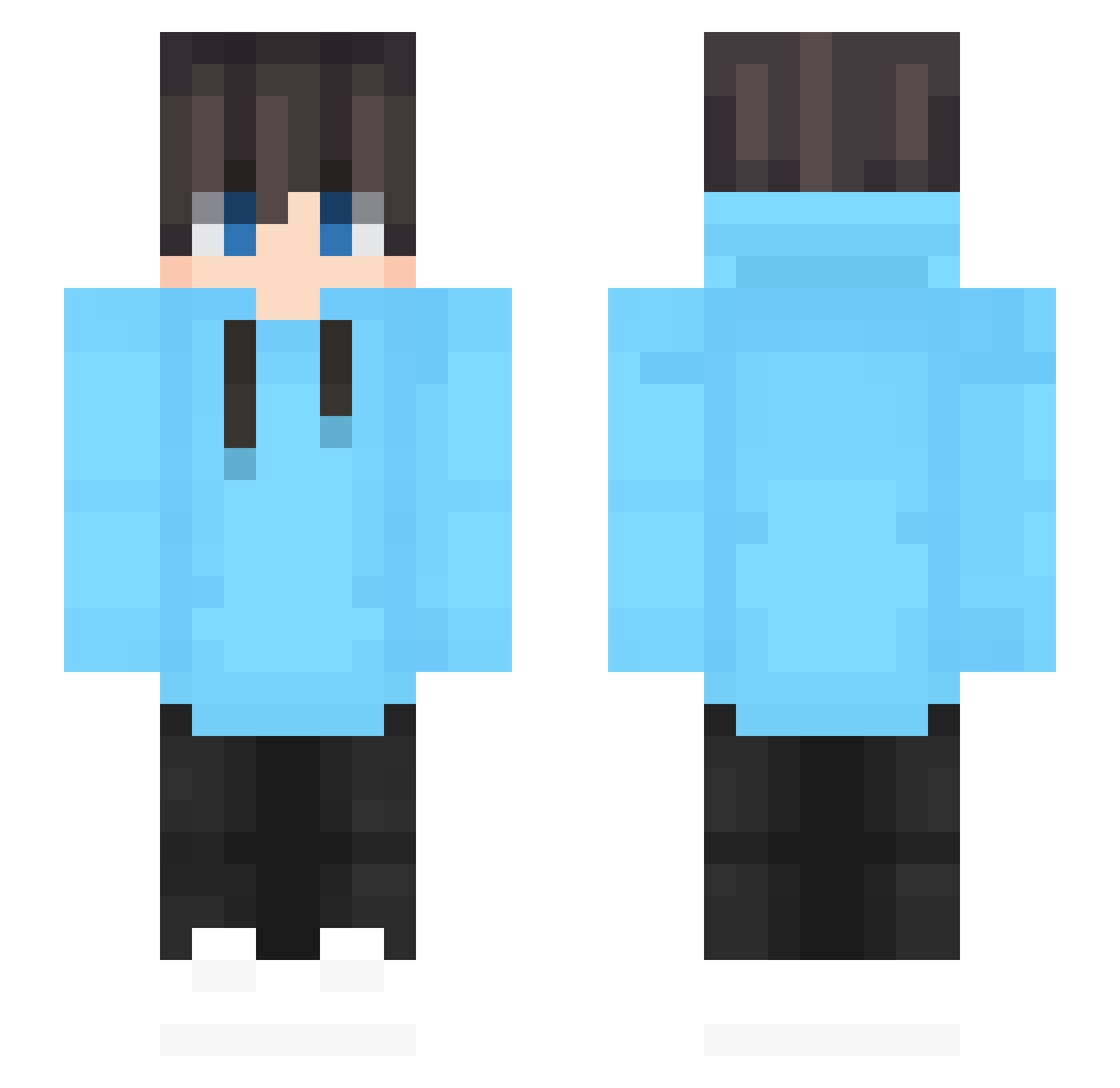
Current Minecraft skin of the player hotin07, loaded from the official Mojang API. Rotate the 3D model with your mouse or finger, then download the skin as a PNG file and use it in Minecraft: Bedrock Edition or Java Edition for free. When hotin07 changes their skin, this page updates automatically and the old skin stays in the history below.
Other players with this skin (620)
hotin07 was the 22nd player we have seen with this skin, first spotted on 26.07.2026. The same skin was seen on these players. Open a nickname to see their current skin and skin history.
 Pulsarly qConfig FroXxy011 BenjaSimon WRNRRBR DJSandMan62 SrPunishYT MAINI145 dark_iceTV RafxT halo148 mokabee09 onlykizer Axxkun Andyeast940524 deeltoets dflk PierreGoKhoi Po_Sui_Steve bruns723 TyKinG1 HYUNJUNWOO toubi1109 Titelio01 eazin1
 Teslaprince19 kogwanyu sssummer_ iAnd3ry coralsnail feng076 xy_Yang Ungebetenerse
 The_Bridges69 _FabricioZzZ_ crosses__ Zerurieru
 PixelBook SmolBean44 woojin224 Oxidation1235 HaeImYeee itzCriss_ ZiMiao666 Yuqus Holdozer BlueFlame justkala thefoolish001 SleepingCiaran Wobbly1234 _Astral_0 MOET0008 SeyyedM iwwl LYSLOVE ChillingChing GianzinhoHD R3miii NIC3SHO1GODz
How to install the hotin07 skin
- Press the Download button above to save the skin as a PNG file.
- Minecraft: Bedrock Edition (PE): open the Dressing Room from the main menu (or tap your character → Edit Character), go to Classic Skins → Owned, press the + (new skin) button, choose the downloaded PNG and pick the Slim (Alex) model. Works on PC and mobile; consoles cannot import custom skins.
- Minecraft: Java Edition: open the Minecraft Launcher, go to the Skins tab, click New Skin, load the PNG, pick the Slim (Alex) model and press Save & Use. You can also upload it at minecraft.net → Profile → Change Skin.
The skin does not show up after import - what should I do?
Restart Minecraft and open the Dressing Room again - imported skins sometimes appear only after a restart. Also make sure you selected the imported skin and picked the Slim (Alex) model.
Which model should I choose, Classic or Slim?
This skin is designed for the Slim (Alex) model. If you pick the wrong model, the arms of the skin will look stretched or squeezed.
Is the skin of hotin07 free to download?
Yes. Press Download, save the PNG file and use it in Minecraft: Bedrock Edition or Java Edition - no payment or registration needed. The skin also works on multiplayer servers and Realms.
More skins
Looking for more? Go back to all Minecraft skins and check the top skins of the week, month and all time, or find any player's skin by nickname.