
ggiacopelli - Minecraft Skins & Skin History
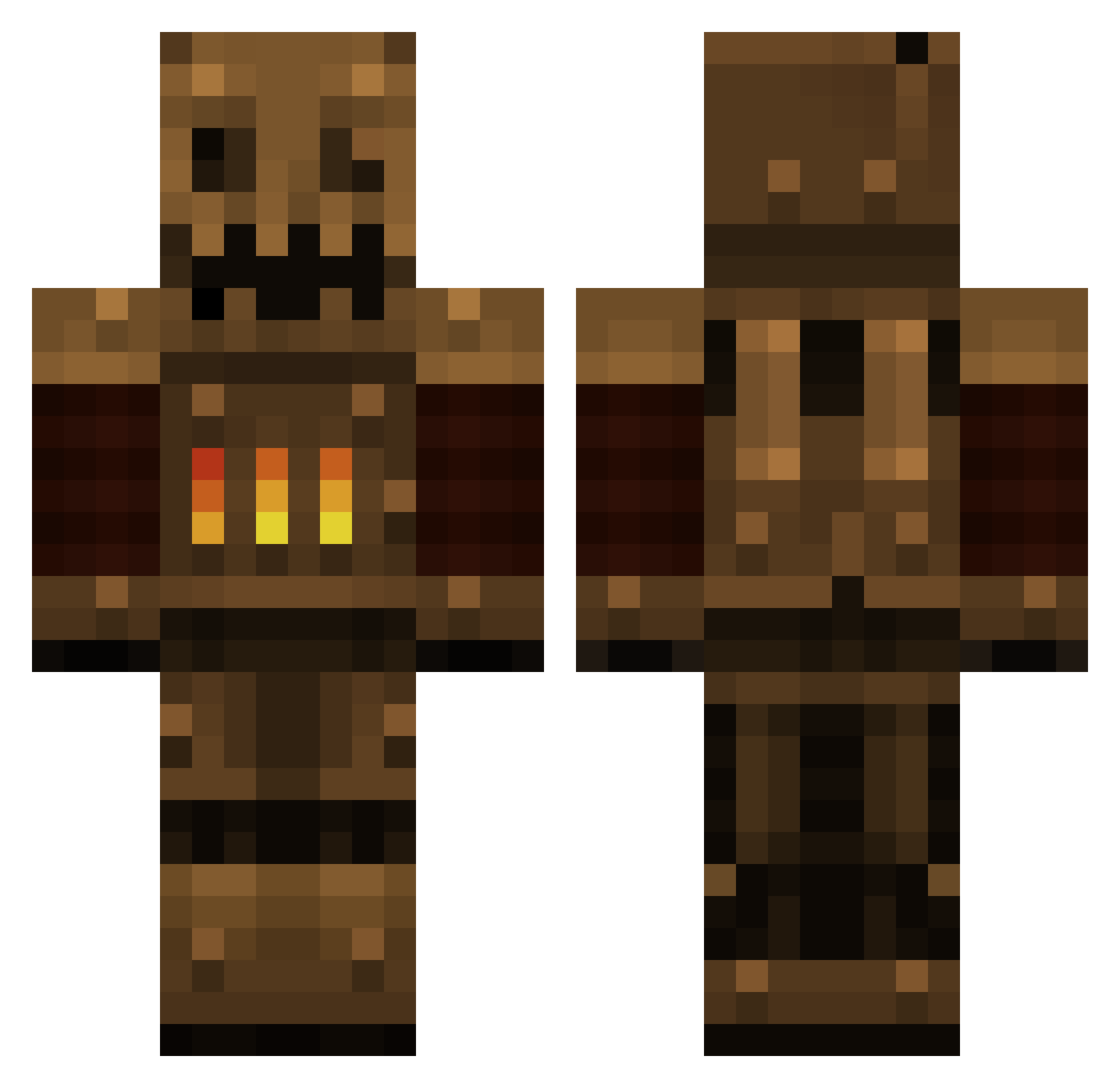
Current Minecraft skin of the player ggiacopelli, loaded from the official Mojang API. Rotate the 3D model with your mouse or finger, then download the skin as a PNG file and use it in Minecraft: Bedrock Edition or Java Edition for free. When ggiacopelli changes their skin, this page updates automatically and the old skin stays in the history below.
Other players with this skin (385)
ggiacopelli was the 180th player we have seen with this skin, first spotted on 08.09.2026. The same skin was seen on these players. Open a nickname to see their current skin and skin history.
 TikhonK NevZylka turbophysics jameyjames04 Mesoare jaeraven CreeperGibby La_Cor Enderben1015 Wiremouth DuchyBunny santsi94 warrenwayne CoffeeCrazy SparkyMCPC OMYRABBITS TERMINATOR500 Robrt tylerh402 GameCast11 Motlante Vikarni XBowzzerX knight_horizon _Crasch_ KingJulian0123 zredderg Rionize SpookyOctopus Spajn ChaoticVI Fafnerd Bottma55 fattypikachu herbbie88 WhimsicalSalt vcordie gabosess mooer MR_BomBom Reptilicon angrydennis HypixelBot jackjo2000 Oronous okuloko Poopy_G_G Eshemizu COLLlDE Great_Perkele kinesfabrik Nowhere77 A1Steaksauce bdabeast456 SgtBeano DEVGRU Captaincrafts123 daugsy mil005 metawewin
More Scarecrow Minecraft skins
How to install the ggiacopelli skin
- Press the Download button above to save the skin as a PNG file.
- Minecraft: Bedrock Edition (PE): open the Dressing Room from the main menu (or tap your character → Edit Character), go to Classic Skins → Owned, press the + (new skin) button, choose the downloaded PNG and pick the Classic (Steve) model. Works on PC and mobile; consoles cannot import custom skins.
- Minecraft: Java Edition: open the Minecraft Launcher, go to the Skins tab, click New Skin, load the PNG, pick the Classic (Steve) model and press Save & Use. You can also upload it at minecraft.net → Profile → Change Skin.
The skin does not show up after import - what should I do?
Restart Minecraft and open the Dressing Room again - imported skins sometimes appear only after a restart. Also make sure you selected the imported skin and picked the Classic (Steve) model.
Which model should I choose, Classic or Slim?
This skin is designed for the Classic (Steve) model. If you pick the wrong model, the arms of the skin will look stretched or squeezed.
Is the skin of ggiacopelli free to download?
Yes. Press Download, save the PNG file and use it in Minecraft: Bedrock Edition or Java Edition - no payment or registration needed. The skin also works on multiplayer servers and Realms.
More skins
Looking for more? Go back to all Minecraft skins and check the top skins of the week, month and all time, or find any player's skin by nickname.