
gamemaster8 - Minecraft Skins & Skin History
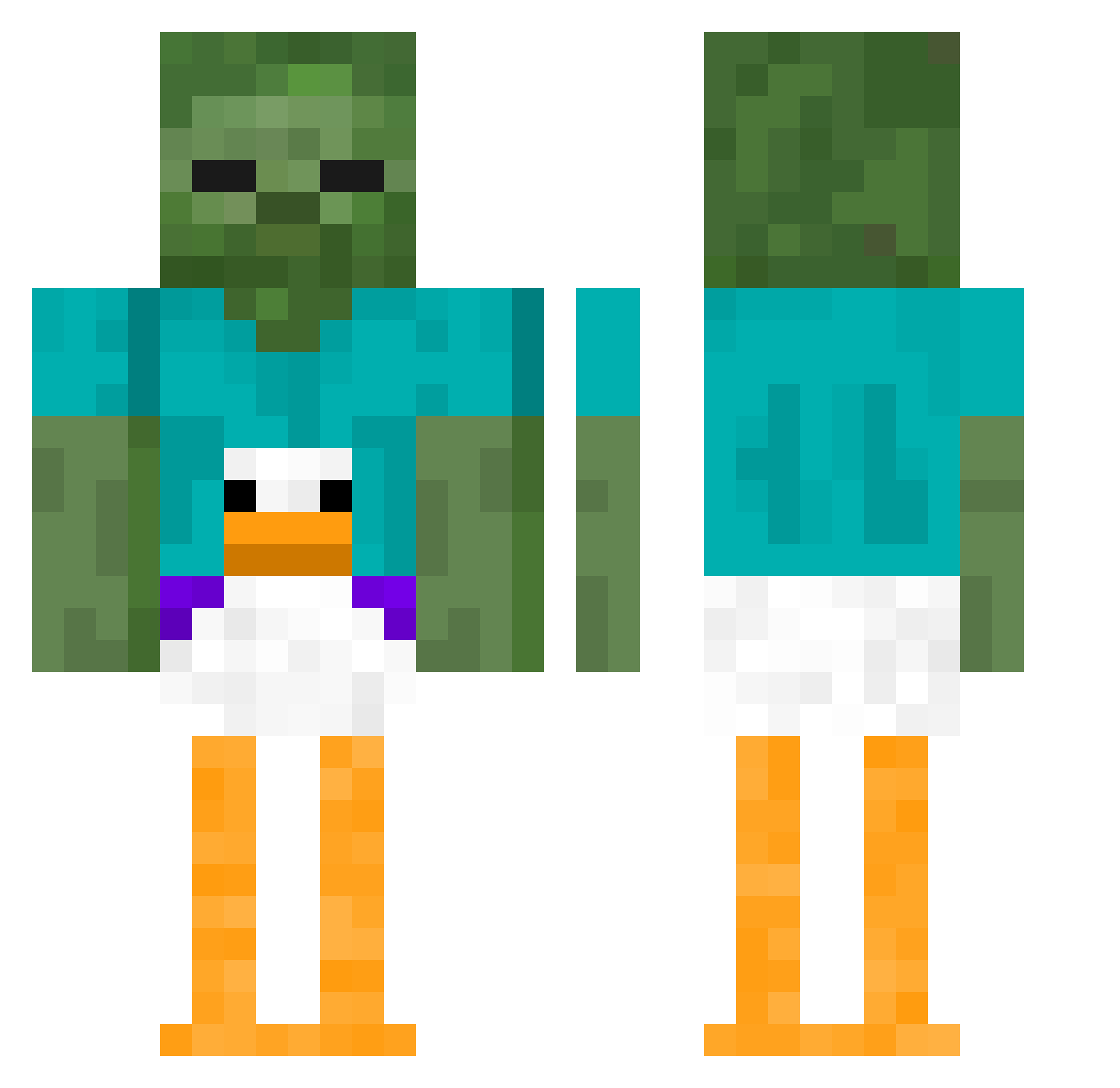
Current Minecraft skin of the player gamemaster8, loaded from the official Mojang API. Rotate the 3D model with your mouse or finger, then download the skin as a PNG file and use it in Minecraft: Bedrock Edition or Java Edition for free. When gamemaster8 changes their skin, this page updates automatically and the old skin stays in the history below.
Other players with this skin (410)
gamemaster8 was the 244th player we have seen with this skin, first spotted on 27.09.2026. The same skin was seen on these players. Open a nickname to see their current skin and skin history.
 RichRobotCowboy nlot HoboWarrior67 Neilonator22 llpaull AlphaBravo69 RECONbot Drew_Peanuts KAZUTO_POTATO cranking90islife PoopieEater69 ReeledSea Demfious PyxoELWyxo Brian0224 MW2707 r0nn1eK11 HEIL_KALEEB DaBomb1881 DinoLemur lkwalkerr boszemated swardfishman BlakeyWakey2436 LeAsteroid lkbfa oakrj JakeLevington MiMiIsCool69 phoxNA BryanGoslin Kingslayer42021 BALLS_master_FR Fonokur0104 godstoenail3 NicoR1204 Sharmzy slushyed13 Markusinss SenseiLingWong potatochippppp manologil09 sararb213 34RB awdnvujaiowd iluvmusic77 Gzegoz13131 Anto1408 Lugginator12 Fourhen5 Me_NaMe_JeRf Vanessabailey tr4ckdown soccerjitsu xd_Ender5168 Raammo TurtlyBird Fabio_yo Asparby EasySHOTZ
More Funny Minecraft skins
How to install the gamemaster8 skin
- Press the Download button above to save the skin as a PNG file.
- Minecraft: Bedrock Edition (PE): open the Dressing Room from the main menu (or tap your character → Edit Character), go to Classic Skins → Owned, press the + (new skin) button, choose the downloaded PNG and pick the Classic (Steve) model. Works on PC and mobile; consoles cannot import custom skins.
- Minecraft: Java Edition: open the Minecraft Launcher, go to the Skins tab, click New Skin, load the PNG, pick the Classic (Steve) model and press Save & Use. You can also upload it at minecraft.net → Profile → Change Skin.
The skin does not show up after import - what should I do?
Restart Minecraft and open the Dressing Room again - imported skins sometimes appear only after a restart. Also make sure you selected the imported skin and picked the Classic (Steve) model.
Which model should I choose, Classic or Slim?
This skin is designed for the Classic (Steve) model. If you pick the wrong model, the arms of the skin will look stretched or squeezed.
Is the skin of gamemaster8 free to download?
Yes. Press Download, save the PNG file and use it in Minecraft: Bedrock Edition or Java Edition - no payment or registration needed. The skin also works on multiplayer servers and Realms.
More skins
Looking for more? Go back to all Minecraft skins and check the top skins of the week, month and all time, or find any player's skin by nickname.