
TurtlyBird - Minecraft Skins & Skin History
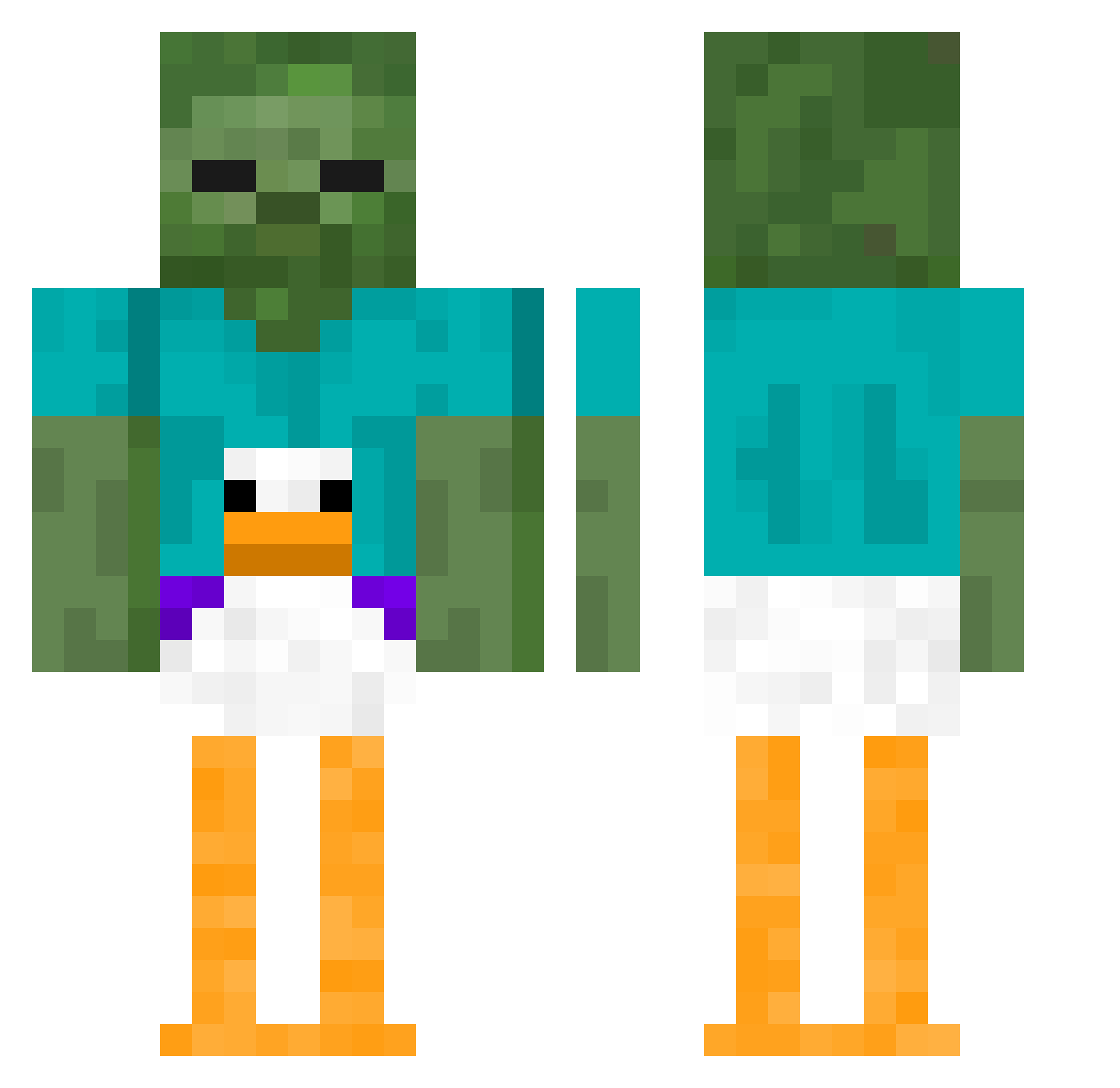
Current Minecraft skin of the player TurtlyBird, loaded from the official Mojang API. Rotate the 3D model with your mouse or finger, then download the skin as a PNG file and use it in Minecraft: Bedrock Edition or Java Edition for free. When TurtlyBird changes their skin, this page updates automatically and the old skin stays in the history below.
Other players with this skin (410)
TurtlyBird was the 272nd player we have seen with this skin, first spotted on 04.10.2026. The same skin was seen on these players. Open a nickname to see their current skin and skin history.
 xd_Ender5168 soccerjitsu Fabio_yo EasySHOTZ Harambe824 Me_NaMe_JeRf Estebbvsss vZayn dirtyred256 Anto1408 iluvmusic77 KingCroak52 Ekka_88 34RB clappedlol arthurshelby_1 OneSaltMine TTV_Vortoz Redblll RckyMT slushyed13 Artur2509 juontheminecraft Fonokur0104 Colinizer_ BryanGoslin phoxNA LarsUlrich69 FinalBoss1344 Joesmith24 Knobby24 JakeLevington TheGynocologist oakrj aRiitor1 lkbfa BlakeyWakey2436 swardfishman stanko99 YogurtLicker DaBomb1881 Soul_Skeleton_ Reinezzz Blinkiblue DJ_Oetziiii KingLatte PyxoELWyxo Demfious cranking90islife Typhoon_krigeren PatMaweiwni KAZUTO_POTATO BENmarshall Drew_Peanuts RECONbot AlphaBravo69 llpaull AverageGuy_12 kuba22458 winkle22
More Funny Minecraft skins
How to install the TurtlyBird skin
- Press the Download button above to save the skin as a PNG file.
- Minecraft: Bedrock Edition (PE): open the Dressing Room from the main menu (or tap your character → Edit Character), go to Classic Skins → Owned, press the + (new skin) button, choose the downloaded PNG and pick the Classic (Steve) model. Works on PC and mobile; consoles cannot import custom skins.
- Minecraft: Java Edition: open the Minecraft Launcher, go to the Skins tab, click New Skin, load the PNG, pick the Classic (Steve) model and press Save & Use. You can also upload it at minecraft.net → Profile → Change Skin.
The skin does not show up after import - what should I do?
Restart Minecraft and open the Dressing Room again - imported skins sometimes appear only after a restart. Also make sure you selected the imported skin and picked the Classic (Steve) model.
Which model should I choose, Classic or Slim?
This skin is designed for the Classic (Steve) model. If you pick the wrong model, the arms of the skin will look stretched or squeezed.
Is the skin of TurtlyBird free to download?
Yes. Press Download, save the PNG file and use it in Minecraft: Bedrock Edition or Java Edition - no payment or registration needed. The skin also works on multiplayer servers and Realms.
More skins
Looking for more? Go back to all Minecraft skins and check the top skins of the week, month and all time, or find any player's skin by nickname.