
 NOT_jogurt 44po INSULTING JerryJerald69 seanhaaluf spach97 teaggirl Flunksprite XEsmeXo Oswaldo37 KJONGH downpipetune Aggenn NnSri 6digitvaxei HugoTheDogg socketlocket RemoteGateway Bvftw PN_C9315 Manio1337 Plox1269 __SIM0n LennyTheTurtle epicgamernocapE Dzejson_momola CHIKEN_JOCKEY1o0 Samu_R3AL1010 valenprosuave StrandedSnow221 FieneK48 Efertmit2 Dokja10 Goonman16 littleboys4life cashmariscal XxADHDx SoggyFritto AthenaFatRatCat Jakulele Will_nye07 Mettwurst73 NastyNastas 100fim thisisallineed EFKLASVEGAS8 EP02 orangelizard352 DROFFY_02 Memo_39 koningkick2009 bree_03 TurkoDad420 T1ny_Angel Fabrego JelloJoe JuiccyW apples082 plugyo MasterTotSlayer
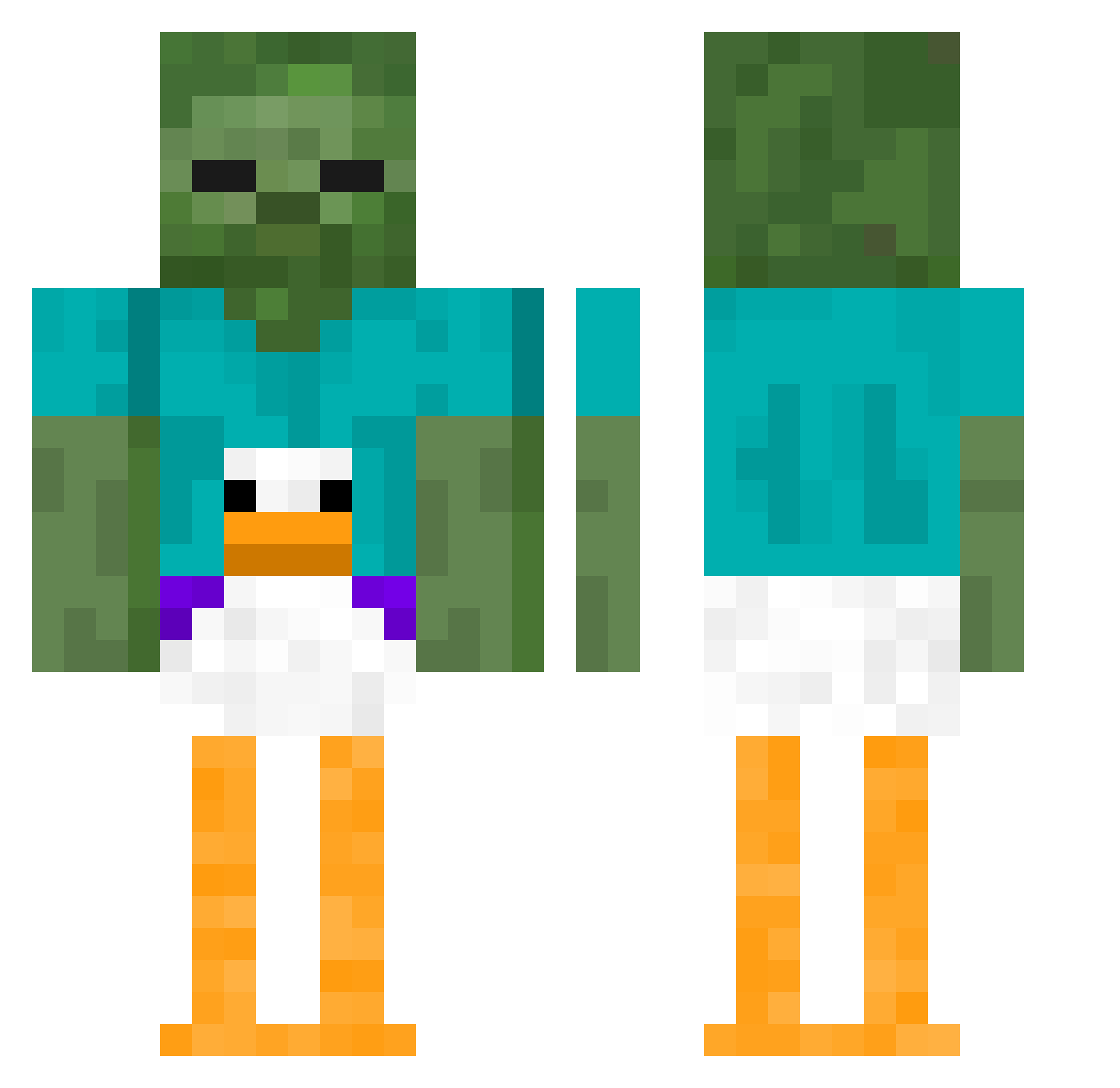
Minecraft skin of MADUCKx. Rotate the 3D model with your mouse or finger to view the skin from every angle, then download it as a PNG file and use it in Minecraft: Bedrock Edition or Java Edition for free. Rate the skin with stars to help other players find the best skins in our collection.
How to install the MADUCKx skin
- Press the Download button above to save the skin as a PNG file.
- Minecraft: Bedrock Edition (PE): open the Dressing Room from the main menu (or tap your character → Edit Character), go to Classic Skins → Owned, press the + (new skin) button, choose the downloaded PNG and pick the Classic (Steve) model. Works on PC and mobile; consoles cannot import custom skins.
- Minecraft: Java Edition: open the Minecraft Launcher, go to the Skins tab, click New Skin, load the PNG, pick the Classic (Steve) model and press Save & Use. You can also upload it at minecraft.net → Profile → Change Skin.
The skin does not show up after import - what should I do?
Restart Minecraft and open the Dressing Room again - imported skins sometimes appear only after a restart. Also make sure you selected the imported skin and picked the Classic (Steve) model.
Which model should I choose, Classic or Slim?
This skin is designed for the Classic (Steve) model. If you pick the wrong model, the arms of the skin will look stretched or squeezed.
Is this skin free to use?
Yes. Press Download, save the PNG file and use it in Minecraft: Bedrock Edition or Java Edition - no payment or registration needed. The skin also works on multiplayer servers and Realms.
More Funny Minecraft skins
More skins
Looking for more? Go back to all Minecraft skins and check the top skins of the week, month and all time, or find any player's skin by nickname.