
exxisting - Minecraft Skins & Skin History
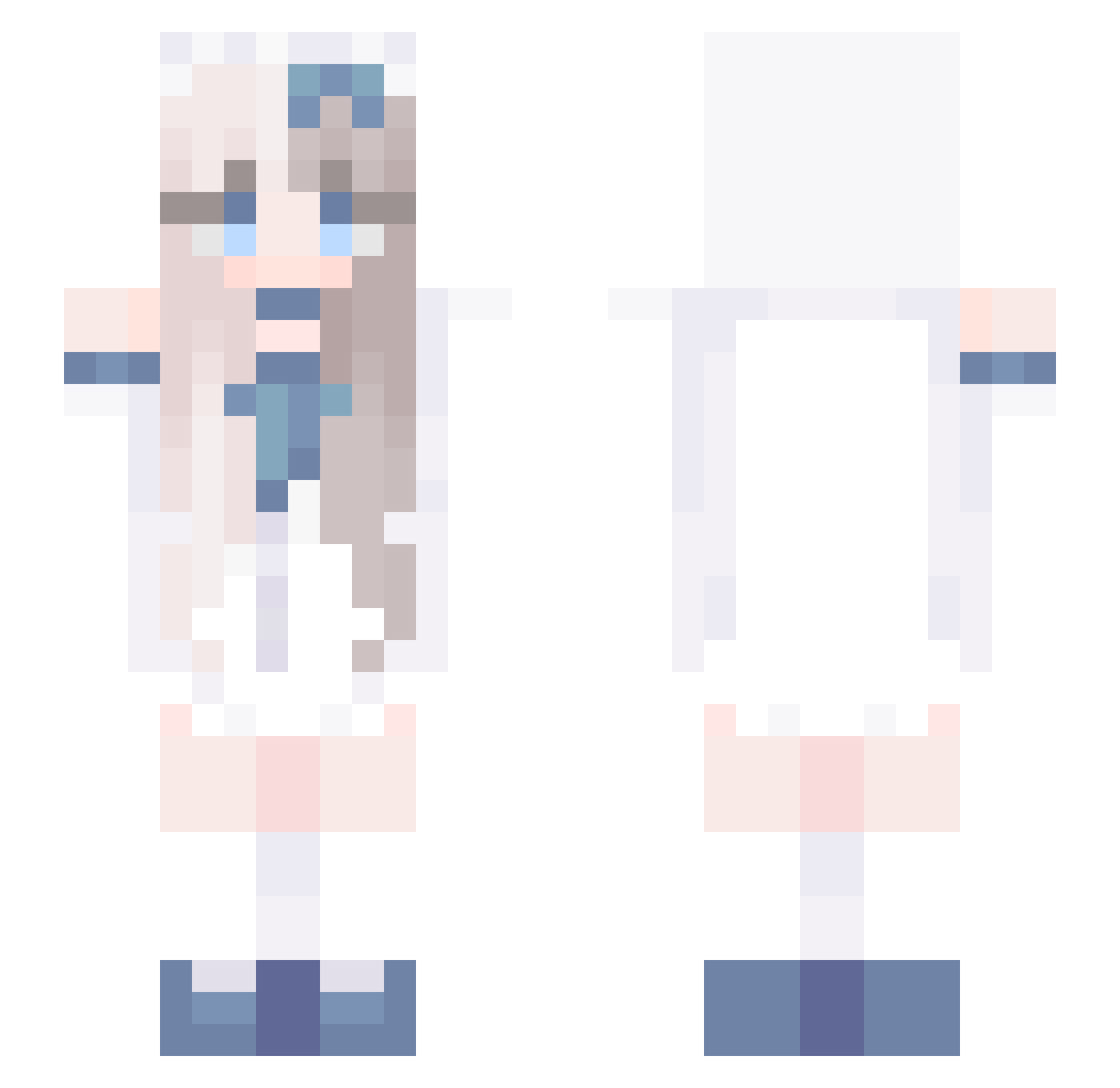
Current Minecraft skin of the player exxisting, loaded from the official Mojang API. Rotate the 3D model with your mouse or finger, then download the skin as a PNG file and use it in Minecraft: Bedrock Edition or Java Edition for free. When exxisting changes their skin, this page updates automatically and the old skin stays in the history below.
Other players with this skin (729)
exxisting was the 53rd player we have seen with this skin, first spotted on 01.08.2026. The same skin was seen on these players. Open a nickname to see their current skin and skin history.
 wiwide LiuNine kchoOo yutaaaaaaaaaaa xuantian747 Mutong_6 Darlingvels yunjuzhi ku1201 oOSmileyOo BluePluto515 cxrixie uoxou_ao pizzaloderbeta KangAlligator _HyRoxus_ OchreFrost jiaolin999 0sio0 klroklro DelightAri mattya_0712 wannasleepwell miniWorldking111 alcovelove2003 CXIXIC Meleysia Kaorisu_ imxxrusa UnderArcher Elvis1206 DidiCucu33 imnothing333 vespacide ArthurTAT Tnto_0 ajqjqiqjqi_3 coolnimabi
 gabriballs katanna0607 ivan3345 TRUMPGG zy303 padobada bunn22y ponsuke0418 CuteEGirl223 Boyeon1004 qawsless SasOtsas BerryWink Nyaazilla Nctu_ white0901 RuoXiangXi6 BeeBooLe REDBEAN77 ywnwn Shader11 sky14356
More Anime Girl Minecraft skins
See all 13497 Anime Girl skins
How to install the exxisting skin
- Press the Download button above to save the skin as a PNG file.
- Minecraft: Bedrock Edition (PE): open the Dressing Room from the main menu (or tap your character → Edit Character), go to Classic Skins → Owned, press the + (new skin) button, choose the downloaded PNG and pick the Slim (Alex) model. Works on PC and mobile; consoles cannot import custom skins.
- Minecraft: Java Edition: open the Minecraft Launcher, go to the Skins tab, click New Skin, load the PNG, pick the Slim (Alex) model and press Save & Use. You can also upload it at minecraft.net → Profile → Change Skin.
The skin does not show up after import - what should I do?
Restart Minecraft and open the Dressing Room again - imported skins sometimes appear only after a restart. Also make sure you selected the imported skin and picked the Slim (Alex) model.
Which model should I choose, Classic or Slim?
This skin is designed for the Slim (Alex) model. If you pick the wrong model, the arms of the skin will look stretched or squeezed.
Is the skin of exxisting free to download?
Yes. Press Download, save the PNG file and use it in Minecraft: Bedrock Edition or Java Edition - no payment or registration needed. The skin also works on multiplayer servers and Realms.
More skins
Looking for more? Go back to all Minecraft skins and check the top skins of the week, month and all time, or find any player's skin by nickname.