
erishia_ - Minecraft Skins & Skin History
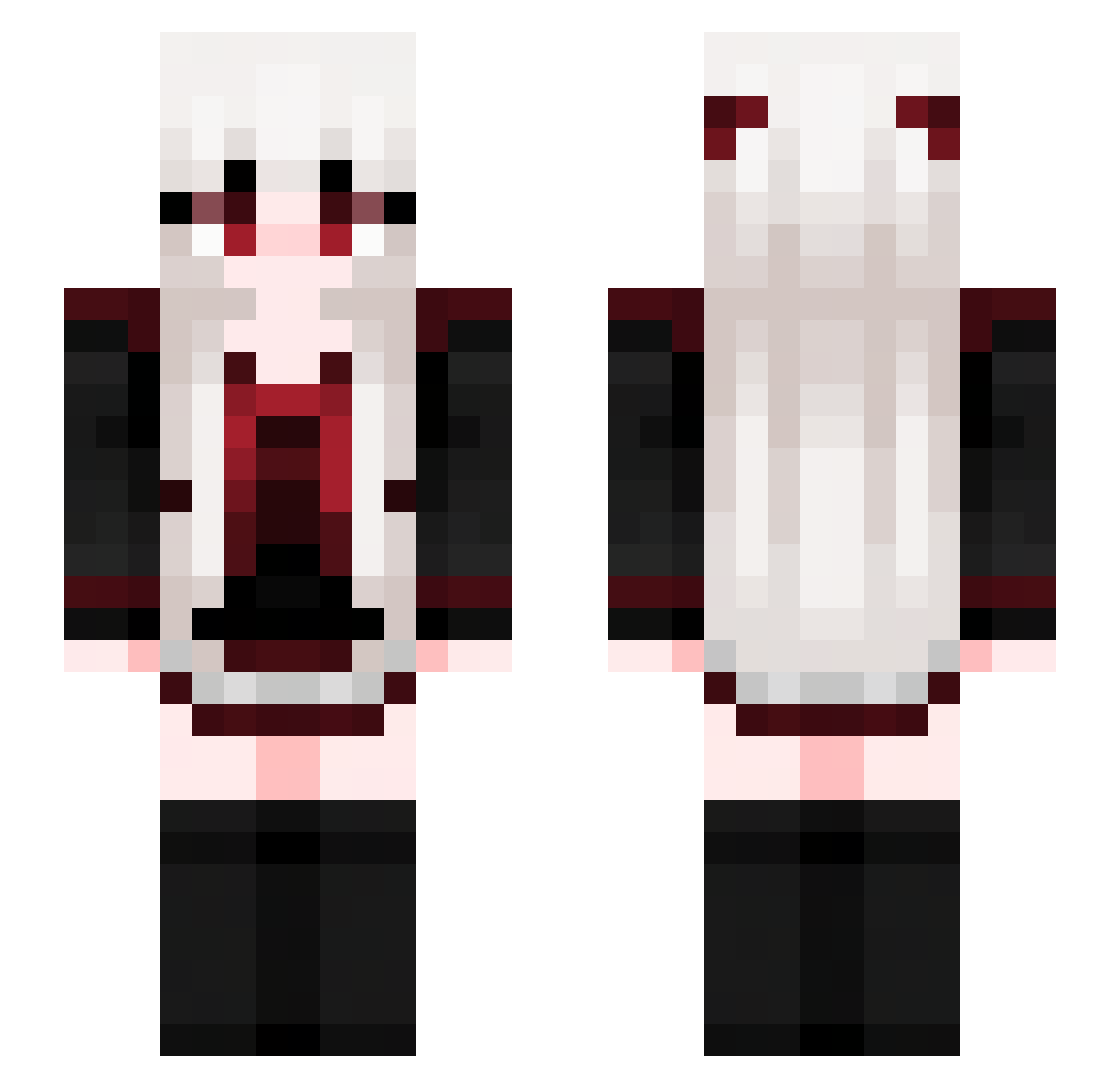
Current Minecraft skin of the player erishia_, loaded from the official Mojang API. Rotate the 3D model with your mouse or finger, then download the skin as a PNG file and use it in Minecraft: Bedrock Edition or Java Edition for free. When erishia_ changes their skin, this page updates automatically and the old skin stays in the history below.
Other players with this skin (677)
erishia_ was the 136th player we have seen with this skin, first spotted on 13.08.2026. The same skin was seen on these players. Open a nickname to see their current skin and skin history.
 rainbowstellar
 meowmrr_ lpbyme x_yori_x_2 Tangero_Limonado
 ORNoble snidepizza6 fyboy Kitty_0341
 LauraGaming jiaobu MoistyHobo fraudloves
 SayakaCarla_0820 b331z3bub lambdodelto SuperProtagonist melancholiya Die4Kate MKKK57 littlecat_125 Jaoyl Leave_N1ght TheSacredClown 1870259 view2549 etyr4 Thatzsick1 andoni7761 Natixs1000 feng1031 SharkieMeow selbon XuGou__ RoseHell_0059 wynrtgd dream_exe6000 Ellie200223 yaitszay LelyMaravilha chiqiqi BestFizz dfght seta0527 mirendaxel24 Jason624 Dr48319 GoldenFella Baby_yunny TimiTorne Lunalunera_ lamiaia BekaOliver looyun Sleepy_PAN Nbnews SB_ZZwXMh_628 Nakitro Latatear ruwihi
More Goth Minecraft skins
How to install the erishia_ skin
- Press the Download button above to save the skin as a PNG file.
- Minecraft: Bedrock Edition (PE): open the Dressing Room from the main menu (or tap your character → Edit Character), go to Classic Skins → Owned, press the + (new skin) button, choose the downloaded PNG and pick the Slim (Alex) model. Works on PC and mobile; consoles cannot import custom skins.
- Minecraft: Java Edition: open the Minecraft Launcher, go to the Skins tab, click New Skin, load the PNG, pick the Slim (Alex) model and press Save & Use. You can also upload it at minecraft.net → Profile → Change Skin.
The skin does not show up after import - what should I do?
Restart Minecraft and open the Dressing Room again - imported skins sometimes appear only after a restart. Also make sure you selected the imported skin and picked the Slim (Alex) model.
Which model should I choose, Classic or Slim?
This skin is designed for the Slim (Alex) model. If you pick the wrong model, the arms of the skin will look stretched or squeezed.
Is the skin of erishia_ free to download?
Yes. Press Download, save the PNG file and use it in Minecraft: Bedrock Edition or Java Edition - no payment or registration needed. The skin also works on multiplayer servers and Realms.
More skins
Looking for more? Go back to all Minecraft skins and check the top skins of the week, month and all time, or find any player's skin by nickname.