
eren7gf - Minecraft Skins & Skin History
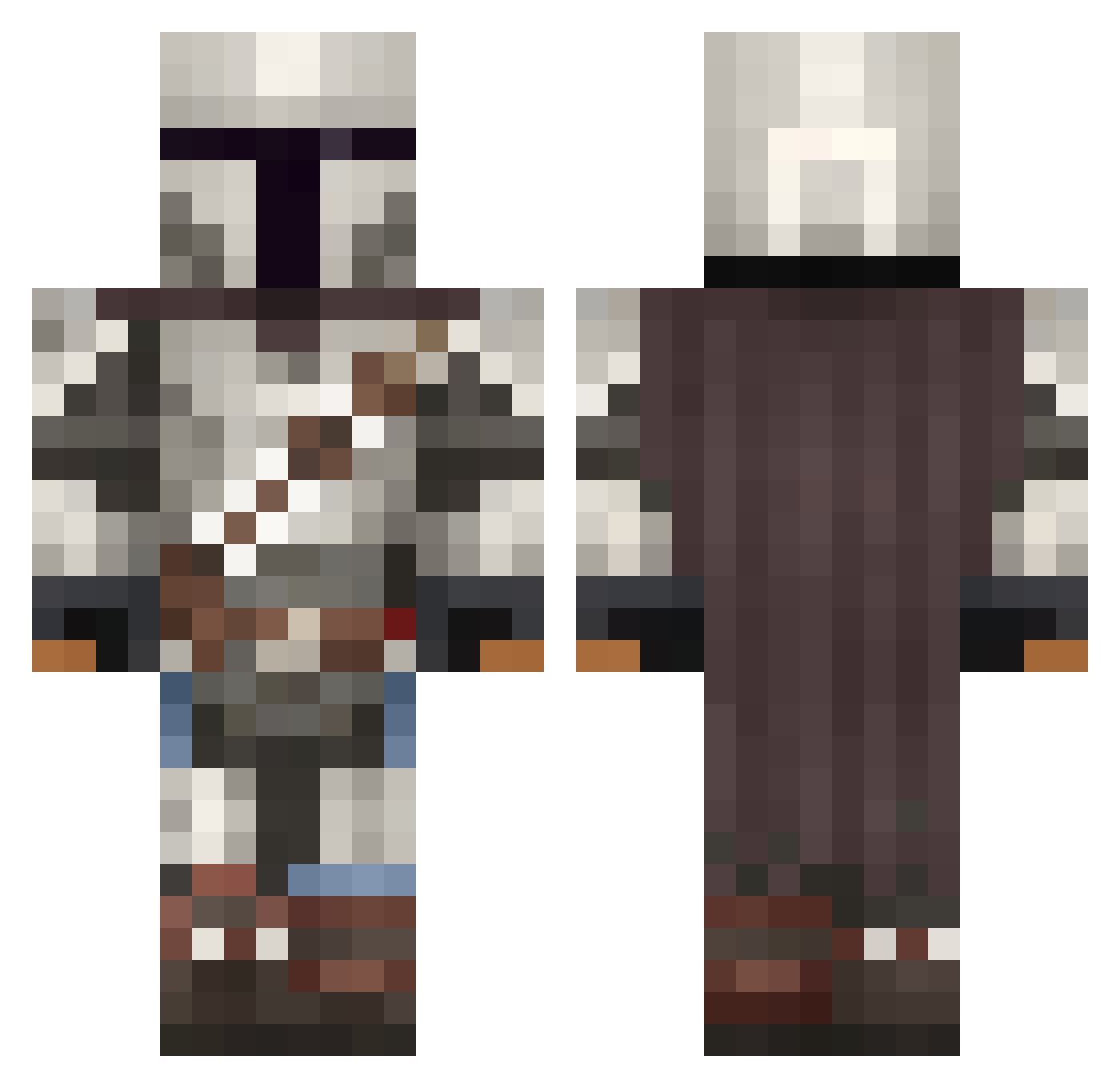
Current Minecraft skin of the player eren7gf, loaded from the official Mojang API. Rotate the 3D model with your mouse or finger, then download the skin as a PNG file and use it in Minecraft: Bedrock Edition or Java Edition for free. When eren7gf changes their skin, this page updates automatically and the old skin stays in the history below.
Other players with this skin (1095)
eren7gf was the 581st player we have seen with this skin, first spotted on 26.09.2026. The same skin was seen on these players. Open a nickname to see their current skin and skin history.
 Dirk___Diggler green_96 ranchsauz Flamingablaze Nemeziz05 Dopewagon majtus32 Bluegecko144 cejames vaudemano InfernoFiend Chpsys ElectricWaste00 Nighty49 McPhalicus Olliabi Zaid_R420 ManVibes FalconDuff7 FineasFoxx ravilonely_ Shawesome _GoldRush JA2pickle S2GYT Monxito DJAXON Doc_Brown7274 Veztral Shotrry TIMOthySIMP JtSlayer1764 shootnapper CraftingDesire eQJ4ck SuperToast4 StoneyHawk Halil911 AceDDrizzle LosBraydos YoSoyLlama pvelli BianaVacker Hypos Speed095 Geese____ JDCL17 _yean1120_ KileMGS CruztyCrab ALFRED_GT PrimeEvil39 brenex28 KylesTakagi zbinkskaplar1213 CajonTiger Besru Sir_Viv0r DinDjarinn Bobbiat
More The Mandalorian Minecraft skins
See all 620 The Mandalorian skins
How to install the eren7gf skin
- Press the Download button above to save the skin as a PNG file.
- Minecraft: Bedrock Edition (PE): open the Dressing Room from the main menu (or tap your character → Edit Character), go to Classic Skins → Owned, press the + (new skin) button, choose the downloaded PNG and pick the Classic (Steve) model. Works on PC and mobile; consoles cannot import custom skins.
- Minecraft: Java Edition: open the Minecraft Launcher, go to the Skins tab, click New Skin, load the PNG, pick the Classic (Steve) model and press Save & Use. You can also upload it at minecraft.net → Profile → Change Skin.
The skin does not show up after import - what should I do?
Restart Minecraft and open the Dressing Room again - imported skins sometimes appear only after a restart. Also make sure you selected the imported skin and picked the Classic (Steve) model.
Which model should I choose, Classic or Slim?
This skin is designed for the Classic (Steve) model. If you pick the wrong model, the arms of the skin will look stretched or squeezed.
Is the skin of eren7gf free to download?
Yes. Press Download, save the PNG file and use it in Minecraft: Bedrock Edition or Java Edition - no payment or registration needed. The skin also works on multiplayer servers and Realms.
More skins
Looking for more? Go back to all Minecraft skins and check the top skins of the week, month and all time, or find any player's skin by nickname.