
eastii2x - Minecraft Skins & Skin History
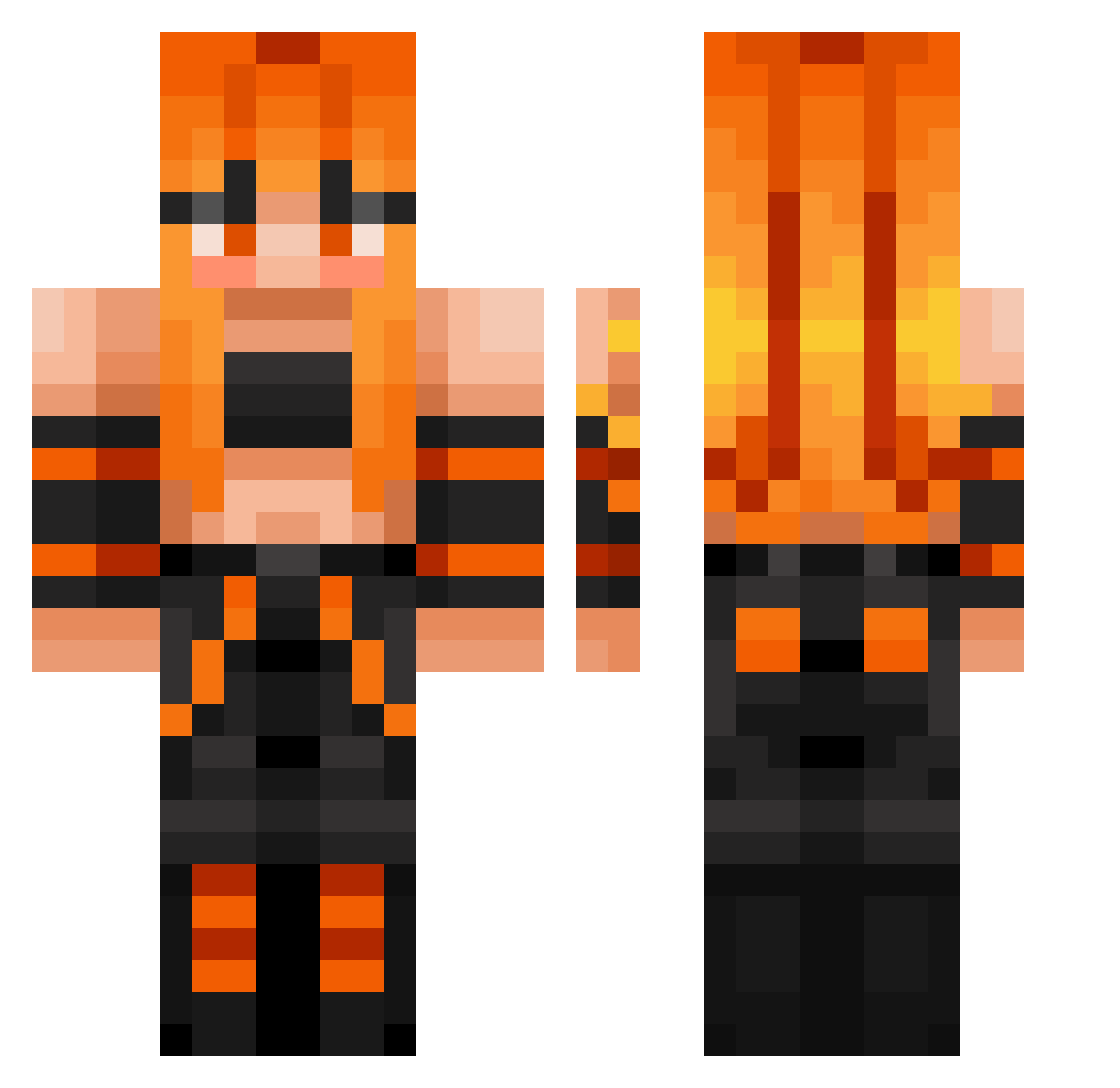
Current Minecraft skin of the player eastii2x, loaded from the official Mojang API. Rotate the 3D model with your mouse or finger, then download the skin as a PNG file and use it in Minecraft: Bedrock Edition or Java Edition for free. When eastii2x changes their skin, this page updates automatically and the old skin stays in the history below.
Other players with this skin (399)
eastii2x was the 32nd player we have seen with this skin, first spotted on 02.08.2026. The same skin was seen on these players. Open a nickname to see their current skin and skin history.
 mantiz1
 Thekillerducky mainer_123 Trinny2022 Spaceysis JetCarrot597199
 FrankTheTank420 FionaFinland Dexmurr ornstein21 Mr_Zazou shadowman1567 MrParada2007 HOV20 PimpBojangles Haru9897 PrincessAlisha18 Niko0130 Dragontoser nbayungobi
 Elitesavage556 KuKisama1 Pawelel9 plvdd Merbear15 CuteToothless0 the_goat4894 kk3375
 Tiputii MackAttack_15 Kendraa3 DrreamerBoy mister_pvp1 JC914 Misty_XD_ ParkHoYA HelloKitty1570 BirdyBirds AceTheGoat571 Loli_Slayer17
 TigaBaka y4lt4 WildFang14 toalqqq Hexecutionar Zenn_Overload maxgentle yoitsmandy tinytoonz05 TJplayer silverfox8523 Slimoakleaf 1ucyx
 Yanael369 Aze666 SAW_35 JewelEmerald123
 mhtns Purge69 experimen
More Girl Minecraft skins
How to install the eastii2x skin
- Press the Download button above to save the skin as a PNG file.
- Minecraft: Bedrock Edition (PE): open the Dressing Room from the main menu (or tap your character → Edit Character), go to Classic Skins → Owned, press the + (new skin) button, choose the downloaded PNG and pick the Classic (Steve) model. Works on PC and mobile; consoles cannot import custom skins.
- Minecraft: Java Edition: open the Minecraft Launcher, go to the Skins tab, click New Skin, load the PNG, pick the Classic (Steve) model and press Save & Use. You can also upload it at minecraft.net → Profile → Change Skin.
The skin does not show up after import - what should I do?
Restart Minecraft and open the Dressing Room again - imported skins sometimes appear only after a restart. Also make sure you selected the imported skin and picked the Classic (Steve) model.
Which model should I choose, Classic or Slim?
This skin is designed for the Classic (Steve) model. If you pick the wrong model, the arms of the skin will look stretched or squeezed.
Is the skin of eastii2x free to download?
Yes. Press Download, save the PNG file and use it in Minecraft: Bedrock Edition or Java Edition - no payment or registration needed. The skin also works on multiplayer servers and Realms.
More skins
Looking for more? Go back to all Minecraft skins and check the top skins of the week, month and all time, or find any player's skin by nickname.