
dreamstar1011 - Minecraft Skins & Skin History
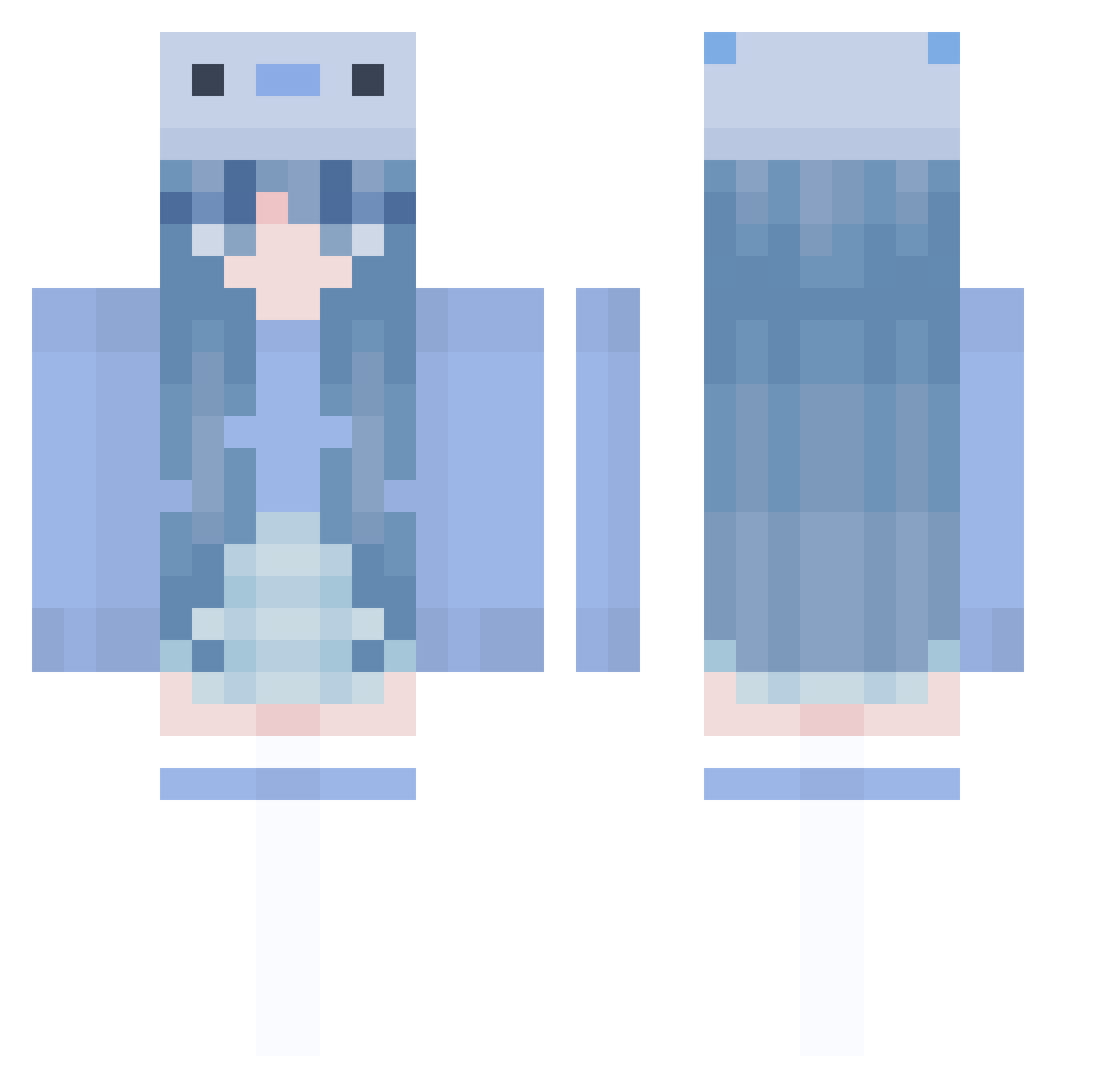
Current Minecraft skin of the player dreamstar1011, loaded from the official Mojang API. Rotate the 3D model with your mouse or finger, then download the skin as a PNG file and use it in Minecraft: Bedrock Edition or Java Edition for free. When dreamstar1011 changes their skin, this page updates automatically and the old skin stays in the history below.
Other players with this skin (1005)
dreamstar1011 was the 125th player we have seen with this skin, first spotted on 07.08.2026. The same skin was seen on these players. Open a nickname to see their current skin and skin history.
 NZNznz_00 Ines_1820 inosu jovanaaa Sillypus M3lixy willythepoohhhhh TianmuTNT hanijin jade_da_mangle duygu12 nonstopdeath212 opehdus AceDM baneno_milk Marisjabel2503 kogasana MonKyXz HydroStreak_o7 charli_bear_ aestheticshroom kjg1406 Zamney Xenia_OwO xCheesyBreadx EinfxchAkii HessiKim mulinya reducethis Dy_haNm1ng Aimmakoto lealol14 Brother_Mc momo_12002 freooo _LodowaHerbata DanMuJl Feyryn Friks_154841 pig767 kartistenn90
 DeinDaddy_GhG MALUMX franzi3112 Skylar_183 Carol_Malus maja_2008 BlazeGGS1 Tornadoruns9 Jennifail zzy0803 laylagraceee MICx_000001 syakp Quietpotato2039 LJ3o 17236q wayne1716 Solvspind Autotorious
More Axolotl Minecraft skins
How to install the dreamstar1011 skin
- Press the Download button above to save the skin as a PNG file.
- Minecraft: Bedrock Edition (PE): open the Dressing Room from the main menu (or tap your character → Edit Character), go to Classic Skins → Owned, press the + (new skin) button, choose the downloaded PNG and pick the Classic (Steve) model. Works on PC and mobile; consoles cannot import custom skins.
- Minecraft: Java Edition: open the Minecraft Launcher, go to the Skins tab, click New Skin, load the PNG, pick the Classic (Steve) model and press Save & Use. You can also upload it at minecraft.net → Profile → Change Skin.
The skin does not show up after import - what should I do?
Restart Minecraft and open the Dressing Room again - imported skins sometimes appear only after a restart. Also make sure you selected the imported skin and picked the Classic (Steve) model.
Which model should I choose, Classic or Slim?
This skin is designed for the Classic (Steve) model. If you pick the wrong model, the arms of the skin will look stretched or squeezed.
Is the skin of dreamstar1011 free to download?
Yes. Press Download, save the PNG file and use it in Minecraft: Bedrock Edition or Java Edition - no payment or registration needed. The skin also works on multiplayer servers and Realms.
More skins
Looking for more? Go back to all Minecraft skins and check the top skins of the week, month and all time, or find any player's skin by nickname.