
delvic - Minecraft Skins & Skin History
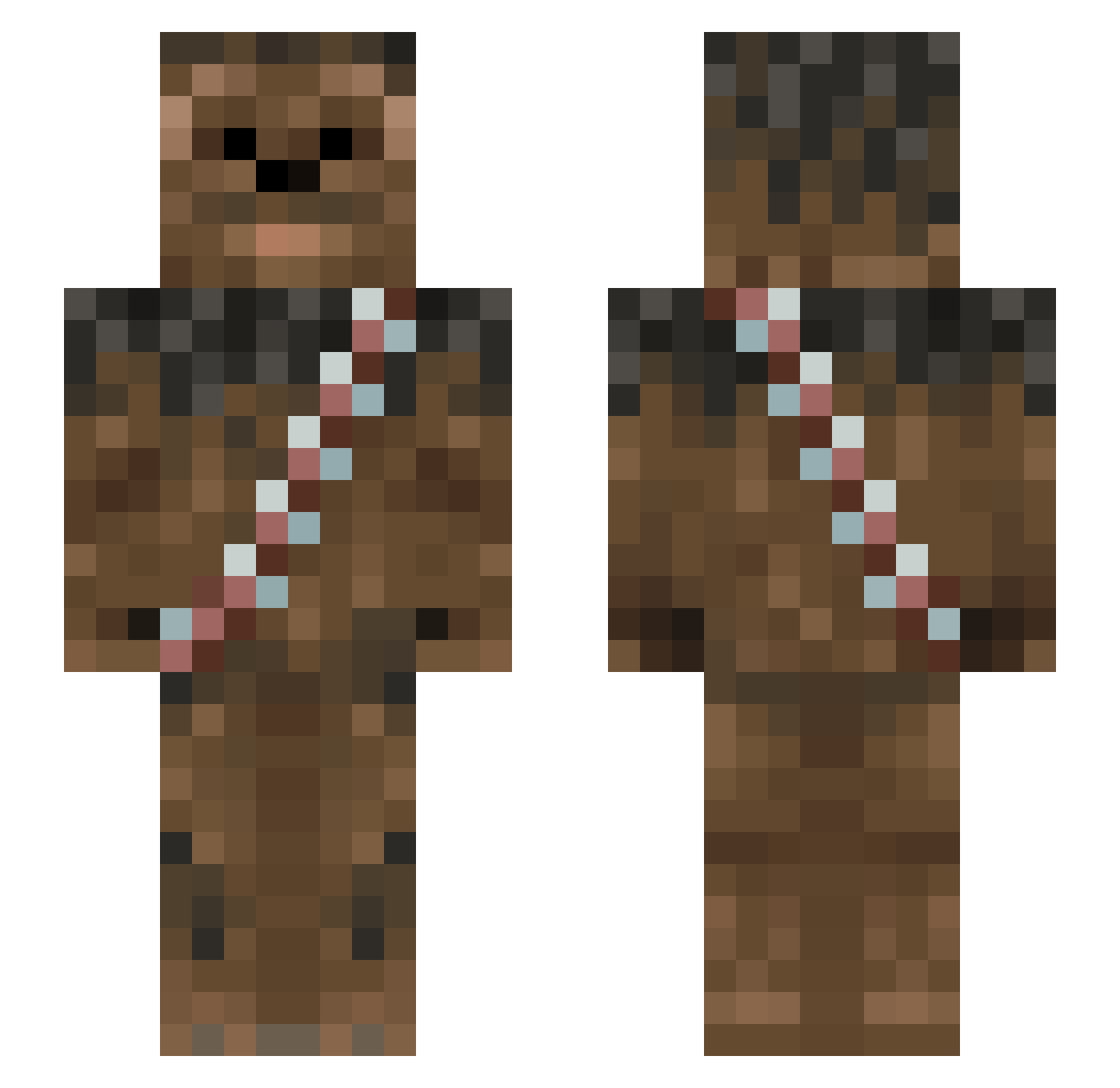
Current Minecraft skin of the player delvic, loaded from the official Mojang API. Rotate the 3D model with your mouse or finger, then download the skin as a PNG file and use it in Minecraft: Bedrock Edition or Java Edition for free. When delvic changes their skin, this page updates automatically and the old skin stays in the history below.
Other players with this skin (1012)
delvic was the 94th player we have seen with this skin, first spotted on 03.08.2026. The same skin was seen on these players. Open a nickname to see their current skin and skin history.
 gokgol AussieGamer65 ZaherisReal123 ItzPonchee enderflinder DeathBlayde123 Smart_dawg CorbinWReality Frabou JRockNRolla Robbie1124 KoalaWithADolla Elwintook DRAGON03056 lenny2k11 katherineritas madnessman9 mcole1977 neoeltonmeyer NBrander DirtrallyCSH Blockcrush3r Janoos BennyOrigins keesprins KeanonJenkins Atro_13 Ben_Villa DanimalNZ Tyrsgard Shayleenrf Koert6 rohan40 Jehdye PointBlank71 marek2000 Firekraker braydenm303 resilientkarma5 434311 THE_CHOSEN_ONE__ heitkids Silentninja924 JFK8102 nickdeufemia ScruffyTwaffle smileo2203 Red_Paragon AlphaR0ck TheMRed360 DerHenry32 Jacob32601 knutsopx rpsls42 DexProEnergy nicholai_thomas SpaceKat95 MartinAtchet Slice_of_dignity taroshik
More Wookiee Minecraft skins
How to install the delvic skin
- Press the Download button above to save the skin as a PNG file.
- Minecraft: Bedrock Edition (PE): open the Dressing Room from the main menu (or tap your character → Edit Character), go to Classic Skins → Owned, press the + (new skin) button, choose the downloaded PNG and pick the Slim (Alex) model. Works on PC and mobile; consoles cannot import custom skins.
- Minecraft: Java Edition: open the Minecraft Launcher, go to the Skins tab, click New Skin, load the PNG, pick the Slim (Alex) model and press Save & Use. You can also upload it at minecraft.net → Profile → Change Skin.
The skin does not show up after import - what should I do?
Restart Minecraft and open the Dressing Room again - imported skins sometimes appear only after a restart. Also make sure you selected the imported skin and picked the Slim (Alex) model.
Which model should I choose, Classic or Slim?
This skin is designed for the Slim (Alex) model. If you pick the wrong model, the arms of the skin will look stretched or squeezed.
Is the skin of delvic free to download?
Yes. Press Download, save the PNG file and use it in Minecraft: Bedrock Edition or Java Edition - no payment or registration needed. The skin also works on multiplayer servers and Realms.
More skins
Looking for more? Go back to all Minecraft skins and check the top skins of the week, month and all time, or find any player's skin by nickname.