
deanooo420 - Minecraft Skins & Skin History
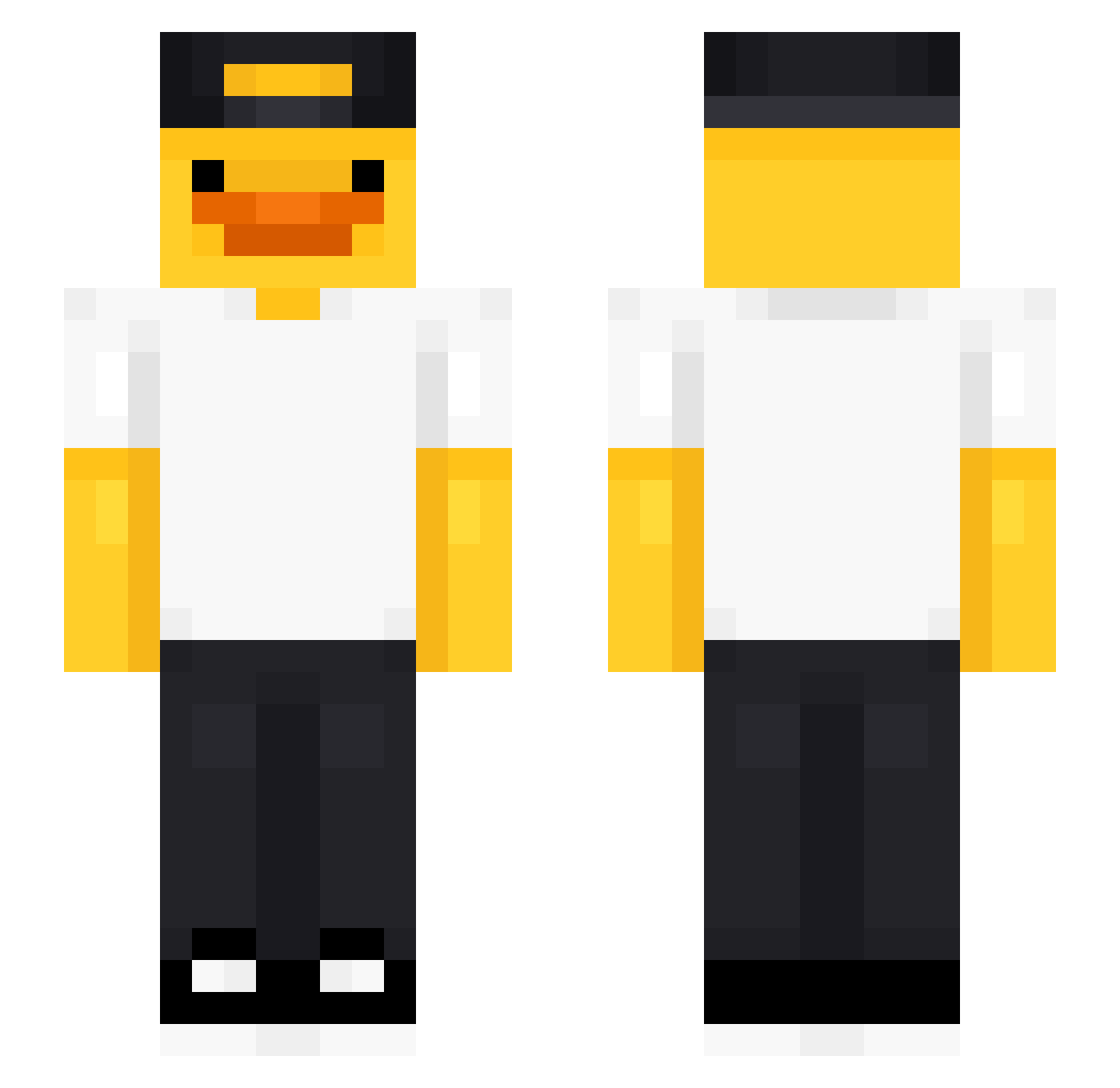
Current Minecraft skin of the player deanooo420, loaded from the official Mojang API. Rotate the 3D model with your mouse or finger, then download the skin as a PNG file and use it in Minecraft: Bedrock Edition or Java Edition for free. When deanooo420 changes their skin, this page updates automatically and the old skin stays in the history below.
Other players with this skin (489)
deanooo420 was the 141st player we have seen with this skin, first spotted on 24.08.2026. The same skin was seen on these players. Open a nickname to see their current skin and skin history.
 Nampii C3SAR_RZ Valentinklettern Vazien Fze1224 kuba213789 FIK01837 bjornn0 _Aimjiblue_ EnzoMaso ALCOHOL1C_PANDA
 AlbinSlayer Sebberwebber NYAMNYAMNYAMNYAM SirBron BIGoptical Miguelin08 upionalffa22 Infin3ty atsi2010 Luko420 Ungarman1 The_Omar_LeOn scoreggia104 PedalBacon Pine_1214 artlog4 eta0826 Maxicekkk3427 SIBACHA777 JOKeR4440 MotherDinoImWill eym0987 4ntonioxx Senbonashi movve900
 Dejjavu81 Depa_19 Storm964Ninja TSNCCamper1 Juuuun Mattlepirate DJCabbar sabiz SuperSonic572 DeadPooL7044 arielhhm homik_oreo HiroJG pizzasteve43 Calin_690 gazeux3945 DOX_02 DrQuackingston simplisticPunge ume_destroy Wakukuw Kaziu42 ChickenWing2k7 GonnaStealYou
More Cap Minecraft skins
How to install the deanooo420 skin
- Press the Download button above to save the skin as a PNG file.
- Minecraft: Bedrock Edition (PE): open the Dressing Room from the main menu (or tap your character → Edit Character), go to Classic Skins → Owned, press the + (new skin) button, choose the downloaded PNG and pick the Slim (Alex) model. Works on PC and mobile; consoles cannot import custom skins.
- Minecraft: Java Edition: open the Minecraft Launcher, go to the Skins tab, click New Skin, load the PNG, pick the Slim (Alex) model and press Save & Use. You can also upload it at minecraft.net → Profile → Change Skin.
The skin does not show up after import - what should I do?
Restart Minecraft and open the Dressing Room again - imported skins sometimes appear only after a restart. Also make sure you selected the imported skin and picked the Slim (Alex) model.
Which model should I choose, Classic or Slim?
This skin is designed for the Slim (Alex) model. If you pick the wrong model, the arms of the skin will look stretched or squeezed.
Is the skin of deanooo420 free to download?
Yes. Press Download, save the PNG file and use it in Minecraft: Bedrock Edition or Java Edition - no payment or registration needed. The skin also works on multiplayer servers and Realms.
More skins
Looking for more? Go back to all Minecraft skins and check the top skins of the week, month and all time, or find any player's skin by nickname.