
cvllye - Minecraft Skins & Skin History
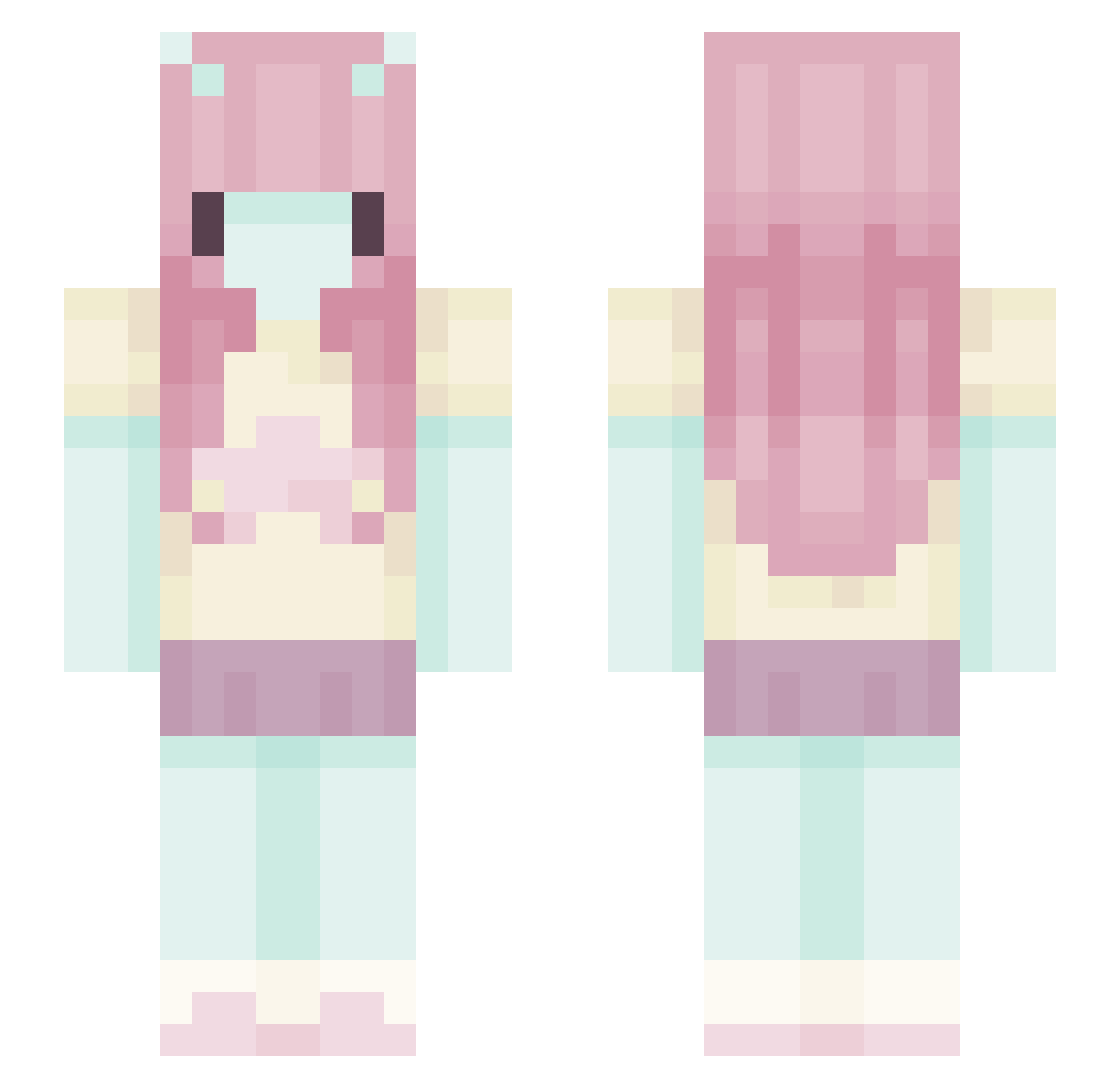
Current Minecraft skin of the player cvllye, loaded from the official Mojang API. Rotate the 3D model with your mouse or finger, then download the skin as a PNG file and use it in Minecraft: Bedrock Edition or Java Edition for free. When cvllye changes their skin, this page updates automatically and the old skin stays in the history below.
Other players with this skin (629)
cvllye was the 603rd player we have seen with this skin, first spotted on 05.11.2026. The same skin was seen on these players. Open a nickname to see their current skin and skin history.
 Tavshedspligt AngelRuu Lii0k foxstert Cactuas come_bosta daisiesrotting jadabee03 MsSoybean xzolot millionsofstars BeanSoup03 PeanutBestfriend mantastingrae cinnabunii_ zyeow keuchii morbidmortuary 8krei don4tsu kylieabbash HoviaZ iza_ily0 wyoli viridiancrow PinkbunnyBerry AlexandriaBrooke laurapalmer67 PuppyLovee Janell303 bubbl3i pixiebugg rllyrema footsniffe4 angeloloogia tintedspirit sadjuice_ Tati16 m_ari_elle maddiepeeps Sn0berry1 Angelstone_xe gingeralelover27 Sammzo_ Kitty_MiauOoO Kuroneko_VT Jermatology milkylilac CRETYzzz Makinna Daisyne Jessicarrr dyvya Bea_u_ majajajko123 IamNotAvailable yDanzy 1Vxo35P3 hambaka01 nezberryy
Previous skins of cvllye
Skins that cvllye wore before, newest first. Click a skin to open its page and download it.
More Zero Two Minecraft skins
How to install the cvllye skin
- Press the Download button above to save the skin as a PNG file.
- Minecraft: Bedrock Edition (PE): open the Dressing Room from the main menu (or tap your character → Edit Character), go to Classic Skins → Owned, press the + (new skin) button, choose the downloaded PNG and pick the Slim (Alex) model. Works on PC and mobile; consoles cannot import custom skins.
- Minecraft: Java Edition: open the Minecraft Launcher, go to the Skins tab, click New Skin, load the PNG, pick the Slim (Alex) model and press Save & Use. You can also upload it at minecraft.net → Profile → Change Skin.
The skin does not show up after import - what should I do?
Restart Minecraft and open the Dressing Room again - imported skins sometimes appear only after a restart. Also make sure you selected the imported skin and picked the Slim (Alex) model.
Which model should I choose, Classic or Slim?
This skin is designed for the Slim (Alex) model. If you pick the wrong model, the arms of the skin will look stretched or squeezed.
Is the skin of cvllye free to download?
Yes. Press Download, save the PNG file and use it in Minecraft: Bedrock Edition or Java Edition - no payment or registration needed. The skin also works on multiplayer servers and Realms.
More skins
Looking for more? Go back to all Minecraft skins and check the top skins of the week, month and all time, or find any player's skin by nickname.