
cristion_ronaldo - Minecraft Skins & Skin History
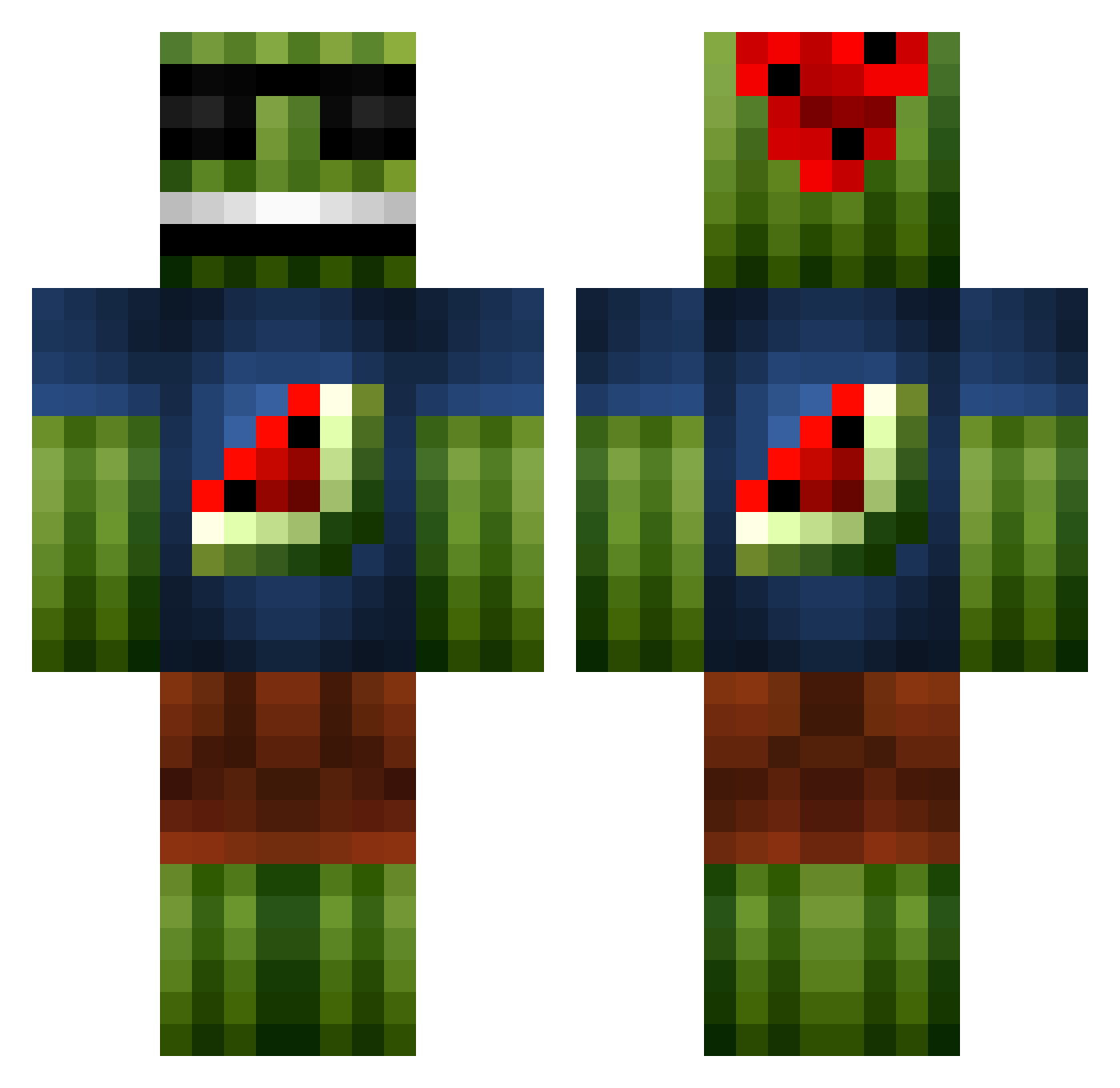
Current Minecraft skin of the player cristion_ronaldo, loaded from the official Mojang API. Rotate the 3D model with your mouse or finger, then download the skin as a PNG file and use it in Minecraft: Bedrock Edition or Java Edition for free. When cristion_ronaldo changes their skin, this page updates automatically and the old skin stays in the history below.
Other players with this skin (1101)
cristion_ronaldo was the 146th player we have seen with this skin, first spotted on 08.08.2026. The same skin was seen on these players. Open a nickname to see their current skin and skin history.
 m4xfpsd Julie1196 Philipp2693 TheDarkGhost56 flan3110 PulverOfficial crazy_kid_101 PotemkinP Malachi_Lupo radboy32 kagge1010 alimahmoud edcharts AJinLV BoB_The_Random ODekka willbasse gpiccolo14 maxxeyy NoahPKP hoihopoika Jc301098 DMX496 TacoMelone miti03 SkinTeck Bowser162 Viakal JuulHugo ErMatador JoeDorito MikkelJensen2404 Chickenskills BadPandLikeYou RomSilver Sislag Warren_Bros Dominik11_6 Alexander_Malm TehPwnaz Nikan_123 CatoSon TIBOR101 karthik1951 cookiecam2001 melon_man3 mozer1239 KevinHe125 henrisala wat3rmelon5 Waitwolf Ilosar Frank_Destructor MrKJ96 GabeMarshall miksuha afdjks_2 Rejkas 007Jasper007 masterXman
More Watermelon Minecraft skins
How to install the cristion_ronaldo skin
- Press the Download button above to save the skin as a PNG file.
- Minecraft: Bedrock Edition (PE): open the Dressing Room from the main menu (or tap your character → Edit Character), go to Classic Skins → Owned, press the + (new skin) button, choose the downloaded PNG and pick the Classic (Steve) model. Works on PC and mobile; consoles cannot import custom skins.
- Minecraft: Java Edition: open the Minecraft Launcher, go to the Skins tab, click New Skin, load the PNG, pick the Classic (Steve) model and press Save & Use. You can also upload it at minecraft.net → Profile → Change Skin.
The skin does not show up after import - what should I do?
Restart Minecraft and open the Dressing Room again - imported skins sometimes appear only after a restart. Also make sure you selected the imported skin and picked the Classic (Steve) model.
Which model should I choose, Classic or Slim?
This skin is designed for the Classic (Steve) model. If you pick the wrong model, the arms of the skin will look stretched or squeezed.
Is the skin of cristion_ronaldo free to download?
Yes. Press Download, save the PNG file and use it in Minecraft: Bedrock Edition or Java Edition - no payment or registration needed. The skin also works on multiplayer servers and Realms.
More skins
Looking for more? Go back to all Minecraft skins and check the top skins of the week, month and all time, or find any player's skin by nickname.