
cristiano6814 - Minecraft Skins & Skin History
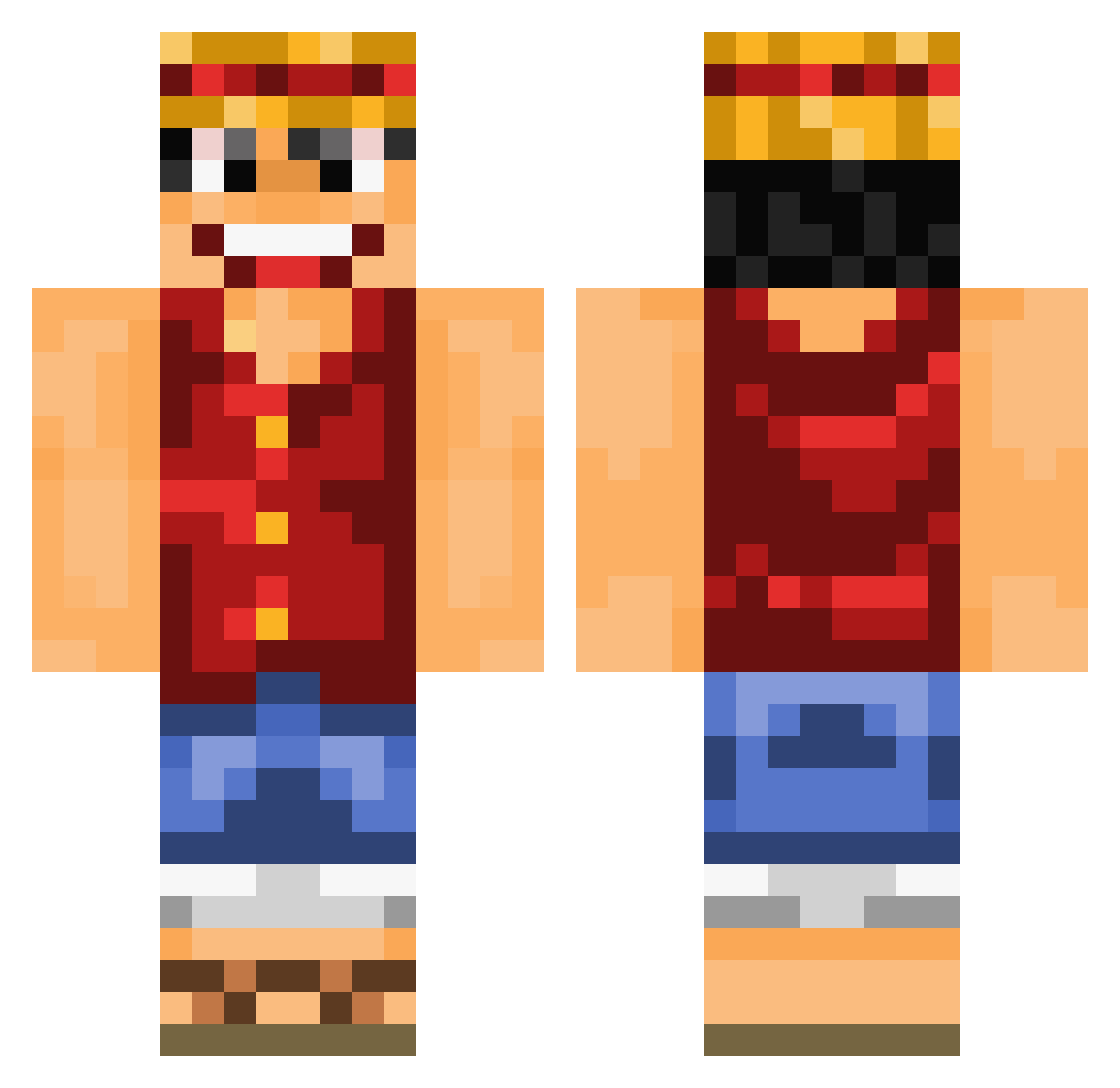
Current Minecraft skin of the player cristiano6814, loaded from the official Mojang API. Rotate the 3D model with your mouse or finger, then download the skin as a PNG file and use it in Minecraft: Bedrock Edition or Java Edition for free. When cristiano6814 changes their skin, this page updates automatically and the old skin stays in the history below.
Other players with this skin (839)
cristiano6814 was the 719th player we have seen with this skin, first spotted on 19.10.2026. The same skin was seen on these players. Open a nickname to see their current skin and skin history.
 bankwick fabio_ephs Veslefrikken nico00300 meadic Sycko21 Ary93250 Apples__0 ngkms dinosours121 Rororororororo TommyKatana Koksu987 LuffyKingPirate cruwley Leeonann X_Luffy Schnitus Senpapixd elpompadeor TheRealKmnK DonEnno Dr_Cross_ Pitri420 Dabdaddy6979 E_s_t_eb simplespice v1ctoproprio RyulJung TheRealSquillium Tyraqi Gorberry hanmin0219 GucciNecklace Nindog Zikeer179 ProOblivion DragonLuffy Big_Red6 Valeshbb zLuiii Masalas Square07 armandex haedallee Groros sushi_skeleton Kronostingz OpTiC24 QuestionH MZeeshaan DENBO_TTV Cristi_Siuuu DonMaxou Pollorush xSyndre Kawhumm Skraaaz Rossul _shiqikuangsan33
More Monkey D Luffy Minecraft skins
See all 925 Monkey D Luffy skins
How to install the cristiano6814 skin
- Press the Download button above to save the skin as a PNG file.
- Minecraft: Bedrock Edition (PE): open the Dressing Room from the main menu (or tap your character → Edit Character), go to Classic Skins → Owned, press the + (new skin) button, choose the downloaded PNG and pick the Classic (Steve) model. Works on PC and mobile; consoles cannot import custom skins.
- Minecraft: Java Edition: open the Minecraft Launcher, go to the Skins tab, click New Skin, load the PNG, pick the Classic (Steve) model and press Save & Use. You can also upload it at minecraft.net → Profile → Change Skin.
The skin does not show up after import - what should I do?
Restart Minecraft and open the Dressing Room again - imported skins sometimes appear only after a restart. Also make sure you selected the imported skin and picked the Classic (Steve) model.
Which model should I choose, Classic or Slim?
This skin is designed for the Classic (Steve) model. If you pick the wrong model, the arms of the skin will look stretched or squeezed.
Is the skin of cristiano6814 free to download?
Yes. Press Download, save the PNG file and use it in Minecraft: Bedrock Edition or Java Edition - no payment or registration needed. The skin also works on multiplayer servers and Realms.
More skins
Looking for more? Go back to all Minecraft skins and check the top skins of the week, month and all time, or find any player's skin by nickname.