
corado18_bro - Minecraft Skins & Skin History
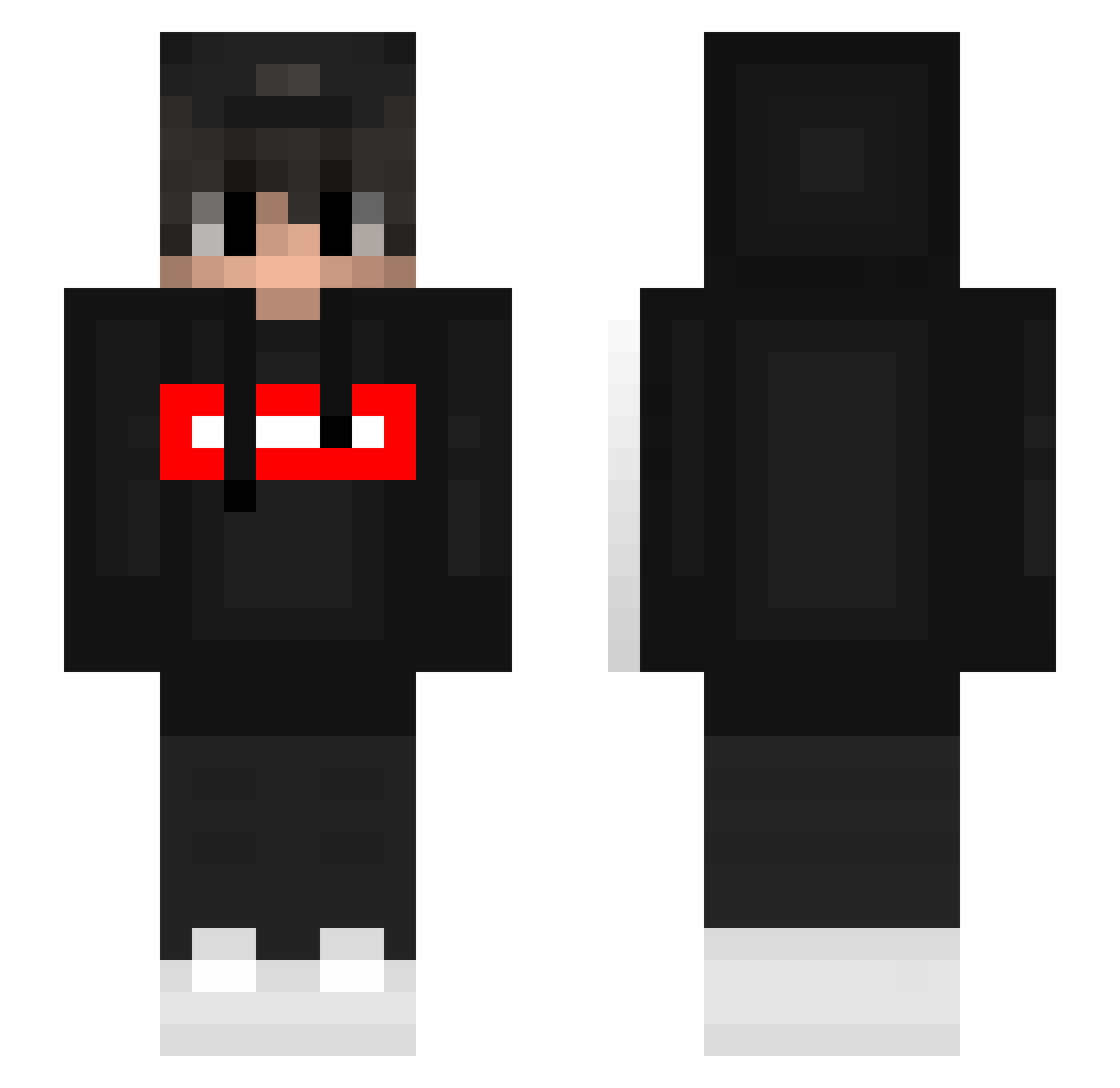
Current Minecraft skin of the player corado18_bro, loaded from the official Mojang API. Rotate the 3D model with your mouse or finger, then download the skin as a PNG file and use it in Minecraft: Bedrock Edition or Java Edition for free. When corado18_bro changes their skin, this page updates automatically and the old skin stays in the history below.
Other players with this skin (393)
corado18_bro was the 241st player we have seen with this skin, first spotted on 30.09.2026. The same skin was seen on these players. Open a nickname to see their current skin and skin history.
 xBrost Muroniiiii Marcos2k happymaster0930 britozz chang_1 Ares7056 xLiamGGxftm Mifoxi6308 sleepykidz dbriceno10 kontrol_yoshi xwitvs UselessFq Towelie2487 Salidalavolpiana qtyil Kshclem MenZz_ satchmowolf2010 DarCoS95 PinTar0laS vitao_cria Progamer27YT csm2902 Kolo55u wad_dwxqsb jambek2006 kordziuu FuRyy787 xXIts_FefeXx Dandyhere _zQuazar_ Mika34 sho_summer Albi_de_superior PapecEz lear_sata Basti260711 Bombie67 LuccarinaOfTime bllafever jianping3440 PotatoLord5 Blessinx sosiskalegend bzmlrxiao_ TheJustPlay isaac9823 Charles0922 Zormat26 Joseco2712 Xsyyds MrAksiu NeverForgetJuan cakeboss123 xAniax AlexanderRod __DARK__KNIGHT RaVeN_214
More Streetwear Minecraft skins
How to install the corado18_bro skin
- Press the Download button above to save the skin as a PNG file.
- Minecraft: Bedrock Edition (PE): open the Dressing Room from the main menu (or tap your character → Edit Character), go to Classic Skins → Owned, press the + (new skin) button, choose the downloaded PNG and pick the Slim (Alex) model. Works on PC and mobile; consoles cannot import custom skins.
- Minecraft: Java Edition: open the Minecraft Launcher, go to the Skins tab, click New Skin, load the PNG, pick the Slim (Alex) model and press Save & Use. You can also upload it at minecraft.net → Profile → Change Skin.
The skin does not show up after import - what should I do?
Restart Minecraft and open the Dressing Room again - imported skins sometimes appear only after a restart. Also make sure you selected the imported skin and picked the Slim (Alex) model.
Which model should I choose, Classic or Slim?
This skin is designed for the Slim (Alex) model. If you pick the wrong model, the arms of the skin will look stretched or squeezed.
Is the skin of corado18_bro free to download?
Yes. Press Download, save the PNG file and use it in Minecraft: Bedrock Edition or Java Edition - no payment or registration needed. The skin also works on multiplayer servers and Realms.
More skins
Looking for more? Go back to all Minecraft skins and check the top skins of the week, month and all time, or find any player's skin by nickname.