
chychy_14 - Minecraft Skins & Skin History
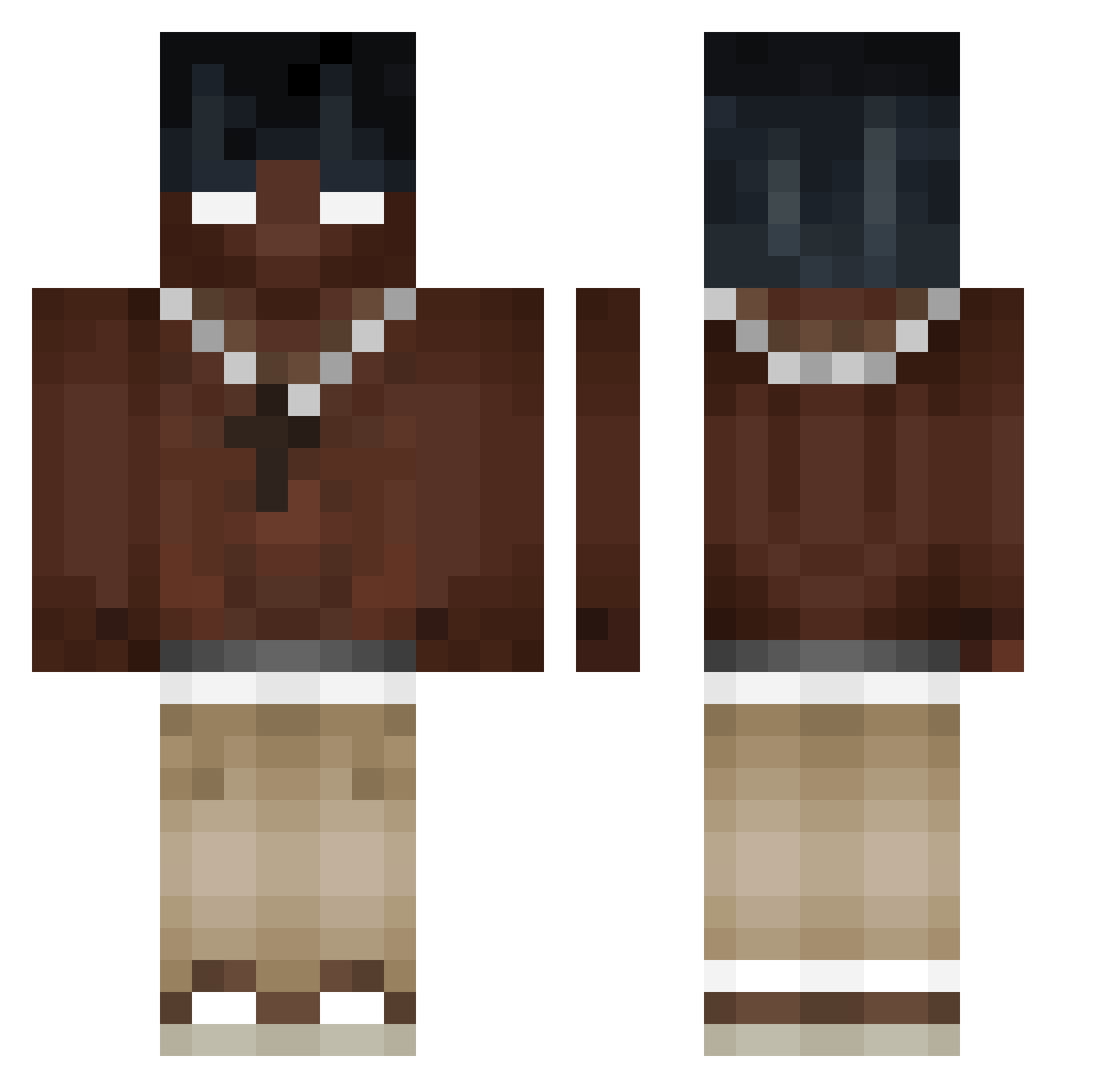
Current Minecraft skin of the player chychy_14, loaded from the official Mojang API. Rotate the 3D model with your mouse or finger, then download the skin as a PNG file and use it in Minecraft: Bedrock Edition or Java Edition for free. When chychy_14 changes their skin, this page updates automatically and the old skin stays in the history below.
Other players with this skin (556)
chychy_14 was the 394th player we have seen with this skin, first spotted on 20.10.2026. The same skin was seen on these players. Open a nickname to see their current skin and skin history.
 endertolfin hiuccup PPPP01 xXeeP IIyad13 Rafael20800 SneaX350 V1nesh DREKII11 DlaCiebiePan Rocksmasher2721 flewrsie TambxhzzZ _The_Snow RICO0221 Leifzadaa Liaulius zRevenTopZz 4Yeat KostekQ Teufelskicker kAOSJK nay50 joacoo2 icebucket_nep walkhn MisterOfcoco unswell wondys Al3xFC Rungullibleflowi felpaz DennerSFS z3r0br00 Sandra42424 Anuelitobrrr9069 Ilves29 FoxyThePirate11 Ulti77 solidnation K1nqTy iTeekki autisticdog52 Mortem9999 DAV1D697 Canierovic14 ELMARIPILILI VaTARUs Bizarrebomb The0_0Warden ivann_xjp Sweezyzi H3KI_ mss0432 iR1ko kevnnard krypz123 xCarteXx UK_DRAGON_EZ Birdx19
More Necklace Minecraft skins
How to install the chychy_14 skin
- Press the Download button above to save the skin as a PNG file.
- Minecraft: Bedrock Edition (PE): open the Dressing Room from the main menu (or tap your character → Edit Character), go to Classic Skins → Owned, press the + (new skin) button, choose the downloaded PNG and pick the Classic (Steve) model. Works on PC and mobile; consoles cannot import custom skins.
- Minecraft: Java Edition: open the Minecraft Launcher, go to the Skins tab, click New Skin, load the PNG, pick the Classic (Steve) model and press Save & Use. You can also upload it at minecraft.net → Profile → Change Skin.
The skin does not show up after import - what should I do?
Restart Minecraft and open the Dressing Room again - imported skins sometimes appear only after a restart. Also make sure you selected the imported skin and picked the Classic (Steve) model.
Which model should I choose, Classic or Slim?
This skin is designed for the Classic (Steve) model. If you pick the wrong model, the arms of the skin will look stretched or squeezed.
Is the skin of chychy_14 free to download?
Yes. Press Download, save the PNG file and use it in Minecraft: Bedrock Edition or Java Edition - no payment or registration needed. The skin also works on multiplayer servers and Realms.
More skins
Looking for more? Go back to all Minecraft skins and check the top skins of the week, month and all time, or find any player's skin by nickname.