
carmilluh - Minecraft Skins & Skin History
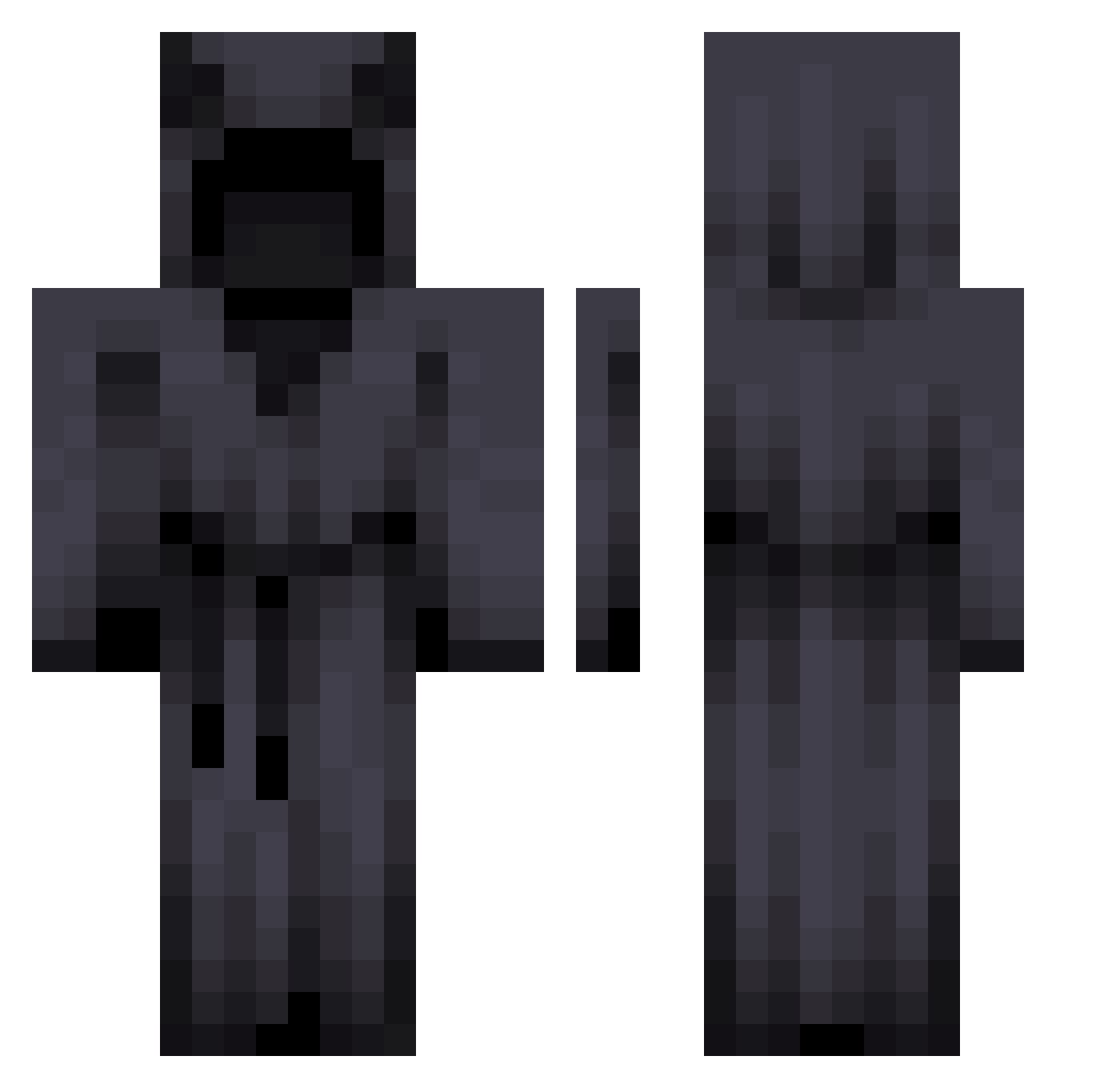
Current Minecraft skin of the player carmilluh, loaded from the official Mojang API. Rotate the 3D model with your mouse or finger, then download the skin as a PNG file and use it in Minecraft: Bedrock Edition or Java Edition for free. When carmilluh changes their skin, this page updates automatically and the old skin stays in the history below.
Other players with this skin (278)
carmilluh was the 22nd player we have seen with this skin, first spotted on 29.07.2026. The same skin was seen on these players. Open a nickname to see their current skin and skin history.
 Niiyoh P1cxz LoroganYT tymon89 WOREKK Nxt420 Nebelherzzog QmoADi ochroniarz0909 Battery_L0w Z30Dior eomby BiohazardousV matii134123 Mal_dZjIey matbris waxonwaxoff TheLaughingScott MozartxD Bulandah Lc_Da_19 Zeko_The_Draco Aymyn_ Zavien12 BlestTK lVolks GraquSP AnastMark Nightmare_io CaptainCooper07 HurricaneNY nekonq HeyliN88 TheReal420Reaper Arzann_
 Goldragon18 Aleandr0_a NeoNotics Pert0
 sandyy_exe beetlebeer SubtleApproach BilltheSlayer pascu1221 mjxl1001 iBlueDiamond Gonzalo_Proo Gameragon1234 SourWurm22 Kyoujin96 Thecoolgamer1 H_lou asuarez18 jiu_jiu_ya Maleiphos LEGRANDSSSTALINE Augustijnkaka glarnis SBGSilent00 4Ecelcrius
More Cultist Minecraft skins
How to install the carmilluh skin
- Press the Download button above to save the skin as a PNG file.
- Minecraft: Bedrock Edition (PE): open the Dressing Room from the main menu (or tap your character → Edit Character), go to Classic Skins → Owned, press the + (new skin) button, choose the downloaded PNG and pick the Classic (Steve) model. Works on PC and mobile; consoles cannot import custom skins.
- Minecraft: Java Edition: open the Minecraft Launcher, go to the Skins tab, click New Skin, load the PNG, pick the Classic (Steve) model and press Save & Use. You can also upload it at minecraft.net → Profile → Change Skin.
The skin does not show up after import - what should I do?
Restart Minecraft and open the Dressing Room again - imported skins sometimes appear only after a restart. Also make sure you selected the imported skin and picked the Classic (Steve) model.
Which model should I choose, Classic or Slim?
This skin is designed for the Classic (Steve) model. If you pick the wrong model, the arms of the skin will look stretched or squeezed.
Is the skin of carmilluh free to download?
Yes. Press Download, save the PNG file and use it in Minecraft: Bedrock Edition or Java Edition - no payment or registration needed. The skin also works on multiplayer servers and Realms.
More skins
Looking for more? Go back to all Minecraft skins and check the top skins of the week, month and all time, or find any player's skin by nickname.