
calqium - Minecraft Skins & Skin History
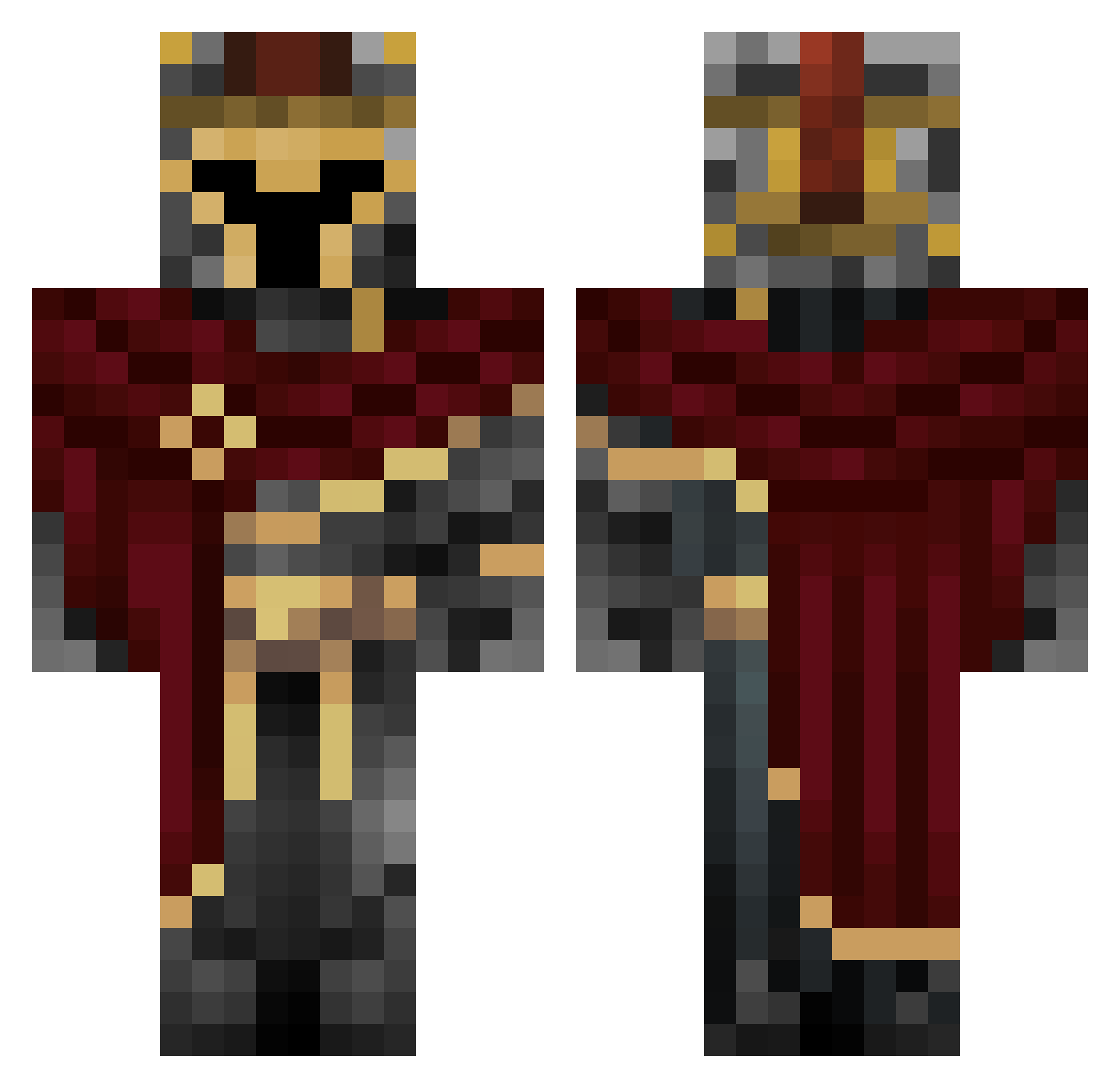
Current Minecraft skin of the player calqium, loaded from the official Mojang API. Rotate the 3D model with your mouse or finger, then download the skin as a PNG file and use it in Minecraft: Bedrock Edition or Java Edition for free. When calqium changes their skin, this page updates automatically and the old skin stays in the history below.
Other players with this skin (660)
calqium was the 187th player we have seen with this skin, first spotted on 24.08.2026. The same skin was seen on these players. Open a nickname to see their current skin and skin history.
 NoxADI SeSpike23 shamman2785 AroundTheCalico sumyull JoseOli Zangrambian EaglesGold4K Gamer_Boy_746 Svey772
 xxRINZLERxx AxelWay DarkerB3 Acesp4des dikkenils stitchbox KDahiya SilverSpear575 inspiredwhale_ LinLin8964 uxorqua Fazles CrispeP1ggy Matv1i Living0nNeptune Bluexa SpeckleZZZZ
 jfdhbr Mansnail433
 anikinn nicc3007 rockstaarr WarGaming424
 Randomness69 Sshadoo _wuts lorenzo____1990 Napl3tson687 Xeamt _ForgottenKnight DayJ4 Klaba7 Xavivivi22 Mar0PL psied D_a_m_O_ Ayax11 realeli_ SsijDallas Accostt omer3011 TeO_ZaM UsLeMarin PRO3002473 W0B_ uhhmatteo Brayan2287 nolzytb Valnoris
 Drakeen_2
More Spartan Minecraft skins
How to install the calqium skin
- Press the Download button above to save the skin as a PNG file.
- Minecraft: Bedrock Edition (PE): open the Dressing Room from the main menu (or tap your character → Edit Character), go to Classic Skins → Owned, press the + (new skin) button, choose the downloaded PNG and pick the Classic (Steve) model. Works on PC and mobile; consoles cannot import custom skins.
- Minecraft: Java Edition: open the Minecraft Launcher, go to the Skins tab, click New Skin, load the PNG, pick the Classic (Steve) model and press Save & Use. You can also upload it at minecraft.net → Profile → Change Skin.
The skin does not show up after import - what should I do?
Restart Minecraft and open the Dressing Room again - imported skins sometimes appear only after a restart. Also make sure you selected the imported skin and picked the Classic (Steve) model.
Which model should I choose, Classic or Slim?
This skin is designed for the Classic (Steve) model. If you pick the wrong model, the arms of the skin will look stretched or squeezed.
Is the skin of calqium free to download?
Yes. Press Download, save the PNG file and use it in Minecraft: Bedrock Edition or Java Edition - no payment or registration needed. The skin also works on multiplayer servers and Realms.
More skins
Looking for more? Go back to all Minecraft skins and check the top skins of the week, month and all time, or find any player's skin by nickname.