
caladiva - Minecraft Skins & Skin History
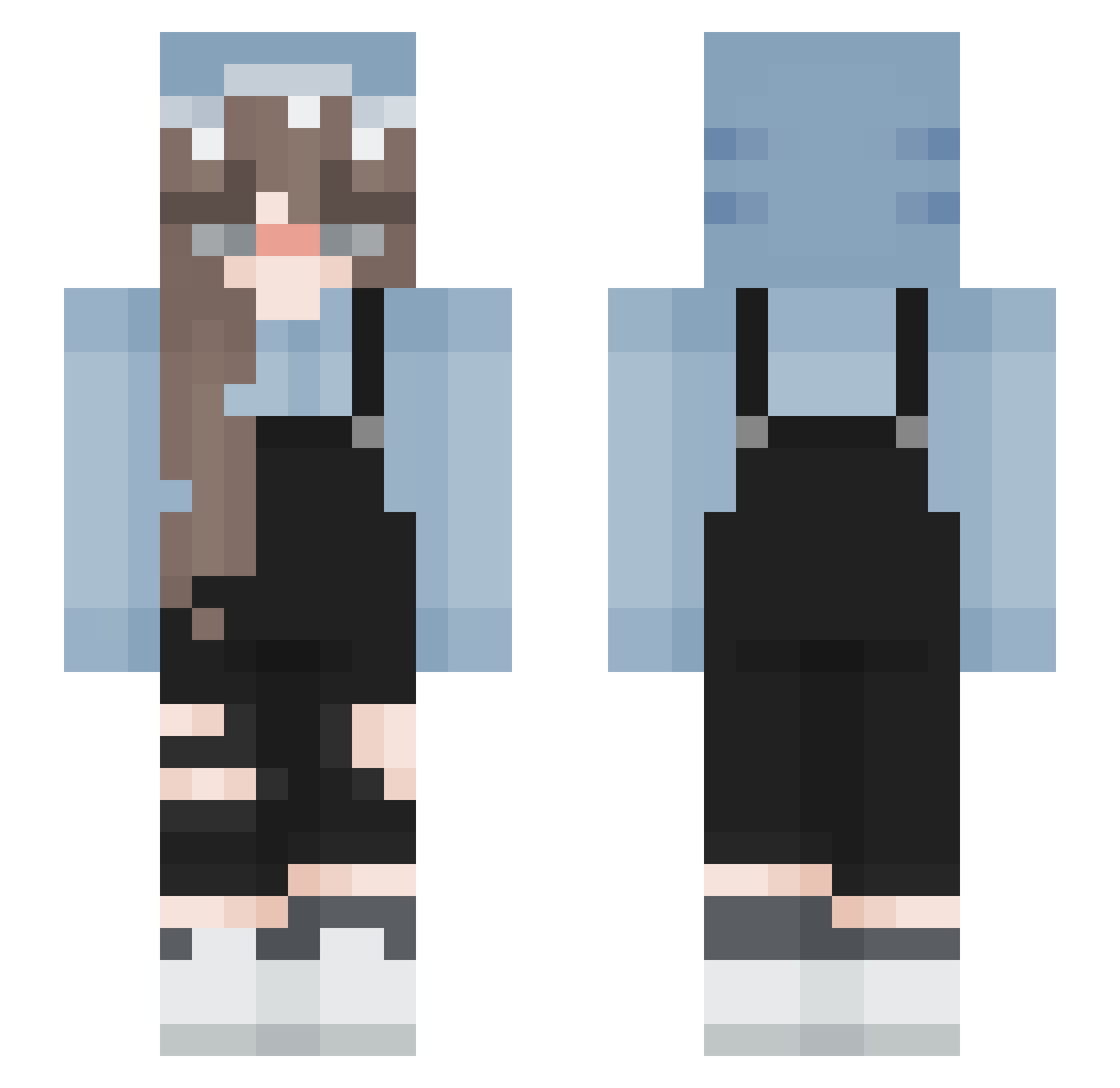
Current Minecraft skin of the player caladiva, loaded from the official Mojang API. Rotate the 3D model with your mouse or finger, then download the skin as a PNG file and use it in Minecraft: Bedrock Edition or Java Edition for free. When caladiva changes their skin, this page updates automatically and the old skin stays in the history below.
Other players with this skin (193)
caladiva was the 138th player we have seen with this skin, first spotted on 13.10.2026. The same skin was seen on these players. Open a nickname to see their current skin and skin history.
 Cebolinha_ sundustcafe lilylulu3030 tjulix X_Xenia_x cbeletbienlui AOWU779 ccpc Tuxedo_Risa eisleyy3 mmuass unahormiguita Heartbreacher MIN060316 busekll newthopia Mushhh_ sana_san chenkun26 lyrasoloveyko euyd0 Knueppelbulle91 Gabrysiakk Chaos_Gamerin ERosi0n BaiLinYu0117 Fish_Summer xHoney_234 Valezkitauaua A_X_I_O miniverse_ cheerleader4eva1 HuiNa0604 KSSKminecraft KANISANNOISI rabbit26 Blonde_Bug Dodum CuzImCara ItsZombieBoy PY_VeiBao real_allgray Azanti Naahiaa gabidudab trawngs MadKitKat9336 Clara_Violett _k4ssy_ kristinazako Gohanix OrangeFries Im_not_Jenny Applepie1026 BIue3000 RileyRamen13 tururu8 ClaimingClock55 dofumao De_Smol_Bean
More Girl Minecraft skins
How to install the caladiva skin
- Press the Download button above to save the skin as a PNG file.
- Minecraft: Bedrock Edition (PE): open the Dressing Room from the main menu (or tap your character → Edit Character), go to Classic Skins → Owned, press the + (new skin) button, choose the downloaded PNG and pick the Slim (Alex) model. Works on PC and mobile; consoles cannot import custom skins.
- Minecraft: Java Edition: open the Minecraft Launcher, go to the Skins tab, click New Skin, load the PNG, pick the Slim (Alex) model and press Save & Use. You can also upload it at minecraft.net → Profile → Change Skin.
The skin does not show up after import - what should I do?
Restart Minecraft and open the Dressing Room again - imported skins sometimes appear only after a restart. Also make sure you selected the imported skin and picked the Slim (Alex) model.
Which model should I choose, Classic or Slim?
This skin is designed for the Slim (Alex) model. If you pick the wrong model, the arms of the skin will look stretched or squeezed.
Is the skin of caladiva free to download?
Yes. Press Download, save the PNG file and use it in Minecraft: Bedrock Edition or Java Edition - no payment or registration needed. The skin also works on multiplayer servers and Realms.
More skins
Looking for more? Go back to all Minecraft skins and check the top skins of the week, month and all time, or find any player's skin by nickname.