
buttcheekw0nder - Minecraft Skins & Skin History
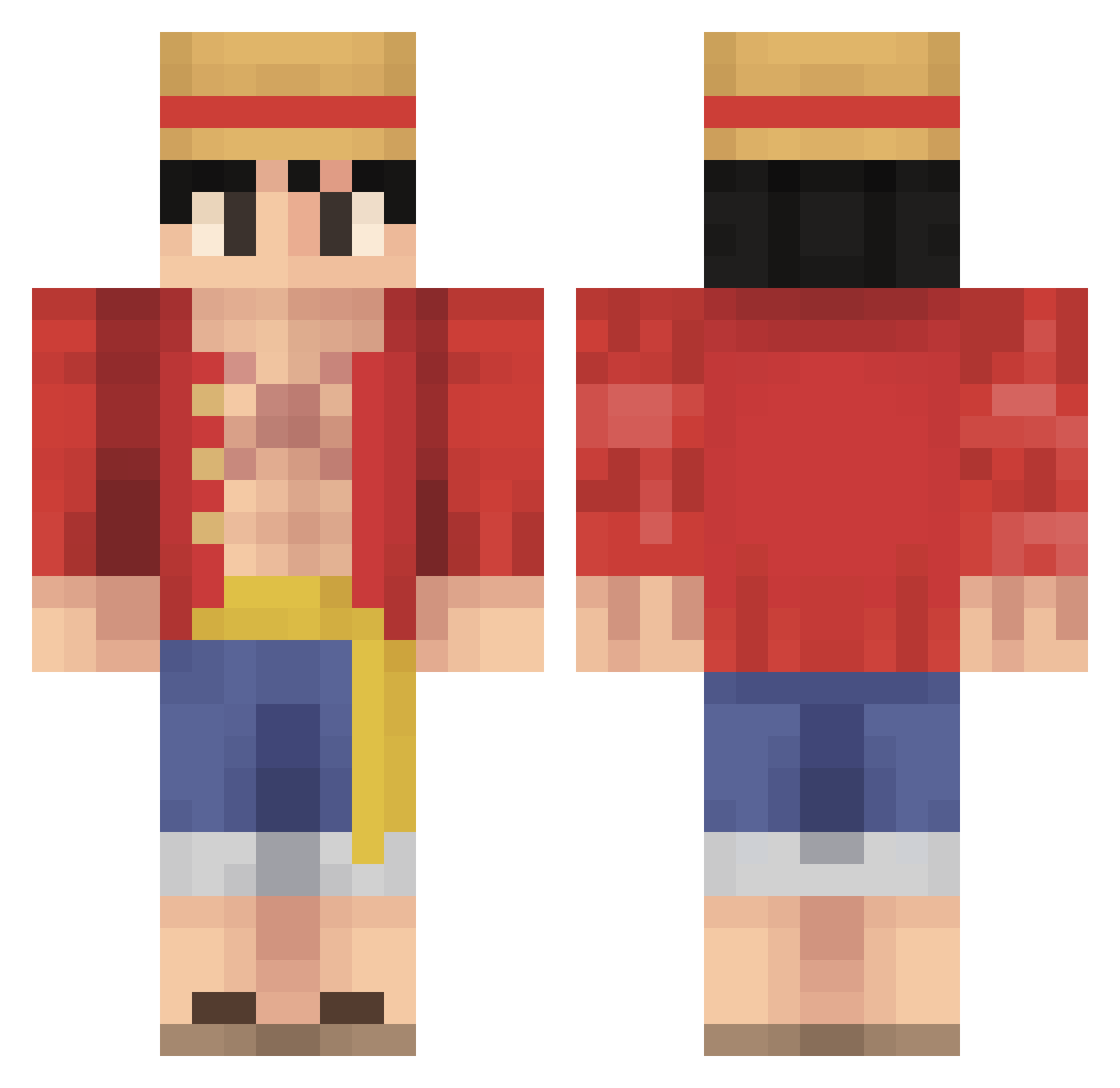
Current Minecraft skin of the player buttcheekw0nder, loaded from the official Mojang API. Rotate the 3D model with your mouse or finger, then download the skin as a PNG file and use it in Minecraft: Bedrock Edition or Java Edition for free. When buttcheekw0nder changes their skin, this page updates automatically and the old skin stays in the history below.
Other players with this skin (485)
buttcheekw0nder was the 143rd player we have seen with this skin, first spotted on 24.08.2026. The same skin was seen on these players. Open a nickname to see their current skin and skin history.
 Saifonic gombeywarrior3D shaggy360 kenneths813 offwhiteguy3 Fattcolin kaasdoggo Hantan lavaman49 Khennnnn ConfusedT34 Thomys4311 Anonymous40 M4rcoiiacono luffyDzoro Trench_420 Province1 JMONEY4528 Stetic_ BongFury RONALDO_1578 DeciduousM baconcabbage FrankieRash RiyuSatoru MauriiiM17 ahapl0x Elpotito Aladdin01 cdwadge
 Maxcarne12 SingaporeCrab Deanrex JustPotato10 KALLUMAMA Neknoo CastBarbecue77 A_bullet2012 KiiixX somebody987 Badr7K HrBender Nereo3144 qataq Lyarun Meaty0555 SwellGuy donmax01 EmeraldSphere23 songfull1999 DISTRUCTO27 KingsRebirth CYisus Dat_Mewtwo_build ntxin MrChiztastic Waybird DjElite julienmauri AnubhabSK
More Monkey D Luffy Minecraft skins
See all 860 Monkey D Luffy skins
How to install the buttcheekw0nder skin
- Press the Download button above to save the skin as a PNG file.
- Minecraft: Bedrock Edition (PE): open the Dressing Room from the main menu (or tap your character → Edit Character), go to Classic Skins → Owned, press the + (new skin) button, choose the downloaded PNG and pick the Classic (Steve) model. Works on PC and mobile; consoles cannot import custom skins.
- Minecraft: Java Edition: open the Minecraft Launcher, go to the Skins tab, click New Skin, load the PNG, pick the Classic (Steve) model and press Save & Use. You can also upload it at minecraft.net → Profile → Change Skin.
The skin does not show up after import - what should I do?
Restart Minecraft and open the Dressing Room again - imported skins sometimes appear only after a restart. Also make sure you selected the imported skin and picked the Classic (Steve) model.
Which model should I choose, Classic or Slim?
This skin is designed for the Classic (Steve) model. If you pick the wrong model, the arms of the skin will look stretched or squeezed.
Is the skin of buttcheekw0nder free to download?
Yes. Press Download, save the PNG file and use it in Minecraft: Bedrock Edition or Java Edition - no payment or registration needed. The skin also works on multiplayer servers and Realms.
More skins
Looking for more? Go back to all Minecraft skins and check the top skins of the week, month and all time, or find any player's skin by nickname.